Glossary of UX Terms
we prioritize good design, good design sells

| Term | Definition |
|---|---|
| UX (User Experience) | The overall feeling and satisfaction a person gets when using a product, like a website or app. It includes how easy, efficient, and enjoyable it is to achieve their goals. |
| UI (User Interface) | The visual and interactive elements of a product, such as buttons, menus, icons, and layouts. Think of it as the "look and feel" that users directly interact with. |
| UX Audit | A thorough review of a product's UX to spot problems, strengths, and ways to improve it. It's like a health checkup for your website or app. |
| Heuristics | Simple, rule-of-thumb guidelines used to evaluate UX. The most famous are Jakob Nielsen's 10 Usability Heuristics, which are general principles (e.g., "match between system and the real world") to judge if a product is user-friendly. |
| Usability | How easy and effective a product is to use. It measures things like learnability (how quickly users figure it out), efficiency (how fast tasks are done), and error rate (how often mistakes happen). |
| Accessibility | Ensuring the product can be used by people with disabilities, such as those who are visually impaired (e.g., screen reader compatibility) or have motor challenges (e.g., keyboard navigation). |
| User Persona | A fictional but realistic profile of a target user, based on research. It includes details like age, goals, behaviors, and pain points to guide design decisions. |
| Wireframe | A basic, low-detail sketch of a page or screen layout, showing where elements like buttons or text go, without colors or images. It's like a blueprint. |
| Prototype | A clickable, interactive mockup of the product that simulates how it works, used for testing before full development. |
| Cognitive Walkthrough | A method where evaluators step through tasks as if they were users, checking for potential confusion at each step. |
| User Testing | Observing real users as they interact with the product to gather feedback on what's working or not. |
| Heatmap | A visual tool showing where users click, scroll, or hover on a page, using colors (hot = high activity, cold = low). |
| A/B Testing | Comparing two versions of a page (A and B) to see which performs better based on user behavior, like conversion rates. |
| Conversion Rate | The percentage of users who complete a desired action, such as signing up or making a purchase. |
| Pain Point | A specific problem or frustration users face while using the product. |
| Stakeholder | People involved in the project, like clients, developers, or managers, who have input or are affected by the UX. |
| SOP (Standard Operating Procedure) | A step-by-step guide outlining how to perform a task consistently and reliably. |
| React Web App | A custom-built website using React, a JavaScript library for creating dynamic, interactive user interfaces (often for complex enterprise tools). |
| Wix Website | A site built using Wix, a drag-and-drop platform for simple websites, popular for small businesses without coding expertise. |
| Design System | The set of values, semantics, syntax, and context that form the foundation of a shared design language. |
| Pattern Library | An organized set of related, reusable components, often containing code examples, design guidelines, and use cases. also known as a design system or style guide |
| Style Guide | The physical or digital document that represents the styles, patterns, practices, and principles of a company/brand and teaches how to use it. |
| Content tone and style: | The tone and style of the website's content must be defined to ensure consistency and coherence throughout the website. |
| UX Audit: | Conducting a UX audit to assess the strengths and weaknesses of the client's existing user experience, identifying usability problems, and gathering data on conversion metrics, traffic, engagement, and sales. The insights can inform the redesign process. Evaluating the existing website's content and distinguishing between valuable content that should be maintained and outdated content that can be revised or retired. |
| Design Errors | Deviations from established UX heuristics or architectural best practices that impede the user's objective-driven workflow. These structural or logic-based inconsistencies increase the probability of user slip-ups and task failure, necessitating systematic remediation to restore interface integrity and user efficacy. |
| Friction | Any variable that slows down or prevents a user from completing a desired action, such as complex navigation or slow load times. It represents the resistance encountered within the user interface that inhibits a seamless flow. |
| Pain Point | A specific problem or frustration a user encounters during their journey that causes significant irritation or drop-off. A common synonym in product management and UX is impediment or user grievance. |
| Interaction Cost | The sum of mental and physical efforts (such as clicking, scrolling, and thinking) that a user must expend to reach a goal. Minimizing this is critical for reducing cognitive load and improving the overall conversion rate. minimize: reading, scrolling, looking around in order to find relevant information, comprehending information presented to you, clicking or touching (without making mistakes), typing, page loads and waiting times, attention switches, memory load — the information that users must remember in order to complete their task. |
| Scrolling Fatigue | A state of diminished user engagement caused by excessively long pages or repetitive content that requires constant vertical navigation. This often results in "boredom" or the user losing track of the primary call-to-action (CTA). |
| Chunking | Breaking down large amounts of information into smaller, distinct units of information (chunks) that are easier to process and remember. It's based on cognitive psychology (George A. Miller's research) which shows that short-term memory can only hold about 7±2 items. A phone number is chunked (e.g., 555-867-5309) instead of a continuous string (5558675309). |
| Progressive Disclosure | An interaction design strategy that deconstructs complex information and actions across several screens or steps. Only essential data is shown first and deferring granular details to secondary layers, this technique presents information in small, manageable chunks,. This can help prevent cognitive overload and make the UX less daunting. |
| User Path: | This is the specific route a user takes through the app, including the screens they view, the actions they perform, and the decisions they make. It's about understanding the "how" of user interaction. |
| Information Architecture: | IA is an interdisciplinary field that draws on principles from design, computer science, psychology, and other fields to create effective and usable digital products and services. While it is related to both design and marketing, its primary focus is on the user experience and usability of digital products. |
| Interaction cost | is the sum of mental and physical efforts—such as clicking, scrolling, and processing information—required for a user to reach their goal within an interface. A high interaction cost often leads to user frustration and abandonment, while a low cost creates a seamless, intuitive experience. |
| Intuitive navigation: | Good UX can create intuitive navigation by organizing content and information in a logical and easy-to-understand way. This involves using clear and concise labels for navigation menus and links, grouping related content together, and using visual cues like icons to guide users through the website or app. |
| Distractions: | Good UX can minimize distractions by simplifying the design and removing unnecessary elements that could distract users from their tasks. This involves using a clean and uncluttered layout, using white space to separate content, and avoiding irrelevant or irrelevant information and ads. |
| Task sequence confusion: | Good UX can prevent task sequence confusion by ensuring that users understand the steps they need to take to complete a task. This involves providing clear instructions and feedback throughout the process, using clear and concise calls-to-action, and providing contextual information and guidance when necessary. |
| Microinteraction | 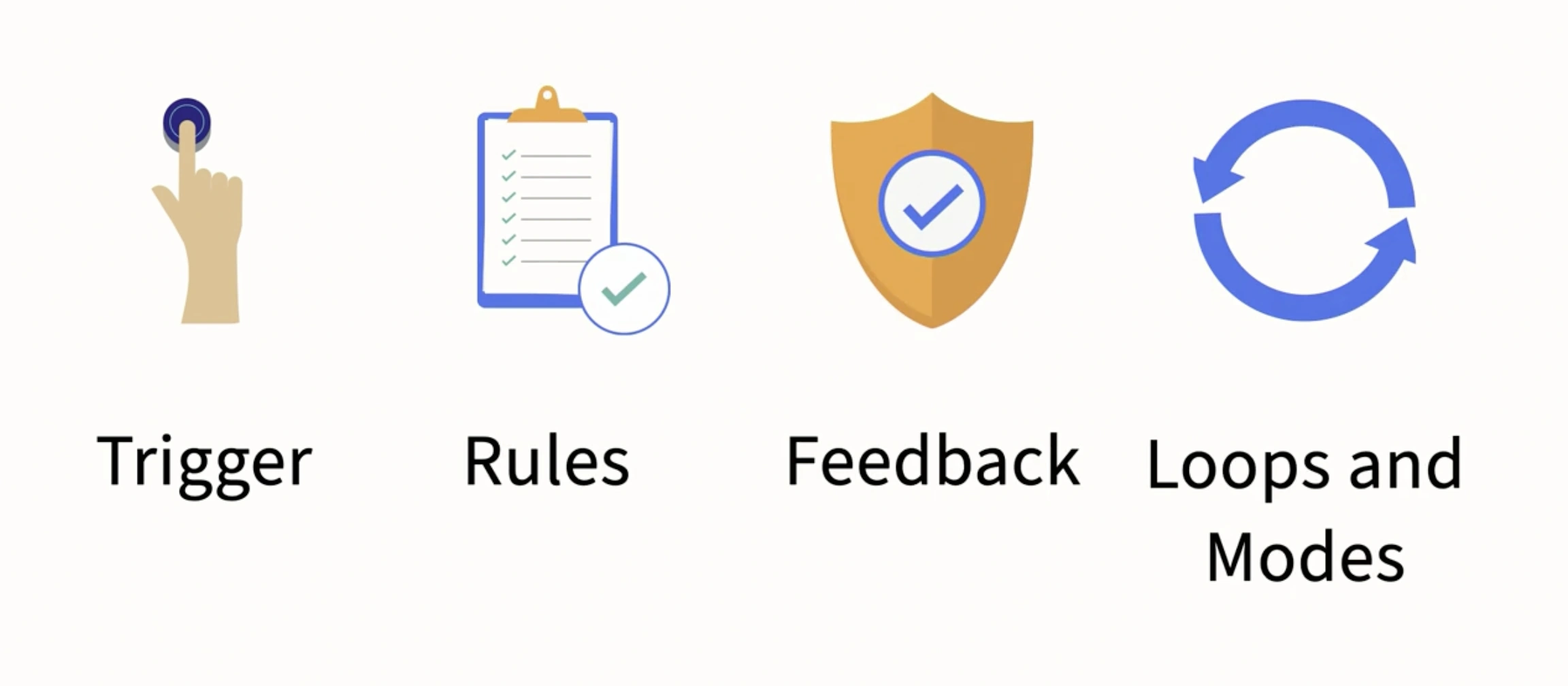 |
| UX Hygiene: | UX hygiene refers to the practices and principles that ensure a good user experience (UX) in digital products or services. It focuses on maintaining and improving the usability, accessibility, and overall quality of the user interface and interaction design. UX hygiene involves following best practices and guidelines to create a positive and seamless user experience. |
| Locality | In UX design, locality refers to the principle of placing interactive controls and elements close to the objects or areas they affect, ensuring users can intuitively find and use them where expected. |
| design theory | |
| kerning | |
| isometric | |
| flat design | |
| parallax | |
| Lead Magnet Landing Page: | Purpose: The entry point. It's a single, focused page with a strong call-to-action (CTA). It offers a valuable, free item (the "lead magnet") in exchange for an email address. Example Content: "Get My Free Wedding Planning DJ Checklist," "Download My Mixtape: Top 20 House Party Hits," or "Book Your Free 15-Minute Consultation." |
| Thank You / Tripwire Offer Page: | Purpose: Appears immediately after the visitor submits their email. It delivers the promised lead magnet and presents a secondary, low-friction offer (often called a "tripwire"). Example Content: "Thanks for signing up! Download your checklist here. While you wait, check out my exclusive DJ packages." This page could also have an embedded video to build rapport. |
| consistent patterns | |
| Design System | The set of values, semantics, syntax, and context that form the foundation of a shared design language. |
| Fluent UX | Microsoft best practices |
| Hierarchy | |
| Pattern Library | An organized set of related, reusable components, often containing code examples, design guidelines, and use cases. also known as a design system or style guide |
| Style Guide | The physical or digital document that represents the styles, patterns, practices, and principles of a company/brand and teaches how to use it. |
| stacking | |
| Spacing | understand how elements relate to one another spatially. Good consistent spacing in interface design enhances the organization and cohesiveness of a design, making it visually appealing. |
| screen real estate | |
| User-centered design (UCD) | methods and techniques used to gain a deep understanding of users, their needs, and their behaviors, and to use this understanding to design products, services, or systems that meet those needs. UCD activities help ensure that the end result is user-friendly, easy to use, and meets the needs of the target audience. |
| user flow diagram, aka process flow / task flow diagram | a visual representation of the steps a user takes to complete a task within the website or application. It shows the user's path through the application, including the different screens, interactions, and decision points. A user flow diagram can help designers identify pain points and areas for improvement in the user experience, and ensure that the application supports the user's goals and needs. |
Related Design Images
Here are additional visual resources related to design concepts: