Continuous Integration Pipeline
CI build pipeline
can be used to automate various tasks for an Angular/React web app, such as building, testing, and deploying the application
- https://medium.com/@tonistiigi/advanced-multi-stage-build-patterns-6f741b852fae
- https://docs.docker.com/develop/develop-images/multistage-build/
CI Pipeline
lint/fix, build, test, and deploy,script, beforeInstall and afterSuccess
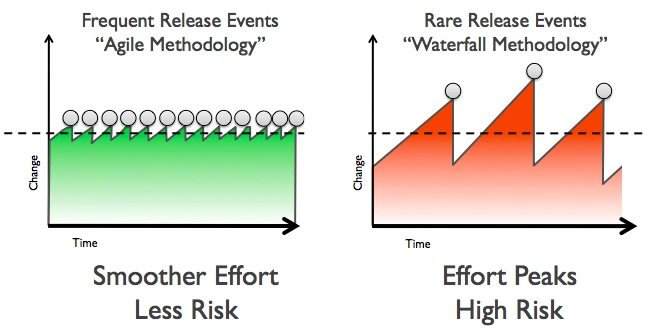
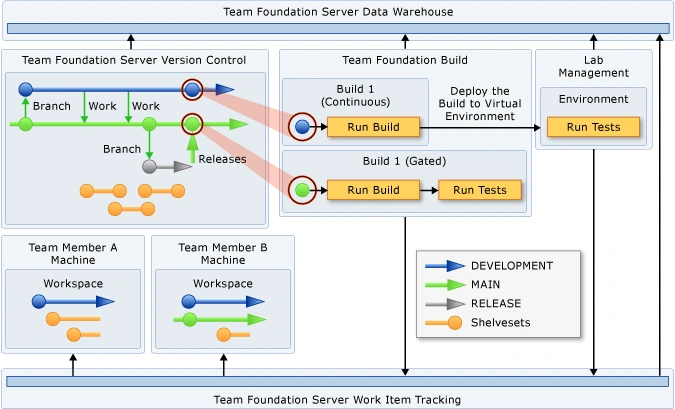
Managing Code Dependencies
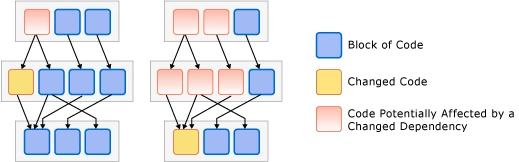
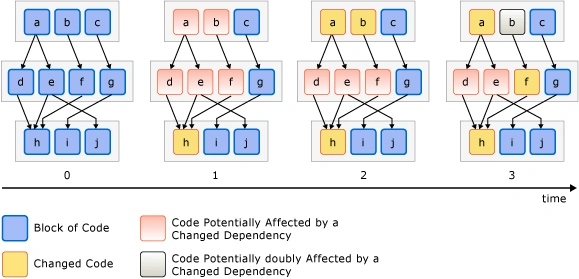
environment password build agent
tools
    tools {
        nodejs 'node 9.8'
}
stages
- install
stage('install') {
                    steps {
                        sh "npm i"
}
lint/fix
 stage('lint') {
                    steps {
                        sh "npm run lint -- --ci;"
                    }
}
build
stage('build') {
                    steps {
                        sh "npm run build:prod"
                    }
}
add platforms
        stage('cordova add platforms') {
            when { expression { buildCordova(params.BUILD_CORDOVA) } }
            steps {
                sh "rm plugins/ios.json"
                sh "rm plugins/android.json"
                sh "npm run cordova -- platform add ios"
                sh "npm run cordova -- platform add android"
            }
}
build platforms
        stage('cordova:build:ios') {
            when { expression { buildCordova(params.BUILD_CORDOVA) } }
            steps {
                sh 'security unlock-keychain -p "\${JENKINS_SVC_PASSWORD}"'
                sh "npm run build:ios -- --device --debug";
            }
            post {
                success {
                hockeyApp applications: [[  downloadAllowed: true, filePath: '**/*/ShopRite.ipa', mandatory: false, notifyTeam: false,
                            releaseNotesMethod: manual(isMarkdown: true, releaseNotes: '# [\${BRANCH_NAME}:\${BUILD_NUMBER}](\${GIT_URL})\n - [Build Results](\${BUILD_URL})\n '), uploadMethod: appCreation(false)]], debugMode:
                            false, failGracefully: false, baseUrl: "https://rink.hockeyapp.net/api/2/"
                }
            }
        }
        stage('cordova:build:android') {
            when { expression { buildCordova(params.BUILD_CORDOVA) } }
            steps {
                sh "npm run build:android";
            }
            post {
                success {
                    hockeyApp applications: [[  downloadAllowed: true, filePath: '**/*/app-debug.apk', mandatory: false, notifyTeam: false,
                        releaseNotesMethod: manual(isMarkdown: true, releaseNotes: '# [\${BRANCH_NAME}:\${BUILD_NUMBER}](\${GIT_URL})\n - [Build Results](\${BUILD_URL})\n '), uploadMethod: appCreation(false)]], debugMode:
                        false, failGracefully: false, baseUrl: "https://rink.hockeyapp.net/api/2/"
                }
            }
        }
}
test deploy
beforeInstall afterSuccess
GitHub Actions
Docker and GitHub Actions can be beneficial for a static Node.js web app in several ways:
-
Consistent Development Environment: Docker allows you to encapsulate your application, its dependencies, and the required runtime environment into a container. This ensures that your app runs consistently across different development machines. Developers can easily set up the required environment by running the Docker container, eliminating the need for manual environment setup and potential compatibility issues.
-
Portability and Deployment: Docker containers are portable, meaning you can run them on any machine that supports Docker, regardless of the underlying operating system. This portability makes it easier to deploy your static Node.js web app to various environments, such as development, staging, and production. You can package your app and its dependencies into a Docker image, which can be deployed consistently across different environments, reducing deployment-related issues.
-
Isolation and Security: Docker containers provide isolation, ensuring that your static web app runs independently of other applications and services on the host machine. This isolation helps prevent conflicts between different apps and enhances security by limiting the container's access to the underlying host system. By using Docker, you can isolate your app and its dependencies, reducing the risk of interference and potential security vulnerabilities.
-
Version Control and Continuous Integration: GitHub Actions allows you to define automated workflows for your static Node.js web app. With GitHub Actions, you can easily set up a continuous integration (CI) pipeline that automatically builds and tests your app whenever changes are pushed to the repository. This ensures that your app remains in a working state and helps catch any potential issues early in the development process. By combining GitHub Actions with Docker, you can build and test your app in a consistent and reproducible environment, ensuring reliable results across different stages of the CI pipeline.
-
Scalability and Collaboration: Docker and GitHub Actions enable scalability and collaboration in the development and deployment of your static Node.js web app. Docker containers can be easily scaled horizontally to handle increased traffic or workload demands. GitHub Actions provides a platform for collaboration among team members, allowing them to contribute code, review changes, and trigger automated workflows. This collaboration and scalability help streamline the development process and enable efficient teamwork.
In summary, using Docker and GitHub Actions for a static Node.js web app provides benefits such as consistent development environments, portability, isolation, security, version control, continuous integration, scalability, and collaboration. These tools enhance the efficiency, reliability, and maintainability of your app throughout the development lifecycle.