Web Hosting
Table of Contents
- Terms
- ICANN Registration
Server Monitoring
1. Not checking all my servers
Yeah it seems like a no-brainer, but when I have so many irons in the fire, it's hard to remember to configure server monitoring for all of them. Some more commonly forgotten servers are:
-
Secondary DNS and MX servers. This 'B' squad of servers usually gets in the game when the primary servers are offline for maintenance or have failed. If I don't keep my eye on them too, they may not be working when I need them the most. Be sure to keep an eye on your failover boxes.
-
New servers. Ah, the smell of fresh pizza boxes from Dell! After all the fun stuff (OS install, configuration, burn-in, hardening, testing, etc) the two most forgotten 'must-haves' on a new server are the corporate asset tag (anybody still use those?) and setting up server monitoring. Add it to your checklist.
-
Cloud servers. Those quick VPS and AWS instances are easy to set up, and easy to forget to monitor.
-
Temporary/Permanent servers. You know the ones I'm talking about. The 'proof of concept' development box that was thrown together from retired hardware that has suddenly been dubbed as 'production'. It needs monitoring too.
2. Not checking all services on a host
We know most failures take the whole box down, but if I don't watch each service on a host, I could have a running website while FTP has flatlined. The most common one I forget is to check both HTTP and HTTPS. Sure, it's the same 'service', but the apache configuration is separate, the firewall rules are likely separate. Also don't forget the SSL checks, separate from the HTTPS checks, to ensure you have valid SSL certificates. I've gotten the embarrassing calls about the site being 'down' only to find out that the cert had expired. Oh, yeah... I was supposed to renew that, wasn't I?
3. Not checking often enough
Users and bosses have very little tolerance for downtime. A lesson learned when trying to use a cheap monitoring service that only provided 10 minute check intervals. That's up to 9.96 minutes of risk (pretty good math, huh?) that my server might be down before I'm alerted. Configure 1 minute check intervals on all services. Even if I don't need to respond to them right away (a development box that goes down in the middle of the night), I'll know 'when' it went down to within 60 seconds which could be helpful information when slogging through the logs for root cause analysis later.
4. Not checking HTTP content
Standard HTTP check is good, but the 'default', 'under-construction' Apache server page has given me that happy 200 response code and a green 'PASS' in my monitoring service just like my real site does. Choose something in the footer of the page that doesn't change and do an HTTP content matching check on that. Don't use the domain name though -- that may show up in the 'default' page too and make that check less useful.
It's also important to make sure certain content does NOT show up on a page. We've all visited a CMS site that displayed that nice 'Unable to connect to database' error. You want to know if that happens.
5. Not setting the correct timeout
Timeouts for a service are very subjective and should be configurable on your monitoring service. Web guys tell me our public website should load under 2 seconds or our visitors will go elsewhere. If my HTTP service check is taking 3.5 seconds, that should be considered a FAIL result and someone should be notified. Likewise, if I had a 4 second 'helo' delay configured in my sendmail, I'd want to move that timeout up over 5 seconds. Timeouts set to high let my performance issues go unnoticed; timeouts set too low just increase my notification noise. It takes time to tweak these on a per-service level.
6. Forgetting DNS goes both ways
Sure I've got a DNS checks to make sure my hostnames are resolving to my IPs but I all too often forget to check the reverse DNS (rDNS) entries as well. It's especially important for SMTP services to have properly resolving PTR records or my email will be headed for the spam bucket. I always monitor SPF and DKIM records while I'm at it. Your monitoring service can do that, right?
Even when I'm using a reputable external DNS service I set up DNS checks to monitor each of the NS records on my domains. A misconfiguration on my part or theirs will cause all kinds of havoc.
7. Sensitivity too low/high
Some servers or services seem more prone to having little hiccups that don't take the server down, but may intermittently cause checks to fail due to traffic or routing or maybe the phase of the moon. Nothing's more annoying than a 3AM 'down' SMS for a host that really isn't down. Some folks call this a false positive or flapping -- I call it a nuisance. Of course I shouldn't jump every time a single ping loses its way around the interwebs and every SMTP 'helo' goes unanswered then reality sets in and a more dangerous condition may occur. I may be tempted to start ignoring notifications because of all the noise of the alerts I really don't care about.
A good monitoring service handles this nicely by allowing me to adjust the sensitivity of each check. Set this too low and my notifications for legitimate down events take too long to reach me, but set it too high and I'm swamped with useless false positive notifications. Again, this is something that should be configured per service and will take time to tweak.
8. Notifying the wrong person
Nothing ruins a vacation like a 'host down' notification. Sure, I've got backup sysadmins that should be covering for me, but I forget to change the PagerDuty schedules so notifications get delivered to them and not me.
9. Not choosing the correct notification type
Quick on the heels of #8 is knowing which type of notification to send. Yeah, I've made the mistake of configuring it to send email alerts when the email server is down. Critical server notifications should almost always send via SMS, voice, or persistent mobile push.
10. Not whitelisting the notification system's email address
Quick on the heels of #9 (we've got lots of heels around here) is recognizing that if I don't whitelist the monitoring service's email address -- it may end up in the spam bucket.
11. Paying too much
I've paid hundreds of dollars a month for a mediocre monitoring service for a couple dozen servers before. That's just stupid. NodePing costs $15 a month for 200 servers/services at 1 minute intervals and it's not the only cost effective monitoring service out there. Be sure to shop around to find one that fits your needs well. Pair it up with PagerDuty's on-call/hand-off capabilities and you're well on your way to avoiding the scars I've got without losing your shirt.
Port 80
This opens Port 80 on your modem for traffic from the internet. It is particularly useful if you plan to host a website from your own server.
Port 25
This opens Port 25 on your modem for traffic to and from the internet. It is particularly useful if you plan to run an email server.
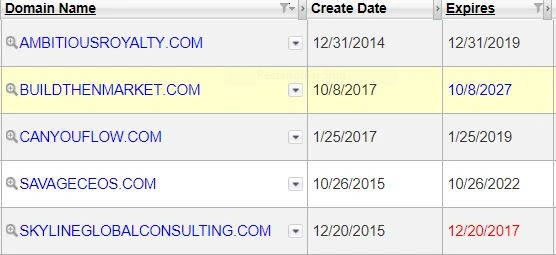
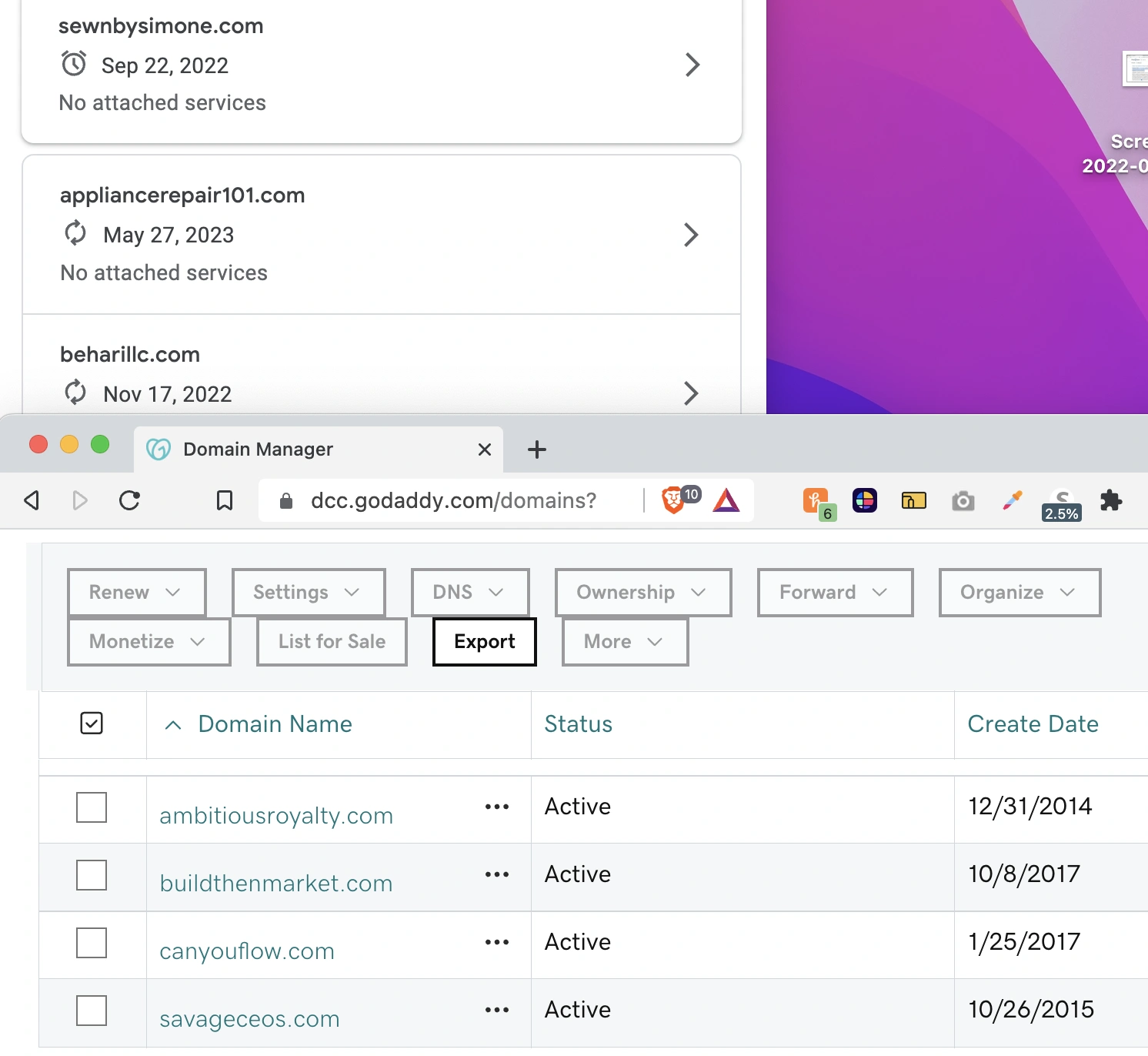
| Domain Creation Date | Expiration Date |
|---|---|
 |  |
Domain Name
A Fully Qualified Domain Name (FQDN) is a complete and unambiguous domain name that specifies the exact location of a host within the Domain Name System (DNS) hierarchy. An FQDN consists of two parts: the hostname and the domain name.
The hostname is the name assigned to a specific device or host within a network. It typically represents the individual computer or server within a domain. For example, in the FQDN "server1.example.com," "server1" is the hostname.
The domain name represents the broader network or organization to which the host belongs. It consists of multiple labels separated by periods (dots). In the example "server1.example.com," "example.com" is the domain name.
When combined, the hostname and domain name create the FQDN. In the case of "server1.example.com," the FQDN is "server1.example.com." The FQDN provides a unique and fully specified address for locating a particular host within the DNS hierarchy.
FQDNs are commonly used in networking, system administration, and web services to identify and locate hosts accurately. They are essential for tasks such as DNS resolution, email delivery, and network communication.
https://www.name.com/ http://www.buydomains.com/
history
There are two organizations responsible for domains and internet addresses. The IANA decides what should and shouldn’t be a top-level domain, such as .com, .org, .uk, or .nz. The organization originated at the University of Southern California, although it was only formalized in 1994, when it won a contract put out by the U.S. It operated for several years as a small research and management committee. As the internet grew, it became clear that a more formal setup was required. By 1998, the IANA became part of a new organization: the Internet Corporation for Assigned Names and Numbers (ICANN). ICANN, based in the U.S., was given the broader responsibility of overseeing the operational stability of the internet and ensuring international interests were represented.
Registrars
In summary, GoDaddy remains a dominant force, but other registrars are also competing strongly.
Key Players and Trends:
- GoDaddy:
- GoDaddy consistently holds a significant portion of the domain registration market. They are a well-established and widely recognized player.
- Namecheap:
- Namecheap is another major player, known for its competitive pricing and customer service. They have been steadily gaining market share.
- Tucows:
- Tucows, through its various brands (like OpenSRS and Hover), is a significant wholesale registrar, meaning they also supply domains to other resellers.
- Other Notable Registrars:
- Other notable players include:
- IONOS
- Network Solutions
- Google Domains (Now part of Squarespace)
- Amazon Registrar.
- Other notable players include:
- Market Dynamics:
- The domain registration market is competitive, with many companies vying for customers.
- Factors that influence market share include:
- Pricing
- Customer service
- Ease of use
- Additional services (like web hosting)
Where to Find Data:
- ntldstats.com:
- This website provides statistics on new gTLD (generic Top-Level Domain) registrations, which can offer insights into registrar market share.
- domainnamestat.com:
- This site also provides statistics on domain name registration, and provides breakdowns of market share.
- Industry Research Reports:
- Market research firms like IBISWorld and Straits Research publish reports on the domain registration industry, which may include market share data.
What is Web Hosting?
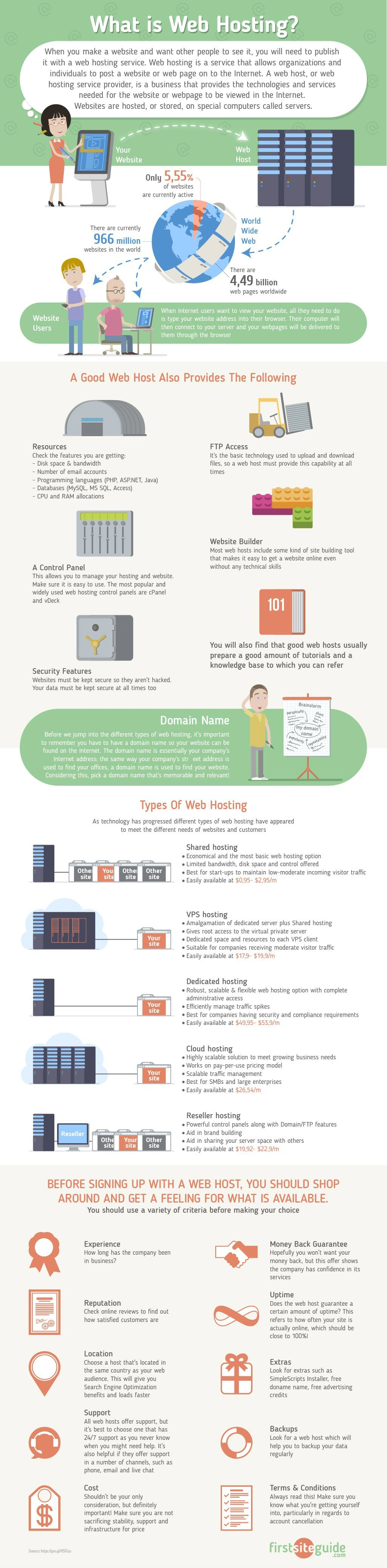 There are several options of how to get your site on the Internet. You can host your own server in your facility, use another facility (co- location), choose to have your files on one server provided by your host (dedicated hosting) or you can choose to share server space with others at your provider.
- the average speed in the hosting industry is about 890ms
Terms
| Terms | Definitions |
|---|---|
| Certificate Signing Request (CSR) | |
| CLOUD: IaaS (Infrastructure as a Service) | |
| ICANN Registration | |
| netmask | |
| Forwarding | |
| Forwarding with masking | |
| Nameserver | |
| Redirects | Permanent 301, Temporary 302 |
| Shared Web Hosting Service | Shared hosting means you share the server resources with several other users from the same server. You have complete access to your account and only your account and a set amount of resources and features. It’s used by over 90% of the websites ad blogs found on the internet. |
| SSL Certificates | |
| SubjectAltName (SAN) | |
| Virtual Private Server (VPS) | |
| zone file |
SSL Cert
- connect
- send certificate file
- do we trust the issuer
- valid expiration date
- CRL ~ Certificate Revocation List
- certificates get stolen then blacklisted
- generate session key & encrypt with public key
IP Address
Mac
curl ipecho.net/plain ; echo

curl ifconfig.me
Connect Remote Server > NGinx
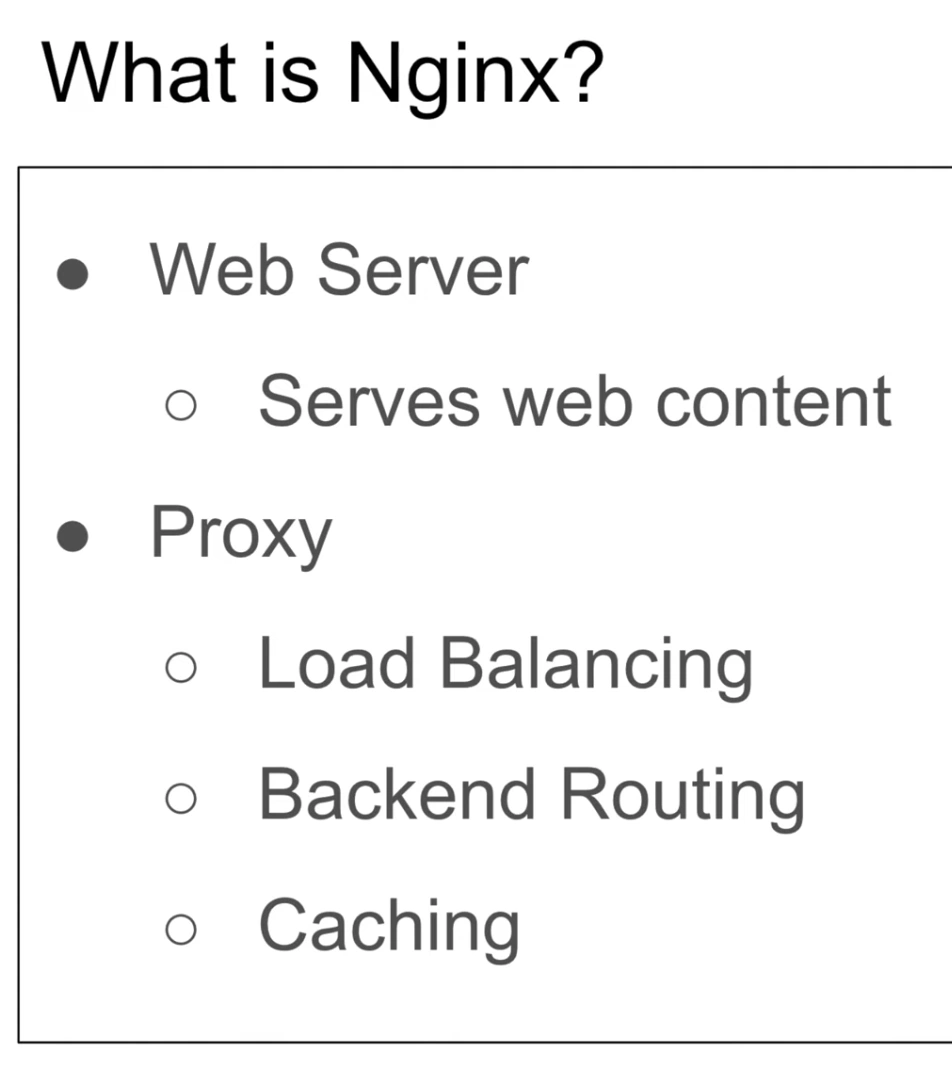
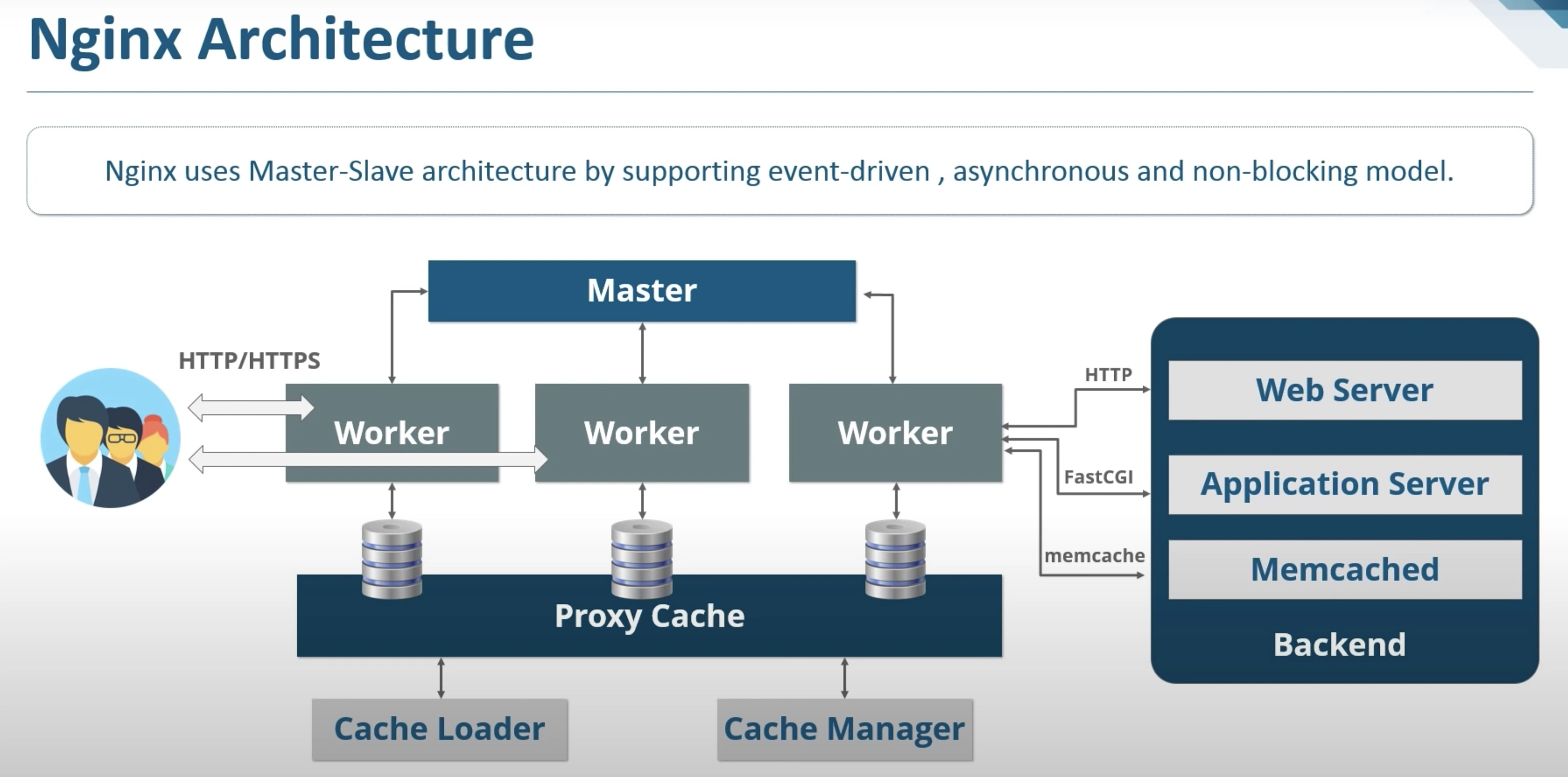
Web Server and also Proxy
Nginx is one of the most popular web servers in the world and is responsible for hosting some of the largest and highest-traffic sites on the internet. It is more resource-friendly than Apache in most cases and can be used as a web server or reverse proxy.
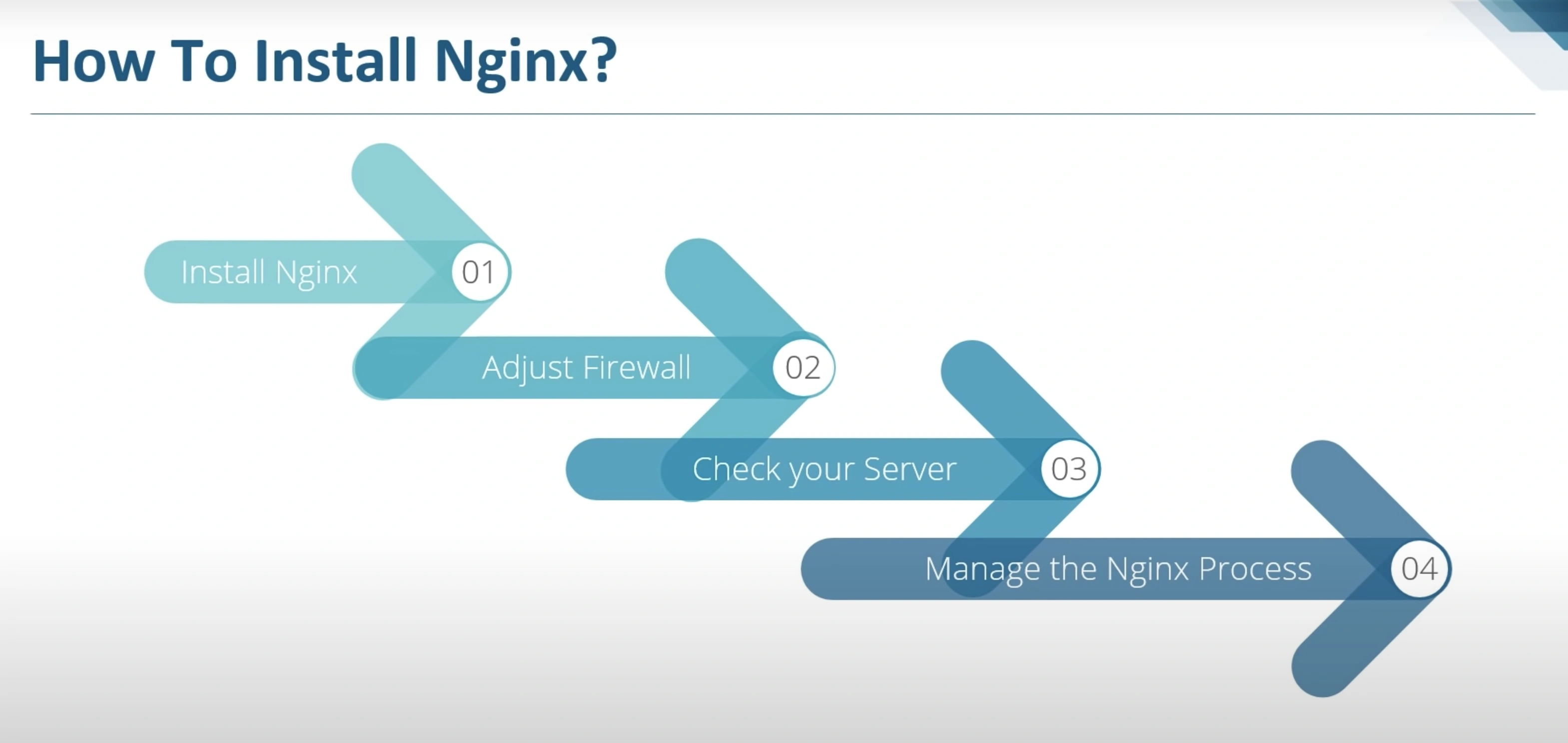
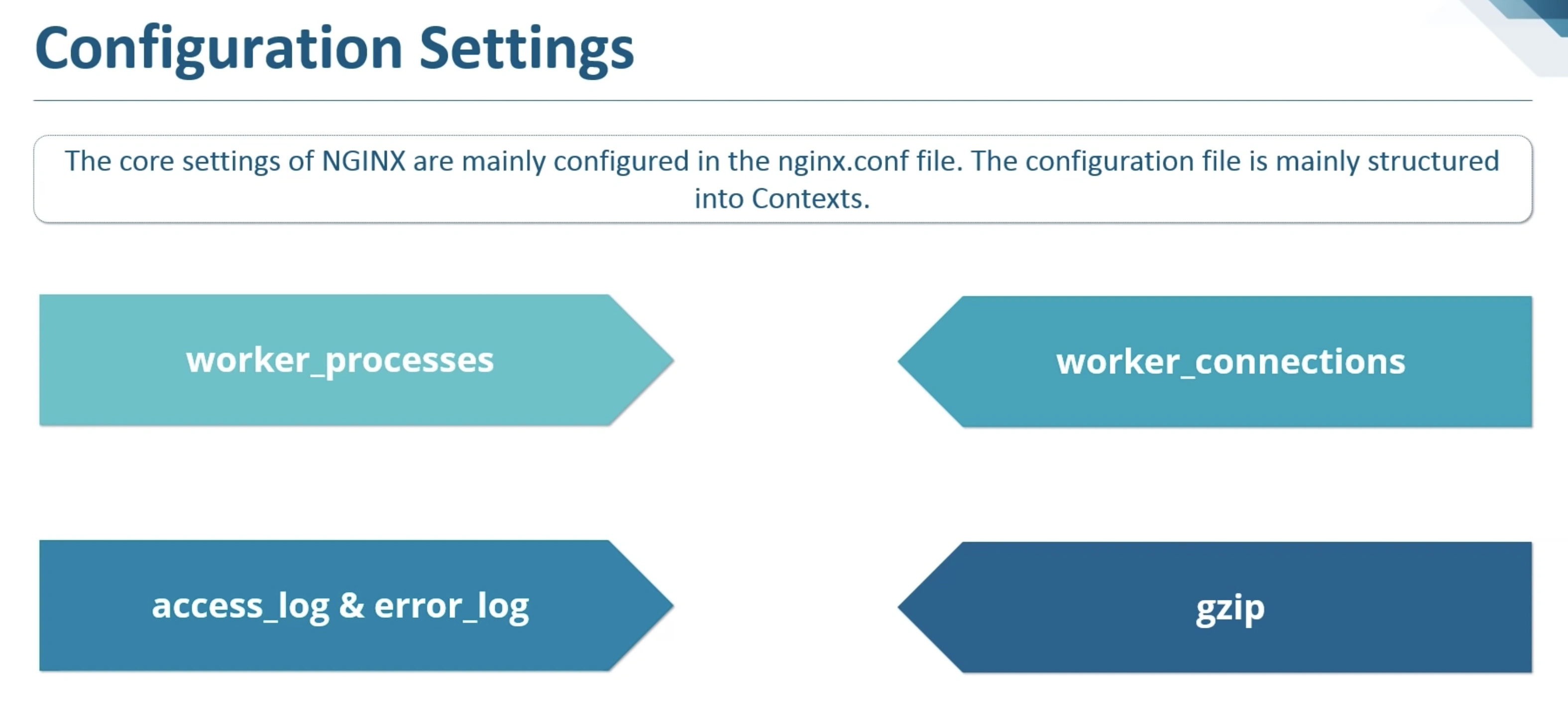
sudo ufw enablesudo ufw app listsudo ufw allow 'Nginx Fullsudo systemctl status nginx
Ubuntu VPS
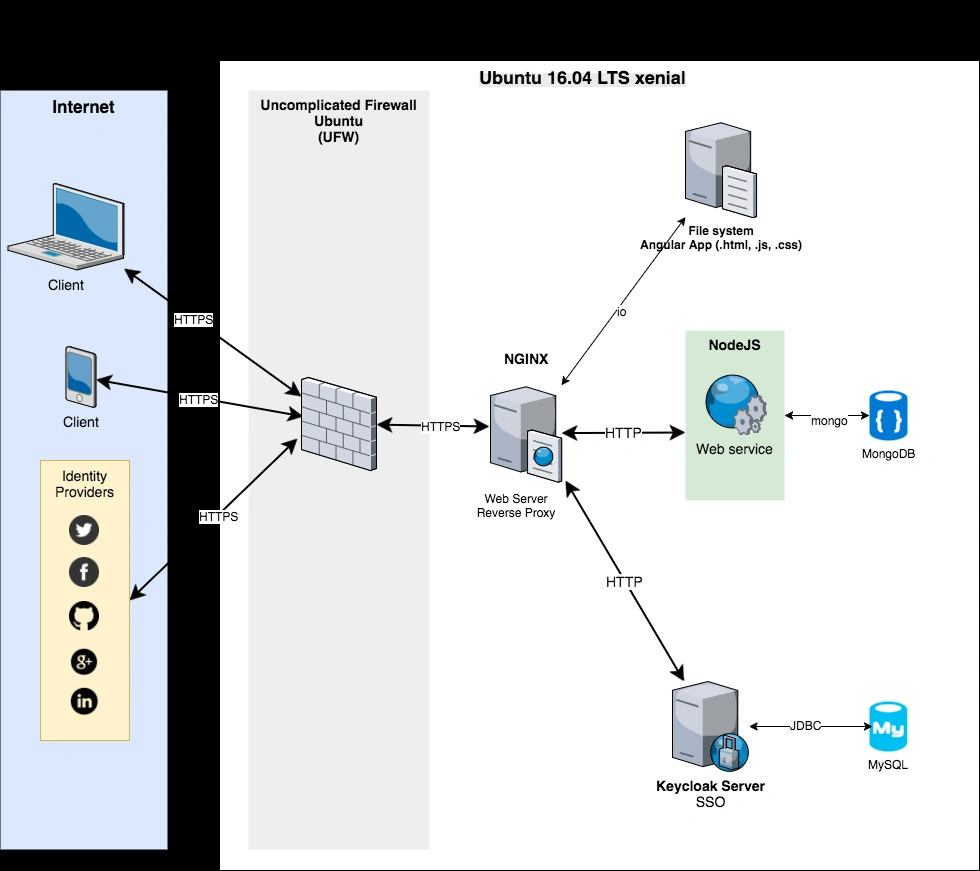
shell command
ssh `user@my.external.ip.address`
Debug
pingssh -v- look at /var/log/auth.log
both Ubuntu Server and Ubuntu Desktop use resolvconf to manage the resolv.conf file. That means that you should no longer edit /etc/resolv.conf directly; instead you should configure your network interface configuration utility to provide the right information to resolvconf. For Ubuntu Server the network interface configuration utility is ifup and it is configured by the file /etc/network/interfaces. For Ubuntu Desktop the network interface configuration utility is NetworkManager.
sudo service network-manager restart
MulticastDNS (mDNS)
Hosting
Hosting Companies
- Digital Ocean
- HostGator
- HostGator was founded back in 2003 by Brent Oxley and later sold to Endurance International Group (EIG).
- According to their website, they host more than 10 million domains making them one of the most popular web hosting providers on the planet (next to GoDaddy).\
- BlueHost
- hosting more than 2 million websites and they belong to EIG who also owns HostGator.
- GoDaddy
- AWS
- HostWay
Cloud vs On Premise | Software Approach vs BaaS
BaaS
- real-time
- easy setup
- Infrastructure doesn’t get any easier than this. Infrastructure is completely abstracted from you, much like the rest of Firebase. Every time a function is triggered, a new virtual server comes to life, does its job, and returns to limbo.
- No scheduler (cron)
- Scalability is great, but run time can fluctuate wildly caused by virtual server boot times. If the virtual server that is running your function is awake, the function will trigger instantly. But if the server has to be brought up from limbo, it will obviously need more time to start working. In the cloud functions lingo, this is referred to as warm and cold starts.
Tips for Choosing a Web Hosting Service
The most important thing to keep in mind when choosing a web host is your needs: just like it wouldn't make sense to use a smaller web host if you're building a huge website that requires multiple servers, it wouldn't make sense to pay for a lot of storage and features you're not going to use if you're launching a small blog. If you are planning on starting with a small site that will become very large, your best bet is to choose a basic package with unlimited disk space, which will give you enough space for all of the pages you'd like to have and make you to accessible through search engines. When your website expands, you'll always have the option of switching to a large host later to accommodate your traffic.
The more you know about the different features and publishing tools that are available, the more you can make your website an inviting environment for visitors. Also, try to grasp the more complex technological specs of each web host. Even if it sounds like jargon to you now, it will begin to make more and more sense as start understanding the different features each host offers.
Once you feel grounded in these technological aspects, make sure your website has features in place to find the customers that you're trying to reach. Almost all web hosts provide means of reaching consumers through free advertisement credits. Shopping carts and multiple email addresses can have a big impact on how professional you look to interested consumers. Checking security features would also be a good idea if you're trying to set up a small shopping website, as well as CMS availability and integration for each web host. Remember, the more you know, the better website you'll ultimately have.
Web Hosting Prices
Many web hosting services let you choose from several types of packages, each with a different price and slightly different range of offerings. The prices can range from $4.25/month to over $40/month. These price differentials can be attributed to the different features included within each plan and to the eagerness of some newer hosting companies, such as iPage, to grow their brand by offering extremely low rates. In order to help you stay within your budget, we've compared the prices of the best web hosting services of 2012 across all the plans they offer.
Bandwidth and Disk Space
Even if you're planning a small site, you should look for a minimum of 5 GB of disk space and 250 GB of bandwidth from your web hosting plan. While this may be enough for most websites, it's important to note that many web hosts such as FatCow are offering an unlimited amount of both at a price that's comparable to more limited plans. Our side-by-side comparison shows what each host offers to help you decide which plan will best suit your needs.
Ease of Use
Choosing an easy-to-use web host is particularly important if you are new to web hosting. We set up accounts with several web hosting services and used each control panel for a variety of tasks in order to evaluate the ease of use. Since only StartLogic lets you test out their control panel with a free demo, we've recorded our findings to help you determine which control panel will be easiest for you to use.
Customer Support
Both web professionals and novice webmasters will likely need assistance from their web host's customer support staff at some point. Since nearly every hosting company promises impeccable support, we put them to the test to show you how helpful and friendly each support team truly was. We tested the hold times, relevance of the response and politeness of both phone and chat representatives. We also tested the email responses of each web host. Finally, we surveyed the self-help services offered by each web host, in case you prefer to find answers independently.
Standard Web Hosting Features
One thing that tends to complicate the decision of choosing a web host is the large (and often unnecessary) features list that each service provides. Although price, bandwidth and disk space are often the biggest determining factors, it's also important to evaluate what other features and add-ons each host offers. Our comprehensive features comparison will help you determine which host offers the features you want. Or, if you're not sure exactly which features your website will need, take a look at our comparison to determine which ones sound helpful and which ones may not be worth the added expense.
Uptime and Page Load Time
Of primary importance to the success of your website is whether or not your visitors will be able to load your site's pages quickly and to see at a glance what your site is all about. While we found iPage to live up to it's 100% uptime guarantee, we were surprised to see that HostGator fell short of it's 99% guarantee. We tested the uptime and page load time of the best hosting services to help you determine which ones are more reliable.