Design Patterns
Interface Example
- class > car > method > travel
- interface > vehicle > plane, skateboard, etc > method > travel
some developers might argue that the Gang of Four (GoF) design patterns aren't as helpful with modern app development
- Language Features: Many modern languages have built-in features that address problems design patterns were created to solve. For example, dependency injection frameworks can handle object creation (a creational pattern concern) more elegantly than the Singleton pattern.
- Over-engineering: Sometimes applying a design pattern can lead to over-engineering if the problem doesn't actually warrant it. A complex solution might be introduced for a simple problem, making the code harder to understand and maintain.
- Context Specificity: The GoF patterns were designed for a specific era of object-oriented programming (OOP). Modern applications might involve different paradigms like functional programming or microservices architectures, where these patterns might not be as directly applicable.
- Focus on Reuse over Readability: While GoF patterns promote code reuse, their complexity can sometimes hinder readability, especially for junior developers. Clear and concise code might be more valuable than complex patterns in some situations.
However, GoF design patterns still have value:
- Shared Language: They provide a common vocabulary for developers to discuss software design concepts. This can be helpful for communication and collaboration within a team.
- Problem-solving Approaches: Understanding the underlying problems that design patterns address can help developers come up with their own solutions in modern contexts.
- Foundation for Advanced Patterns: Some more advanced design patterns build upon the concepts introduced in GoF patterns. Understanding these basics can be helpful for learning more complex patterns.
In conclusion, GoF design patterns aren't a magic bullet for modern app development. Their usefulness depends on the specific context and the complexity of the problem you're trying to solve. However, understanding these patterns can still be valuable for developers.
Table of Contents
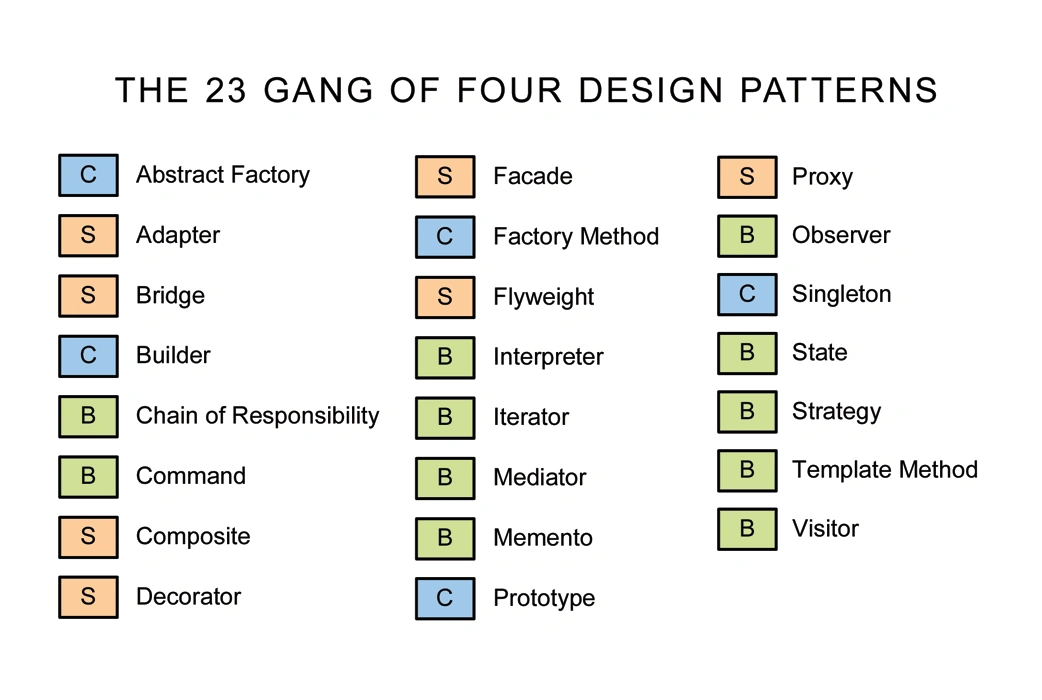
Facade
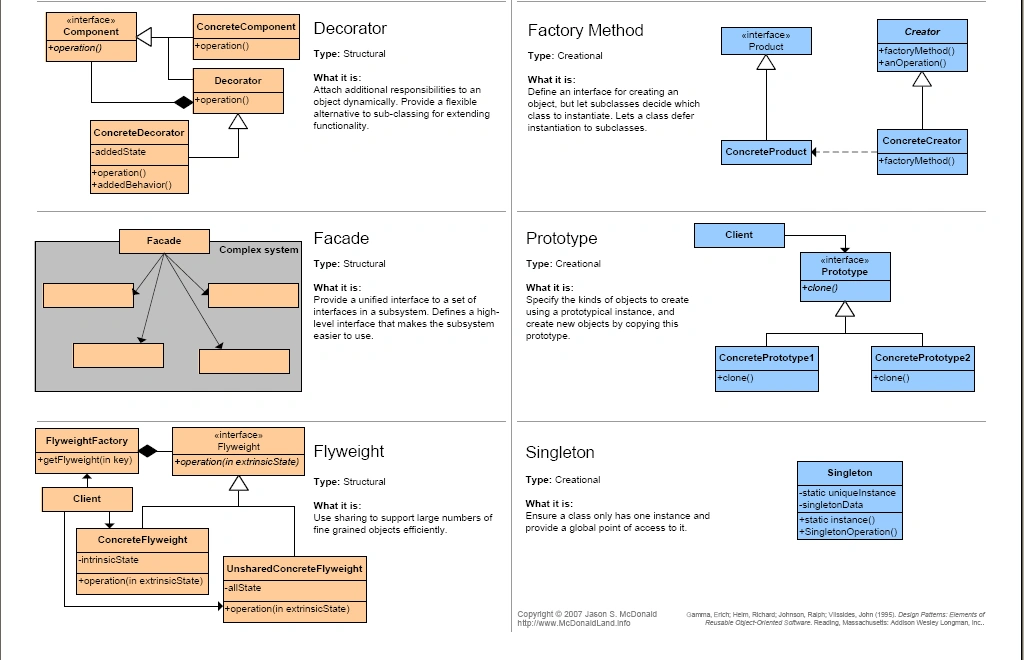
The Facade design pattern is a structural design pattern that provides a simplified interface to a complex subsystem of classes, making it easier to use. In the context of web applications, the Facade pattern can be used to provide a simplified interface or entry point to a set of complex components or services.
Here's an example of how the Facade pattern can be applied in a web application:
Let's say you have a web application that interacts with multiple subsystems such as a user authentication system, a payment gateway, and a database. Each subsystem may have a complex interface with multiple classes and methods. To simplify the usage of these subsystems and provide a more straightforward interface, you can use the Facade pattern.
Here are the steps to apply the Facade pattern in a web application:
-
Identify the complex subsystem: Determine the set of classes and components that form the complex subsystem. These could be different services, libraries, or modules that your web application interacts with.
-
Design the facade class: Create a facade class that encapsulates the interactions with the complex subsystem. The facade class should provide a simplified interface or set of methods that the client code can use to perform common tasks.
-
Implement the facade methods: Inside the facade class, implement the methods that map to the desired functionality of the complex subsystem. These facade methods should internally coordinate the interactions with the underlying classes and components of the subsystem, shielding the client code from its complexities.
-
Expose the facade to the client code: Ensure that the client code has access to the facade class and uses it as the primary entry point to interact with the subsystem. The client code should rely on the facade's simplified interface instead of directly interacting with the individual components of the complex subsystem.
Here's a simplified code example in Python to illustrate the Facade pattern for a web application:
# Complex subsystem classes
class AuthenticationService:
    def authenticate(self, username, password):
        print("Authenticating user...")

class PaymentService:
    def process_payment(self, amount):
        print(f"Processing payment of {amount}...")

class DatabaseService:
    def save_data(self, data):
        print("Saving data to the database...")

# Facade class
class WebApplicationFacade:
    def __init__(self):
        self.auth_service = AuthenticationService()
        self.payment_service = PaymentService()
        self.db_service = DatabaseService()

    # Facade methods
    def login_and_process_payment(self, username, password, amount, data):
        self.auth_service.authenticate(username, password)
        self.payment_service.process_payment(amount)
        self.db_service.save_data(data)

# Client code
facade = WebApplicationFacade()
facade.login_and_process_payment("john", "password", 100, "Some data")

# Use the facade to interact with the complex subsystem
# ...
In the example above, the complex subsystem is represented by the AuthenticationService, PaymentService, and DatabaseService classes. The WebApplicationFacade class encapsulates the interactions with these subsystem classes and provides a simplified interface for the client code.
The login_and_process_payment method in the WebApplicationFacade coordinates the authentication, payment processing, and data saving operations by internally invoking the corresponding methods of the subsystem classes. The client code interacts with the facade by calling the login_and_process_payment method, which shields the client from the complexities of the subsystem.
By using the Facade pattern, you can provide a simpler and more intuitive interface to the complex subsystem in your web application, making it easier to use and understand for the client code.
Factory
Provides an interface for creating objects, allowing subclasses to decide which class to instantiate.
- the purpose of a factory function is to create new objects with similar properties and methods
- commonly name Factory functions with create________
function createEmployee(firstName, lastName){

}
Graceful Degradation
Accessibility
- core content is still delivered even if device does not support
Separation
- Separating behavior from Markup
Event-driven Environment
- (helpful with node.js)
"Principle of Least Privilege"
-
also sometimes called "Least Authority" or "Least Exposure".
-
This principle states that in the design of software, such as the API for a module/object, you should expose only what is minimally necessary, and "hide" everything else.
(avoid divergence) > Shared Library Pattern
A common challenge when developing an application is that both the UI and the back-end have data constructs that overlap. Defining things in each of these codebases can lead to major issues with divergence. The better approach is to use a shared library of types that both applications can import and use.
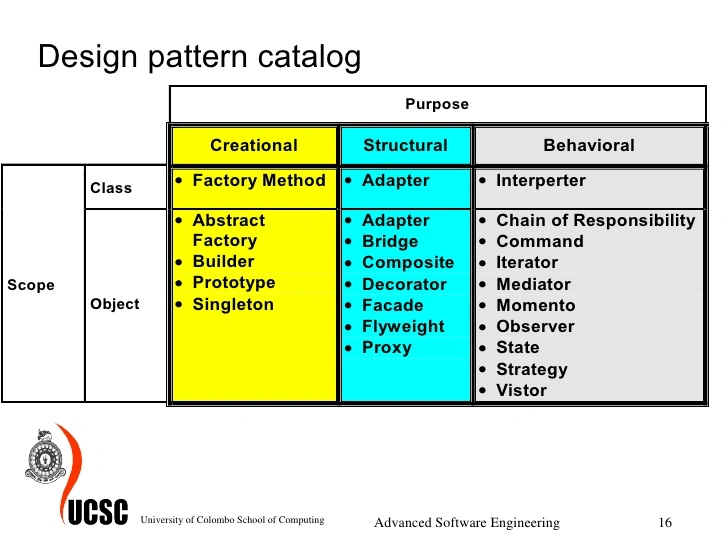
revealing module
The revealing module design pattern is a way of organizing code in JavaScript that allows you to encapsulate private functionality and expose a public API to other parts of your application.
In this pattern, you define a module as an object literal with properties and methods, some of which may be private (i.e., not accessible from outside the module) and some of which are public (i.e., accessible from outside the module). The private properties and methods are created using closures, which means they can only be accessed by code within the module.
Here's an example of how the revealing module pattern might be implemented:
var myModule = (function() {
  var privateVar = "I am a private variable";

  function privateFunction() {
    console.log("I am a private function");
  }

  function publicFunction() {
    console.log("I am a public function");
  }

  return {
    publicFunction: publicFunction
  };
})();

myModule.publicFunction(); // "I am a public function"
myModule.privateVar; // undefined
myModule.privateFunction; // undefined
In this example, privateVar and privateFunction are defined as private variables and functions, respectively, within the module's closure. The publicFunction is returned as part of the module's public API, and can be accessed from outside the module. However, privateVar and privateFunction are not accessible from outside the module.
The revealing module pattern can help you write more modular, maintainable code by providing a way to encapsulate private functionality and expose a public API to other parts of your application.
mediator
The mediator design pattern is a behavioral pattern that allows communication between objects without them needing to have direct references to each other. In this pattern, a mediator object acts as an intermediary, coordinating communication between the other objects.
The mediator pattern can help to reduce coupling between objects, making it easier to modify and maintain the system as a whole. It can also make it easier to add new objects to the system, since they can communicate through the mediator without needing to be aware of the other objects in the system.
Here's an example of how the mediator pattern might be implemented in JavaScript:
function Mediator() {
  this.colleagues = [];

  this.register = function(colleague) {
    this.colleagues.push(colleague);
    colleague.setMediator(this);
  }

  this.send = function(sender, message) {
    for (var i = 0; i < this.colleagues.length; i++) {
      if (this.colleagues[i] !== sender) {
        this.colleagues[i].receive(message);
      }
    }
  }
}

function Colleague(name) {
  this.name = name;
  this.mediator = null;

  this.setMediator = function(mediator) {
    this.mediator = mediator;
  }

  this.send = function(message) {
    this.mediator.send(this, message);
  }

  this.receive = function(message) {
    console.log(this.name + " received message: " + message);
  }
}

// Usage
var mediator = new Mediator();

var colleague1 = new Colleague("Alice");
var colleague2 = new Colleague("Bob");

mediator.register(colleague1);
mediator.register(colleague2);

colleague1.send("Hello, Bob!");
colleague2.send("Hi, Alice!");
In this example, the Mediator object acts as an intermediary between the Colleague objects. The Mediator maintains a list of colleagues and provides a send method that sends a message to all colleagues except the sender. The Colleague objects have a setMediator method that allows them to register with the mediator, and a send method that sends a message through the mediator. When a message is received, the Colleague object logs a message to the console.
By using the mediator pattern, the Colleague objects can communicate with each other without needing to have direct references to each other. This can help to reduce coupling between objects and make the system easier to modify and maintain.
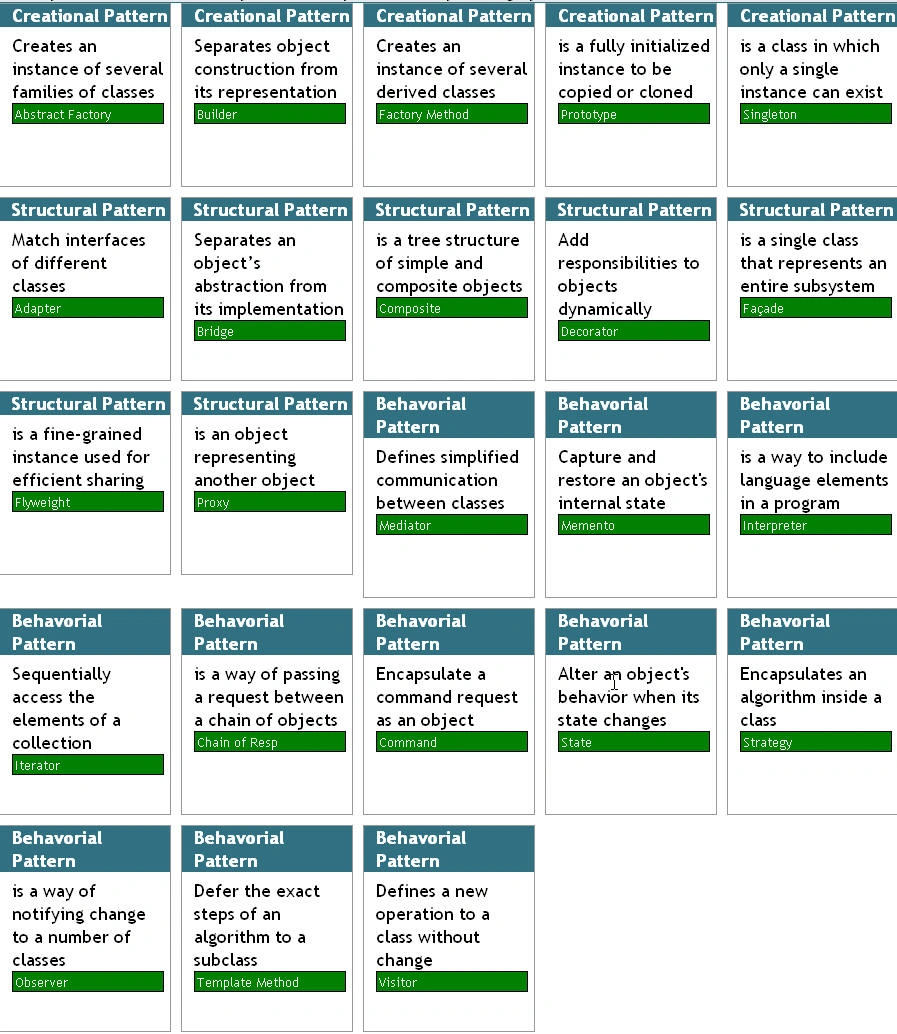
Lazy initialization
Lazy initialization is a design pattern in software development that involves delaying the initialization of an object or resource until it is actually needed.
In lazy initialization, you defer the creation of an object or resource until the first time it is requested by the application. This can help to improve performance and reduce memory usage, since the object or resource is only created when it is actually needed, rather than at the start of the application.
Lazy initialization is often used with objects or resources that are expensive to create, such as database connections or large data structures. By deferring the creation of these objects until they are actually needed, you can avoid the overhead of creating them unnecessarily.
Here's an example of how lazy initialization might be implemented in JavaScript:
var myObject = null;

function getMyObject() {
  if (myObject === null) {
    myObject = expensiveObjectCreation();
  }
  return myObject;
}

function expensiveObjectCreation() {
  console.log("Creating expensive object...");
  return { /* object created here */ };
}

// Usage
getMyObject(); // Creating expensive object...
getMyObject(); // (no output)
In this example, the getMyObject function uses lazy initialization to create the myObject object only when it is actually needed. The first time getMyObject is called, the expensiveObjectCreation function is called to create the object. The second time getMyObject is called, the previously-created object is returned, without needing to recreate it.
By using lazy initialization in this way, you can improve the performance and reduce the memory usage of your application, especially in situations where you have expensive objects or resources that are only needed in certain circumstances.
Enum Flags
In web applications, Enum Flags, short for enumeration flags, refer to a technique used to represent and manipulate a collection of binary options or flags using an enumerated type (enum).
An enum is a data type that consists of a set of named values, often called enumerators or members. Each enumerator represents a distinct option or state. Enum flags allow you to combine multiple options or states into a single value by performing bitwise operations on the underlying binary representation of the enum values.
For example, let's say you have an enum representing different roles in a web application:
[Flags]
public enum UserRole
{
    None = 0,           // 0000
    Administrator = 1,  // 0001
    Moderator = 2,      // 0010
    Editor = 4,         // 0100
    Viewer = 8          // 1000
}
With enum flags, you can combine multiple roles into a single value using bitwise OR (|) operator:
UserRole userRoles = UserRole.Administrator | UserRole.Editor;
Here, userRoles represents a user who has both the administrator and editor roles. The binary representation of userRoles is 0101, where the 1s indicate the roles the user possesses.
You can perform various operations on enum flags, such as checking if a specific flag is set, adding or removing flags, or performing logical operations like AND (&), OR (|), and XOR (^).
Enum flags are commonly used in web applications for scenarios where you need to represent and manipulate collections of options or states that can be combined or toggled. They provide a concise and efficient way to handle such scenarios, especially when dealing with permissions, user roles, or configuration settings.
Strangler Pattern (for Rewriting Legacy code)
wrap new module around old code
Front-End Design Patterns
Observer
Establishes a one-to-many relationship between objects, allowing them to be notified of changes.
Singleton
Ensures a class has only one instance and provides a global point of access to it.
Adapter
Converts the interface of one class into another interface that clients expect.
The Adapter design pattern is a structural design pattern that allows objects with incompatible interfaces to work together. It converts the interface of one class into another interface that clients expect. In the context of web applications, the Adapter pattern can be used to integrate different components or services with incompatible interfaces.
Here's an example of how the Adapter pattern can be applied in a web application:
Let's say you have an existing web application that interacts with a legacy external service to fetch data. The legacy service has its own specific interface and may not align with the interface expected by your application.
To integrate the legacy service into your web application using the Adapter pattern, you can follow these steps:
-
Define the target interface: Create an interface that represents the functionality expected by your web application. This interface will define the methods your application needs to interact with the service.
-
Implement the adapter class: Create an adapter class that implements the target interface. The adapter class will wrap the legacy service and provide the necessary translations or adaptations to bridge the gap between the legacy service and your application's interface.
-
Adapt the legacy service: Inside the adapter class, you need to adapt the methods of the legacy service to match the target interface. This may involve transforming parameters, calling different methods, or handling the response in a way that conforms to the target interface.
-
Integrate the adapter into your application: Replace the direct usage of the legacy service in your application with the adapter class. Your application can now interact with the legacy service through the adapter, which handles the translation and adaptation of interfaces.
Here's a simplified code example in Python to illustrate the Adapter pattern for a web application:
# Step 1: Define the target interface
class DataService:
    def fetch_data(self, query):
        raise NotImplementedError

# Step 2: Implement the adapter class
class LegacyServiceAdapter(DataService):
    def __init__(self, legacy_service):
        self.legacy_service = legacy_service

    # Step 3: Adapt the legacy service
    def fetch_data(self, query):
        # Perform necessary adaptations
        transformed_query = transform_query(query)

        # Call the legacy service method
        result = self.legacy_service.retrieve_data(transformed_query)

        # Adapt the response
        adapted_result = adapt_response(result)

        return adapted_result

# Step 4: Integrate the adapter into your application
legacy_service = LegacyService()  # Existing legacy service
adapter = LegacyServiceAdapter(legacy_service)
data = adapter.fetch_data('example query')

# Use the adapted data in your web application
# ...
In the example above, the DataService interface represents the expected functionality in your web application. The LegacyServiceAdapter class wraps the LegacyService and adapts its interface to match the DataService interface. The fetch_data method of the adapter handles the necessary adaptations and translations to bridge the gap between the two interfaces.
By using the Adapter pattern, you can seamlessly integrate the legacy service into your web application without directly modifying the existing code that relies on the DataService interface.
Decorator
Adds additional behavior to an object dynamically.
Strategy
Defines a family of interchangeable algorithms and encapsulates each one.
Command
Encapsulates a request as an object, allowing the parameterization of clients with different requests.
Back-End Design Patterns
Repository
Mediates between the data source and the business logic, providing a standardized data access interface.
Dependency Injection
Provides a way to inject dependencies into an object from an external source.
Builder
Constructs complex objects step by step, separating the construction process from the object's representation.
The Builder design pattern is a creational pattern that separates the construction of a complex object from its representation, allowing you to create different representations of the same object using the same construction process.
The Builder pattern can be useful in situations where you need to create complex objects with many optional parameters or configurations, and where it might be difficult or impractical to create multiple constructors or factory methods. By using the Builder pattern, you can create a builder object that knows how to construct the complex object, and then use that builder to create different representations of the object with different configurations.
Here's an example of how the Builder pattern might be implemented in JavaScript:
function Product(name, price, description) {
  this.name = name;
  this.price = price;
  this.description = description;
}

function ProductBuilder() {
  this.name = null;
  this.price = null;
  this.description = null;

  this.setName = function(name) {
    this.name = name;
    return this;
  }

  this.setPrice = function(price) {
    this.price = price;
    return this;
  }

  this.setDescription = function(description) {
    this.description = description;
    return this;
  }

  this.build = function() {
    return new Product(this.name, this.price, this.description);
  }
}

// Usage
var builder = new ProductBuilder();

var product1 = builder.setName("Product 1").setPrice(10).setDescription("This is product 1").build();
console.log(product1); // Product { name: "Product 1", price: 10, description: "This is product 1" }

var product2 = builder.setName("Product 2").setPrice(20).setDescription("This is product 2").build();
console.log(product2); // Product { name: "Product 2", price: 20, description: "This is product 2" }
In this example, the ProductBuilder object knows how to construct a Product object with a name, price, and description. The ProductBuilder object has methods for setting each of these properties, as well as a build method that constructs and returns a Product object.
By using the ProductBuilder object, you can create different representations of the Product object with different configurations. In this example, we create two different Product objects with different names, prices, and descriptions, using the same ProductBuilder object.
The Builder pattern can be useful in many different situations, such as when you need to create objects with many optional parameters, or when you need to create objects with complex initialization logic. By using the Builder pattern, you can separate the construction of the object from its representation, making it easier to create different representations of the same object with different configurations.
Proxy
Provides a surrogate or placeholder for another object and controls its access.
The proxy design pattern is a structural pattern that allows you to provide a surrogate or placeholder object for another object. The proxy object acts as an intermediary between the client and the real object, allowing the client to interact with the object indirectly.
The proxy pattern can be useful in situations where you want to control access to an object, or where you need to defer the creation of an object until it is actually needed. It can also be used to add additional functionality to an object without modifying its code.
Here's an example of how the proxy pattern might be implemented in JavaScript:
function RealObject() {
  this.doSomething = function() {
    console.log("RealObject: doing something");
  }
}

function ProxyObject() {
  this.realObject = null;

  this.doSomething = function() {
    if (this.realObject === null) {
      this.realObject = new RealObject();
    }
    this.realObject.doSomething();
  }
}

// Usage
var proxy = new ProxyObject();

proxy.doSomething(); // RealObject: doing something
In this example, the RealObject is the object that the client ultimately wants to interact with. However, the ProxyObject acts as a surrogate for the RealObject. When the ProxyObject's doSomething method is called, it checks whether the RealObject has been created yet. If not, it creates a new RealObject. Then, it calls the doSomething method on the RealObject.
By using the proxy pattern in this way, the client can interact with the RealObject indirectly, through the ProxyObject. This can be useful if you want to control access to the RealObject, or if you want to defer the creation of the RealObject until it is actually needed.
In addition to the basic proxy pattern shown here, there are also several variations of the pattern, such as the virtual proxy, the protection proxy, and the remote proxy. Each variation has its own specific use case and implementation details.
Data Access Object (DAO)
Provides a common interface for accessing a specific type of database or persistence mechanism.
Template Method
Defines the skeleton of an algorithm, allowing subclasses to provide specific implementations for certain steps.
Chain of Responsibility
Allows an object to pass a request along a chain of potential handlers until one handles it.
Full Stack Design Patterns
Model-View-Controller (MVC)
Separates data (model), presentation (view), and user interaction (controller).