Software Architecture
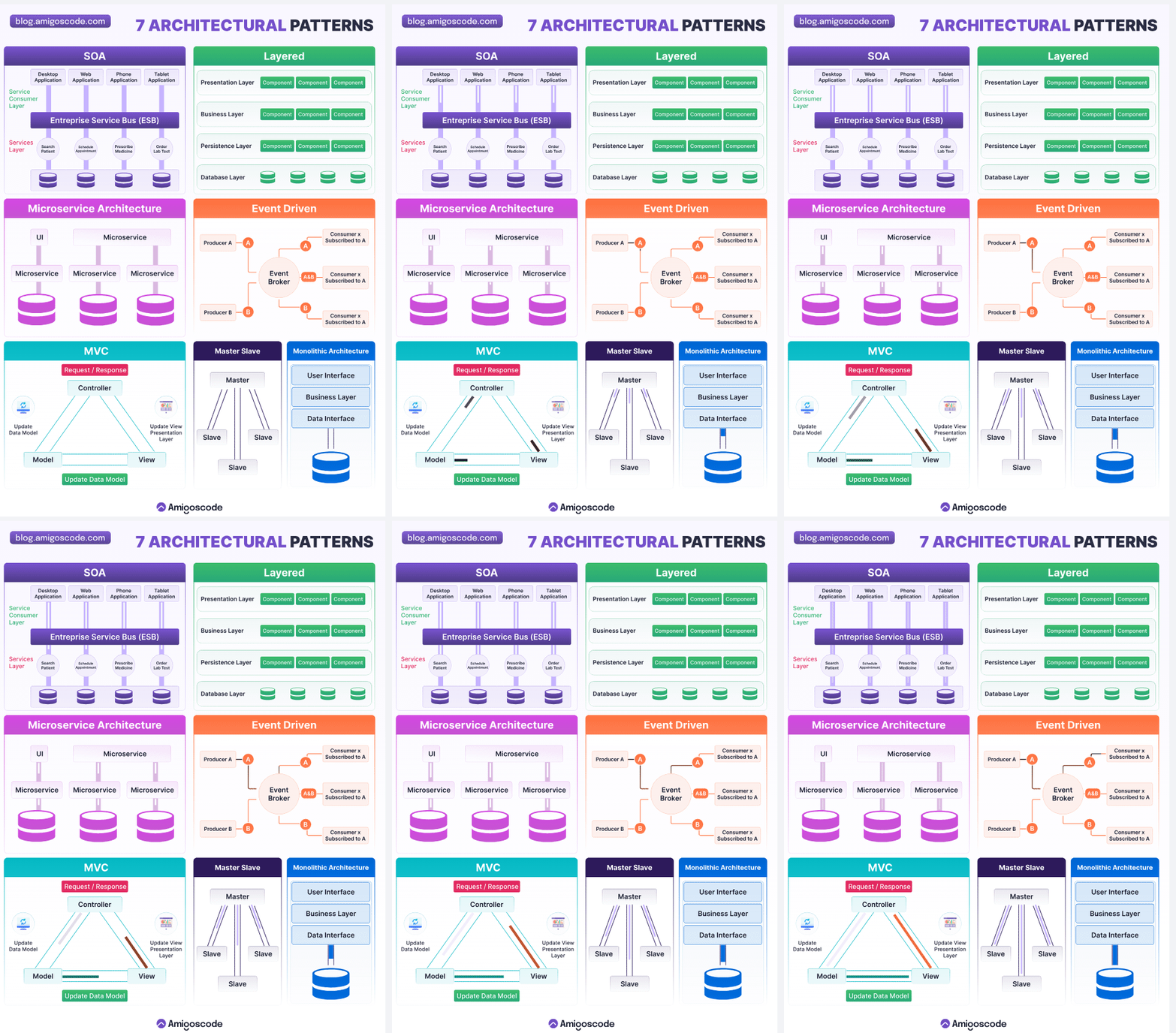
Table of Contents
Put Business Logic In The Backend
As you build out your application you're often confronted with the choice of where logic should live: on the client (e.g., web browser, mobile device, physical hardware) or some form of backend server. For certain types of logic, such as anything related to authentication, value calculations, anti-cheating/tampering mechanisms, this is a firm requirement. For most other logic it's still a good idea for the following reasons:
Backends are often easier to test than clients, so you can more confidently confirm the correctness of business logic on the backend.
More logic on the backend means thinner clients, and also means you can produce clients for multiple platforms that can leverage a single source for logic, reducing code duplication.
Logic on the backend can't be tampered with or modified by the client.
Use As Few Languages As Possible
With every programming language comes an associated build system, dependency management system, programming best practices, and interfaces. Your team should be putting in considerable effort to ensure your primary language and ecosystem are well integrated and working well for local developers, test environments, and production environments.
For every additional language you add to your stack, you'll need to replicate all of that effort, and you'll suffer from an inability to share code between the runtimes. Before allowing an additional language in your stack you should be able to build a robust and bulletproof argument that the benefits of the new language dwarf the operational and maintenance burdens that the new language adds. Otherwise you're better off without it.
Software Architecture Principles
- Scope: Software architecture principles encompass higher-level design decisions and considerations that guide the overall structure and organization of a software system.
- Level of Granularity: Architecture principles operate at a broader level than coding best practices. They address system-level concerns such as scalability, maintainability, performance, security, extensibility, and separation of concerns.
- Examples: Examples of software architecture principles include the use of modular and loosely coupled components, adhering to the SOLID principles, employing architectural patterns like MVC (Model-View-Controller) or microservices, ensuring appropriate layering and abstraction, designing for scalability and fault tolerance, and considering the trade-offs between different architectural styles.
In summary, coding best practices focus on the implementation level, guiding developers on how to write clean, efficient, and maintainable code, on the other hand, deal with higher-level design decisions to create a robust and scalable software system that meets the desired functional and non-functional requirements.
N-tier architecture
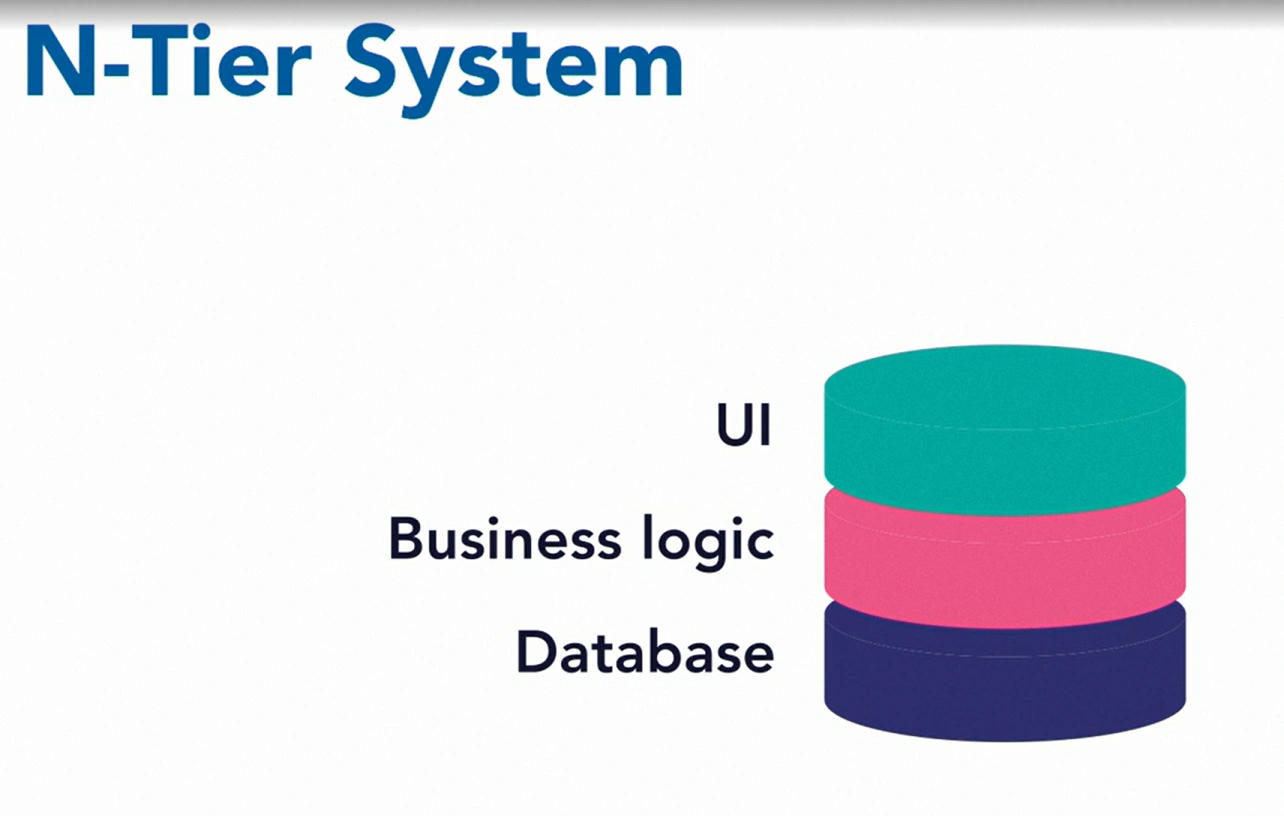
N-tier architecture, also known as multi-tier architecture, is a software design pattern commonly used for developing web applications. It divides an application into multiple layers or tiers, each with distinct responsibilities and functionalities. The primary goal of n-tier architecture is to separate concerns and promote modularity, scalability, and maintainability in web application development.
Typically, the n-tier architecture consists of three main tiers, namely:
-
Presentation Tier (also known as the User Interface Tier):
- This tier focuses on the user interface (UI) and handles the interaction between the application and the end-user.
- It includes components such as web browsers, mobile apps, or desktop applications that users directly interact with.
- The presentation tier is responsible for rendering the user interface, handling user input, and displaying data to the user.
-
Application Tier (also known as the Business Logic Tier or Middle Tier):
- The application tier contains the business logic and acts as an intermediary between the presentation tier and the data tier.
- It processes user requests, performs the necessary computations, and implements the business rules and logic of the application.
- The application tier encapsulates the core functionality of the application, including data validation, business workflows, and application-specific rules.
- It may also include components related to security, authentication, authorization, and external integrations.
-
Data Tier (also known as the Data Access Tier or Persistence Tier):
- The data tier is responsible for managing data storage, retrieval, and persistence.
- It handles interactions with databases, file systems, or any other data storage mechanisms.
- The data tier provides an abstraction layer that allows the application tier to interact with the underlying data without directly dealing with the storage details.
- This tier includes components such as database management systems (DBMS), object-relational mapping (ORM) frameworks, and data access libraries.
In addition to these three main tiers, n-tier architecture might incorporate additional layers or tiers depending on the complexity of the application. For example, it is common to introduce service-oriented architectures (SOA) or microservices architecture, where services are organized into separate tiers to promote scalability, reusability, and independent deployment.
Overall, the n-tier architecture provides a structured and modular approach to building web applications, enabling better separation of concerns, flexibility, and easier maintenance and evolution of the system.
Key Software Engineering Laws
important software engineering laws that can significantly impact the development process and product quality.Understanding these laws can help optimize workflows, improve collaboration, and enhance the user experience.
-
Murphy's Law: "Anything that can go wrong will go wrong." As a front-end engineer, it's crucial to anticipate potential failures in your code. Implement thorough testing and error handling to mitigate issues before they affect the user experience.
-
Brooks' Law: "Adding manpower to a late software project makes it later." More team members can lead to increased complexity in communication and integration. Focus on efficient collaboration and agile methodologies rather than just increasing team size.
-
Conway's Law: "Organizations which design systems are constrained to produce designs which are copies of the communication structures of these organizations." The structure of your team influences the architecture of your applications. Foster open communication and collaboration among team members to create cohesive and efficient front-end designs.
-
Lehman's Laws: "As a system evolves, its complexity increases unless work is done to maintain or reduce it." Regularly refactor your code and maintain clean architecture to prevent technical debt from accumulating, ensuring that your front-end remains manageable and scalable.
-
The Law of Leaky Abstractions: "All non-trivial abstractions, to some degree, are leaky." Be aware that abstractions (like frameworks and libraries) can fail or behave unexpectedly. Understand the underlying mechanisms of the tools you use to better troubleshoot issues.
-
Amdahl's Law: "The speedup of a task using multiple processors is limited by the sequential fraction of the task." When optimizing front-end performance, recognize that not all parts of your application can be parallelized. Focus on optimizing critical rendering paths to improve overall performance.
-
The Law of Demeter: "Only talk to your immediate friends." Minimize dependencies between components to enhance modularity. This practice aids in making your front-end codebase more maintainable and easier to test.
-
The Principle of Least Astonishment: "Users should not be surprised by the behavior of a system." Design user interfaces that are intuitive and predictable. Consistency in design patterns will lead to a better user experience and reduce the learning curve for users.
-
The 90-90 Rule: "The first 90% of the code takes 90% of the time. The last 10% takes the other 90%." Expect that finalizing features and polishing your application will take longer than anticipated. Allocate sufficient time for testing and debugging.