Design System

Table of Contents
- information architecture
- Design Thinking
- DesignOps
- Design Comps
- UI Best Practices
- Usability Testing
- Terms
- User Experience Research
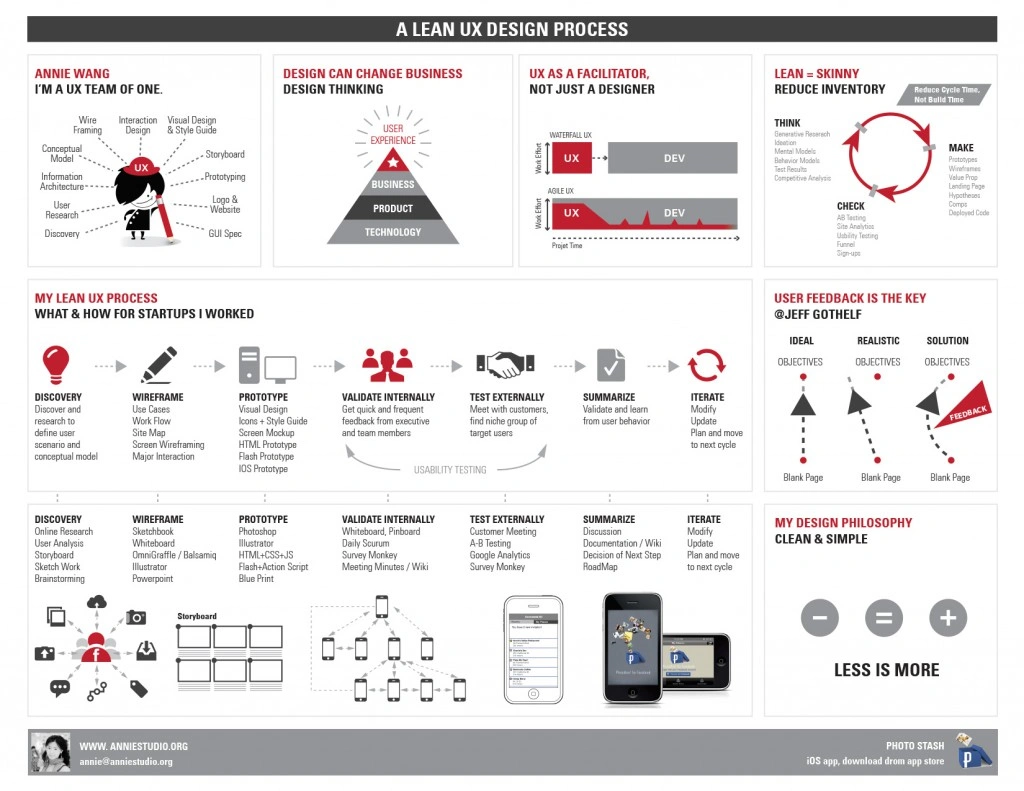
Jokes

https://kyleshevlin.com/design-system-retrospective/
- narratives and adjectives can provide inspiration, poetic guide
The set of values, semantics, syntax, and context that form the foundation of a shared design language.
- well-defined design principles
- specific
- essential
- based on company’s values
common categories
- border
- breakpoint
- color
- interactions
- layer
- palette
- shadow
- spacing
- typography
- components/button
Consistency: A pattern library ensures that all design elements are consistent across different pages and sections of a digital product. Users will be able to easily recognize and navigate the interface, which can improve the overall user experience.
Efficiency: A pattern library can save time and resources by providing pre-designed UI components that can be reused across different projects. This can help designers create new interfaces more quickly and efficiently, without having to start from scratch.
Scalability: As a digital product evolves and new features are added, a pattern library can help ensure that the new components are consistent with the existing design elements, maintaining continuity in the UX.
Collaboration: A pattern library can facilitate collaboration among designers, developers, and other stakeholders by providing a shared set of design elements and guidelines. This can help ensure that everyone is working towards the same goals and can reduce inconsistencies in the design.
What is a Style Guide
The physical or digital document that represents the styles, patterns, practices, and principles of a company/brand and teaches how to use it.
- Writing Styles & Tone
- Imagery
- Visual Identity
- color schemes
- typography
- textures
- adjectives
- Design Principles
- Best Practices
- Brand Styles
- Use Cases
- Iconography
Collaboration Tools
Certifications
The cost and duration of UX design certifications can vary depending on the provider, format, and level of the certification. Here are some general guidelines, but it's important to check with each certification program for the most up-to-date information:
-
Certified Professional in User Experience (CPUX): The cost of CPUX certification exams typically ranges from $300 to $500. The duration of the certification process varies, but it typically involves self-study or attending training courses followed by an exam.
-
UX-PM Certification: The cost of UX-PM certification can vary depending on the location and training provider. The certification program usually consists of a 3-5 day training workshop that covers the necessary topics.
-
Certified User Experience Analyst (CXA): The cost of the CXA certification by Human Factors International (HFI) is typically around $1,000 to $2,000. The certification process involves attending a training course, completing assignments, and passing an exam.
-
Interaction Design Foundation (IDF) Certification: IDF offers a subscription-based pricing model, which provides access to their entire course library and certifications. The subscription cost is around $20 to $30 per month. The duration of each course varies, but most courses can be completed within a few weeks to a couple of months, depending on your pace.
-
Nielsen Norman Group (NN/g) UX Certification: The cost of NN/g certifications can vary depending on the level and type of certification. The certification programs often consist of attending in-person or online training courses, completing assignments, and passing an exam. The duration can range from a few days to several weeks, depending on the program.
-
Certified Usability Analyst (CUA): The cost of the CUA certification by Human Factors International (HFI) is typically around $1,000 to $2,000. The certification process involves attending a training course, completing assignments, and passing an exam.
Please note that these cost ranges are approximate and can vary over time. Additionally, the duration of the certification programs can be influenced by factors such as your availability, learning pace, and prior knowledge in the field. It's advisable to visit the respective certification providers' websites for the most accurate and up-to-date information on costs and durations.
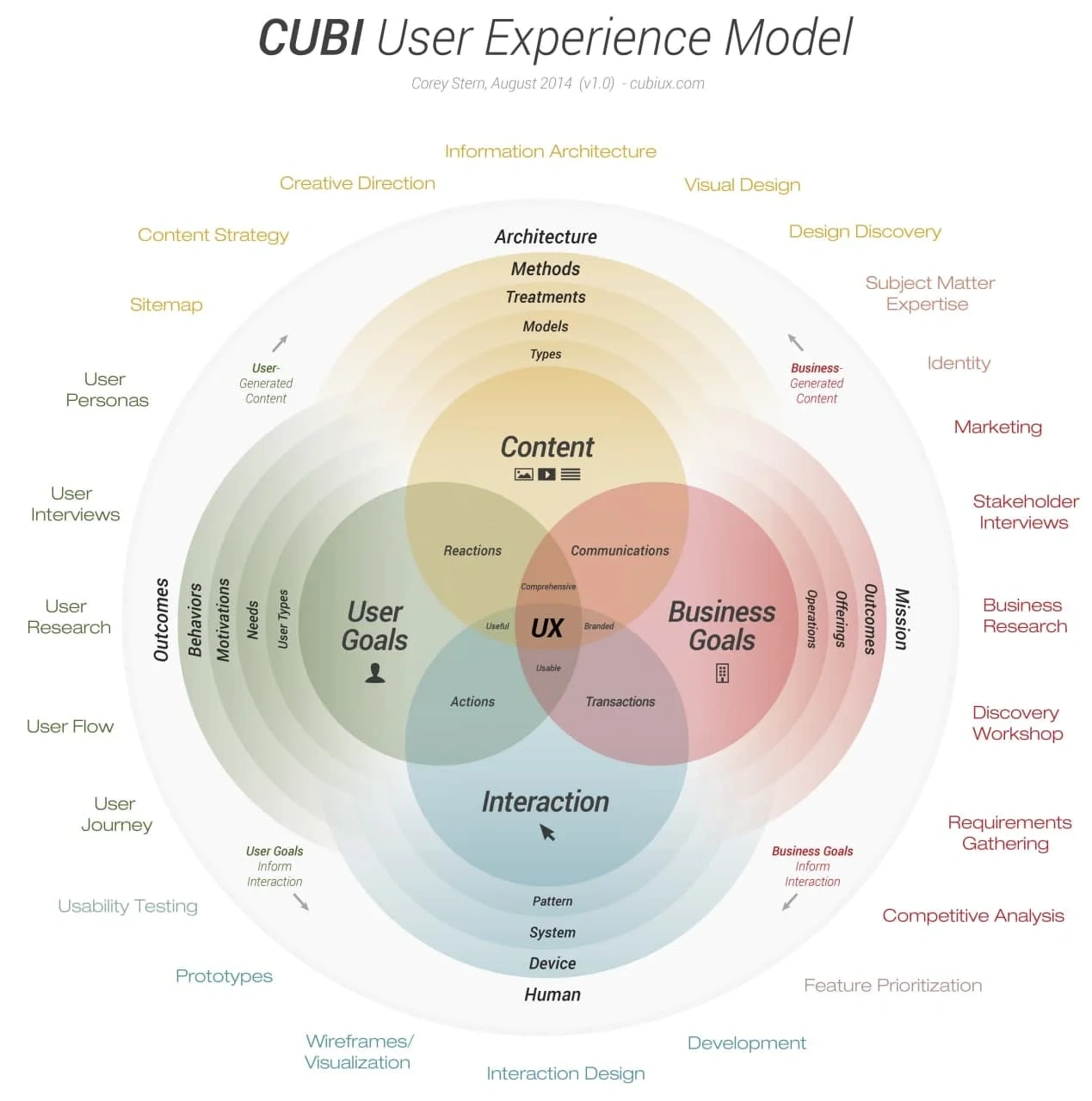
There are several valuable certifications available for UX (User Experience) design professionals. While the "best" certification may vary depending on your specific goals and professional context, here are some well-regarded certifications in the field:
-
Certified Professional in User Experience (CPUX): Offered by the International Usability and User Experience Qualification Board (UXQB), CPUX is an internationally recognized certification that validates a candidate's knowledge in usability and UX-related topics.
-
UX-PM Certification: The UX-PM certification, provided by UXalliance, focuses on the practical aspects of UX design project management. It covers topics such as user research, prototyping, and evaluation methods.
-
Certified User Experience Analyst (CXA): Offered by Human Factors International (HFI), the CXA certification evaluates a candidate's understanding of UX principles, research methods, and design best practices.
-
Interaction Design Foundation (IDF) Certification: IDF offers a range of self-paced online courses that culminate in certifications. Their courses cover various UX design topics, such as user research, interaction design, and information architecture.
-
Nielsen Norman Group (NN/g) UX Certification: NN/g, a renowned UX research and consulting firm, provides several certifications, including UX Master Certification and UX Specialist Certification. These certifications validate your knowledge and skills in UX research and design.
-
Certified Usability Analyst (CUA): Offered by Human Factors International (HFI), the CUA certification focuses on usability testing, evaluation techniques, and user-centered design principles.
Remember that while certifications can be valuable for enhancing your knowledge and credibility, they are not a substitute for practical experience and a strong portfolio. It's important to combine certifications with real-world projects and continuous learning to grow as a UX design professional.
Tools













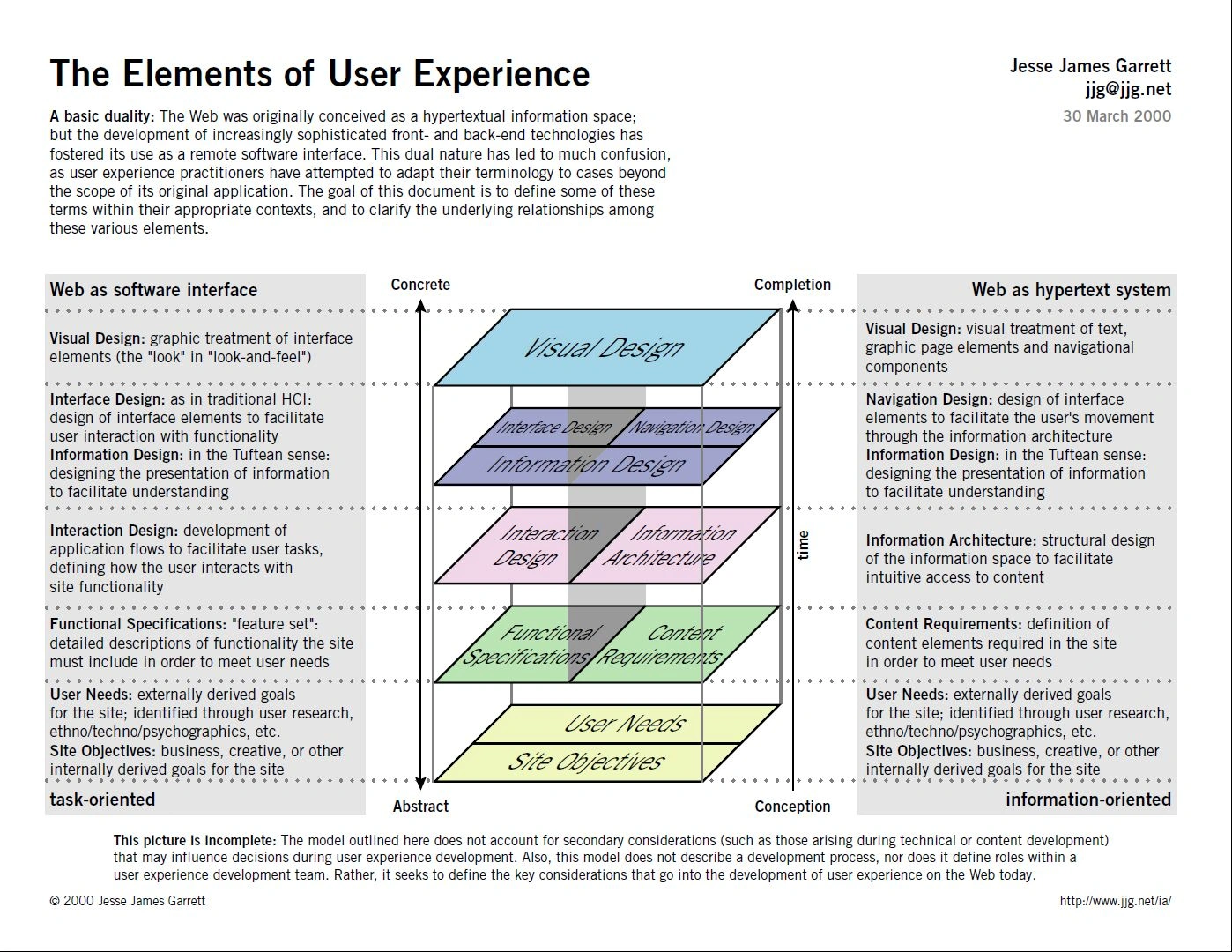
Information Architecture
Information architecture (IA) is a discipline that focuses on the organization, structure, and navigation of digital information to make it more accessible, usable, and understandable for users. IA is related to both design and marketing, but it is primarily concerned with the user experience and usability of digital products and services.
Design is closely related to IA because it involves the visual and interactive design of digital interfaces, which are often informed by the underlying IA. Good IA is essential for effective design because it provides a clear and organized structure for the content and functionality of digital products.
Marketing is also related to IA because it involves the communication of information to users in a way that is clear, concise, and persuasive. Good IA can help marketers effectively communicate their message by providing a clear and organized structure for the content and messaging of digital products.
Decomposition diagram: A decomposition diagram, also known as a site map or information architecture diagram, is a visual representation of the website or application's content and information hierarchy. It shows the relationships between different pages, sections, and content types, and how they are organized and linked together. A decomposition diagram can help designers ensure that the website or application is easy to navigate and that users can find the information they need quickly and easily.
Good guidelines page structure in a website
Organize content logically: Group related content together and create a clear hierarchy of information. Use headings and subheadings to organize content and make it easier to scan.
Use descriptive and concise labels: Use clear and concise labels for navigation menus and links. Avoid jargon and use terms that are familiar to your audience.
Keep it simple: Avoid clutter and keep the layout clean and simple. Use white space to separate content and make it easier to read.
Provide clear and consistent navigation: Use standard navigation conventions, such as a horizontal menu at the top of the page or a vertical menu on the left-hand side. Make sure navigation is consistent across all pages of the website.
Use visual cues: Use visual cues such as icons, colors, and typography to guide users through the website and highlight important information.
Consider the user's perspective: Think about the user's goals and needs when designing the page structure. Make sure the most important information is easy to find and accessible.
Use responsive design: Ensure that your website is designed to be responsive and work well on different devices, including desktops, tablets, and smartphones.
Design Thinking
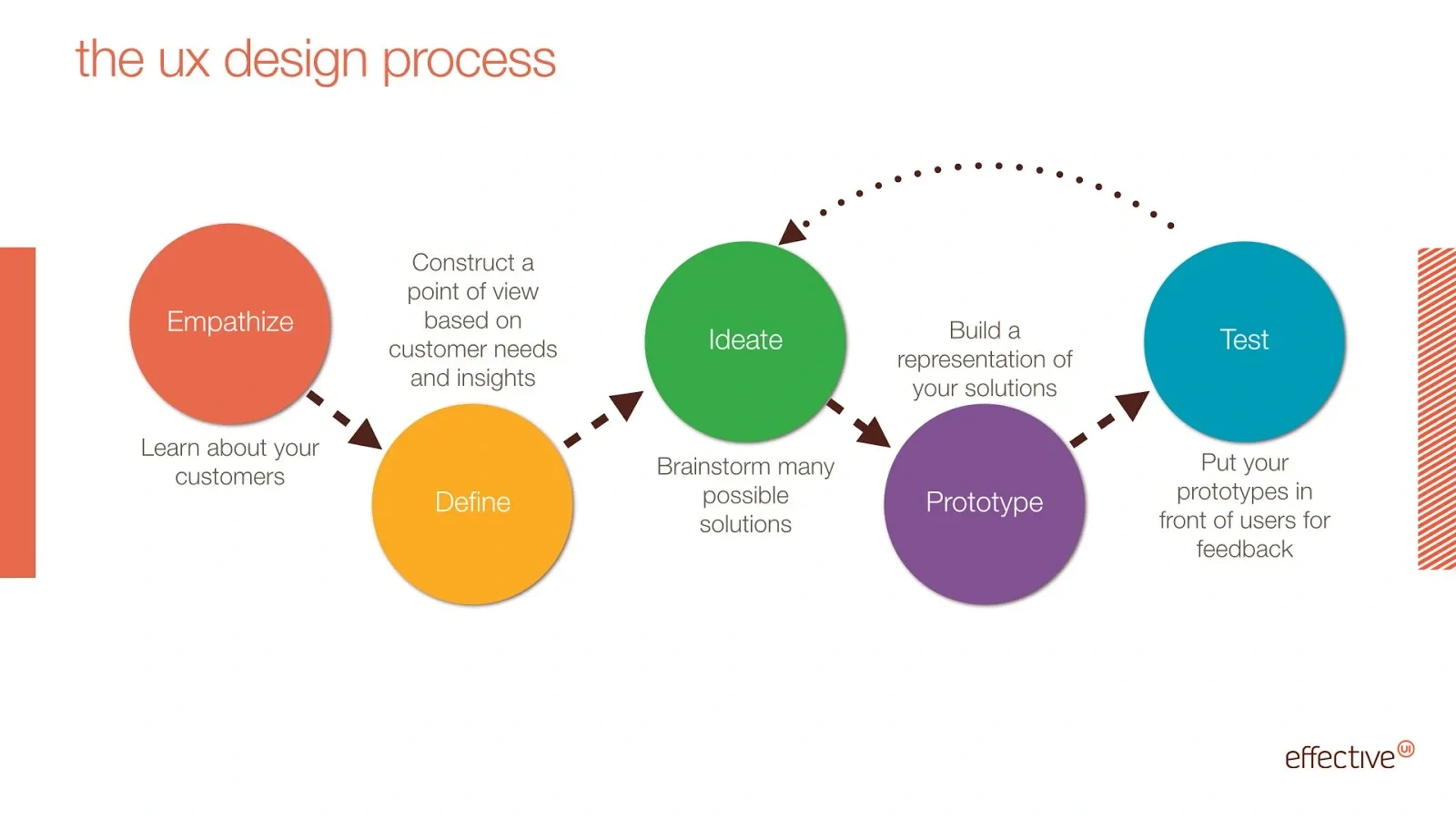
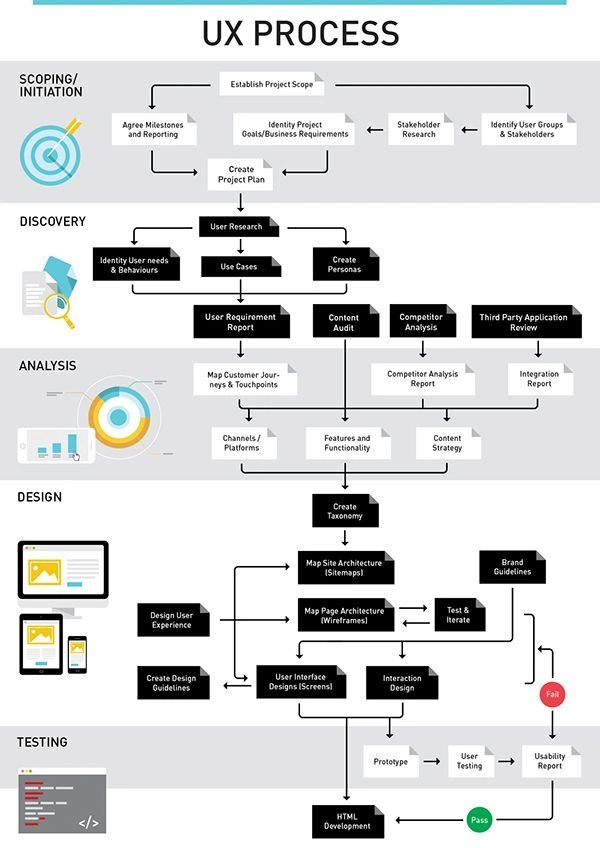
Design thinking is an iterative problem-solving approach that is widely used in user experience (UX) design. It involves using empathy, creativity, and experimentation to identify and solve user problems.
In UX design, design thinking typically involves the following five stages:
Empathize: This stage involves understanding the user's needs, goals, and pain points. It may involve conducting user research, such as surveys, interviews, and observation, to gain insights into the user's perspective.
Define: This stage involves synthesizing the insights gained from the empathy stage to define the problem that needs to be solved. This may involve creating user personas, user journey maps, and problem statements to guide the design process.
Ideate: This stage involves generating a wide range of ideas and potential solutions to the problem. This may involve brainstorming sessions, sketching, and other ideation techniques to generate a large number of ideas.
Prototype: This stage involves creating low-fidelity prototypes of the most promising ideas. This may involve creating wireframes, paper prototypes, or digital prototypes to test and refine the design.
Test: This stage involves testing the prototypes with users to gain feedback and insights. This may involve conducting user testing sessions, surveys, or other methods to gather feedback and refine the design.
Design thinking is often used in UX design because it places the user at the center of the design process. By understanding the user's needs and perspectives, designers can create solutions that are more effectiveand user-friendly. The iterative nature of design thinking also allows designers to quickly test and refine their designs based on user feedback, which can lead to better outcomes. Overall, design thinking is an effective approach to UX design that can help designers create solutions that meet the needs of users and solve complex problems.
UX design decision-making process
making informed and data-driven decisions that align with user needs, business objectives, and design principles. Here are the key steps in the UX design decision-making process:
Define the problem: The first step in the UX design decision-making process is to define the problem that needs to be solved. This may involve conducting user research, analyzing user feedback, and understanding business objectives.
Gather information: Gather information from various sources, including user research, market analysis, and stakeholder feedback. This information will help to inform the decision-making process and provide a broad perspective on the problem.
Analyze options: Analyze the various options and potential solutions to the problem. Consider the risks, costs, and benefits of each option, and determine which option best aligns with user needs, business objectives, and design principles.
Prioritize: Prioritize the options based on their impact on user needs, business objectives, and design principles. Consider the resources available, the timeline, and the overall feasibility of each option.
Collaborate: Collaborate with stakeholders, including designers, developers, and business leaders, to make informed and data-driven decisions. Consider different perspectives and opinions, and work together to find the best solution.
Test and iterate: Test the potential solutions with users and gather feedback to refine the design. Iterate the design based on the feedback and continue to test until the design meets user needs and aligns with business objectives.
Implement and evaluate: Implement the final design and evaluate its effectiveness. Monitor user engagement, conversion rates, and customer satisfaction to determine whether the design is meeting user needs and business objectives. Use this feedback to refine the design and make ongoing improvements.
The UX design decision-making process is an iterative process that involves gathering information, analyzing options, and collaborating with stakeholders to make informed decisions. By following this process, designers can create solutions that meet the needs of users and align with business objectives in an effective and user-friendly way.
DesignOps
DesignOps is a relatively new discipline that focuses on streamlining and optimizing design workflows and processes. The goal of DesignOps is to improve the efficiency and effectiveness of design teams, enabling them to deliver high-quality design work more quickly and consistently.
DesignOps often involves the use of tools and automation to standardize and streamline design processes. This can include the use of design systems, templates, and libraries to make it easier for designers to work consistently and efficiently. It can also involve the use of project management and collaboration tools to help design teams work together more effectively.
DesignOps is becoming increasingly important as design teams are asked to work faster and more collaboratively, often across different geographies and time zones. By optimizing design workflows and processes, DesignOps can help design teams work more efficiently, reducing errors and improving the overall quality of design work.
Some key areas of focus for DesignOps include:
Collaboration: DesignOps focuses on improving collaboration between designers, developers, and other stakeholders involved in the design process.
Standardization: DesignOps aims to standardize design processes and workflows, reducing errors and ensuring consistency in design work.
Automation: DesignOps involves the use of tools and automation to streamline design processes and make them more efficient.
Scaling: DesignOps helps design teams scale their work to meet the needs of larger and more complex projects.
Overall, DesignOps is a discipline that helps design teams work more effectively and efficiently, delivering high-quality design work that meets the needs of stakeholders and users.
https://simpleprogrammer.com/figma-ui-ux-engineering/design/
An ecosystem map is a visual representation of the different phases and components involved in a UX project. While the specific phases may vary depending on the project and the organization, here are some common phases that may be included in a UX ecosystem map:
Discovery: This phase is focused on gathering information about the users, the business goals, and the context of the project. It may involve conducting user research, competitive analysis, and stakeholder interviews.
Analysis and synthesis: In this phase, the information gathered in the discovery phase is analyzed and synthesized to identify patterns, insights, and opportunities. This phase may involve creating personas, user journeys, and other design artifacts to help understand the user's needs and goals.
Ideation: During the ideation phase, designers generate a wide range of ideas and concepts for the project. This may involve brainstorming sessions, design sprints, and other ideation activities to generate and refine design solutions.
Prototyping: In this phase, designers create low-fidelity and high-fidelity prototypes of the design concepts to test with users. This may involve creating wireframes, mockups, and interactive prototypes to test the usability and functionality of the designs.
User testing: During the user testing phase, designers test the prototypes with real users to gather feedback and insights on the usability and effectiveness of the designs. This information is used to refine the designs and improve the user experience.
Implementation: In the implementation phase, the designs are developedand built into a functional product or service. This phase may involve working closely with developers, engineers, and other stakeholders to ensure that the designs are implemented correctly and meet the user's needs.
Launch: During the launch phase, the product or service is released to the public. This phase may involve marketing and communication efforts to promote the product or service and drive user adoption.
Evaluation and iteration: After the product or service is launched, designers continue to monitor and evaluate its performance and user feedback. This information is used to identify areas for improvement and to iterate on the design to improve the user experience over time.
Overall, an ecosystem map can help designers and stakeholders understand the different phases and components involved in a UX project and how they relate to each other. It can also help to ensure that all aspects of the project are considered and accounted for, resulting in a more effective and user-friendly product or service.
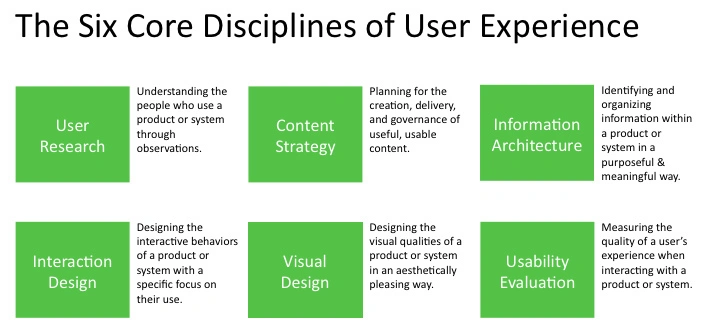
UX Principles
- ditch the unneccesary
- conder context
- Keep it consistent
- Obssess over inclusivity
- Be Real
Jakob Nielson's 10 usability heurisitics
- Give clear status info
- users should always know where they are
- you're in a large flow, where do they want to be?
- is there anything like a down server preventing them from doing what they want to do
- don't be contrived (be like the real world)
- stove knobs are in the same layout means you're less likely to burn yourself
- borrow from universal patterns from elsewhere in the environment or nature
- avoid jargon unless you're sure even a new user will understand it
- using icons when words will do, or vice versa
- Offer an escape hatch
- undo, redo
- users think hard about whether it'll be hard to back out of a process, instead offer them an escape hatch so they feel empowered
- Be consistent
- users should not have to deal with things that look, feel, behave differently depending on the environment they're in
- Make it hard to make mistakes
- users shouldn't have to worry about deleting something forever or think too hard about whether a button does what they think it will.
- making it easy to undo a mistake
- enable recognition over remembering
- users shouldn't have to remember where anything is or how it works
- if you have good IA
- consistent visual/structural cues or in-context help
- be efficient but also flexible
- give good easy default patterns
- also allow for power users (keyboard shortcuts and other "accelerators" for power users)
- don't get unneccesarily fancy
- make errors understandable
- offer help in context
Adjectives: dense, tactile, depth
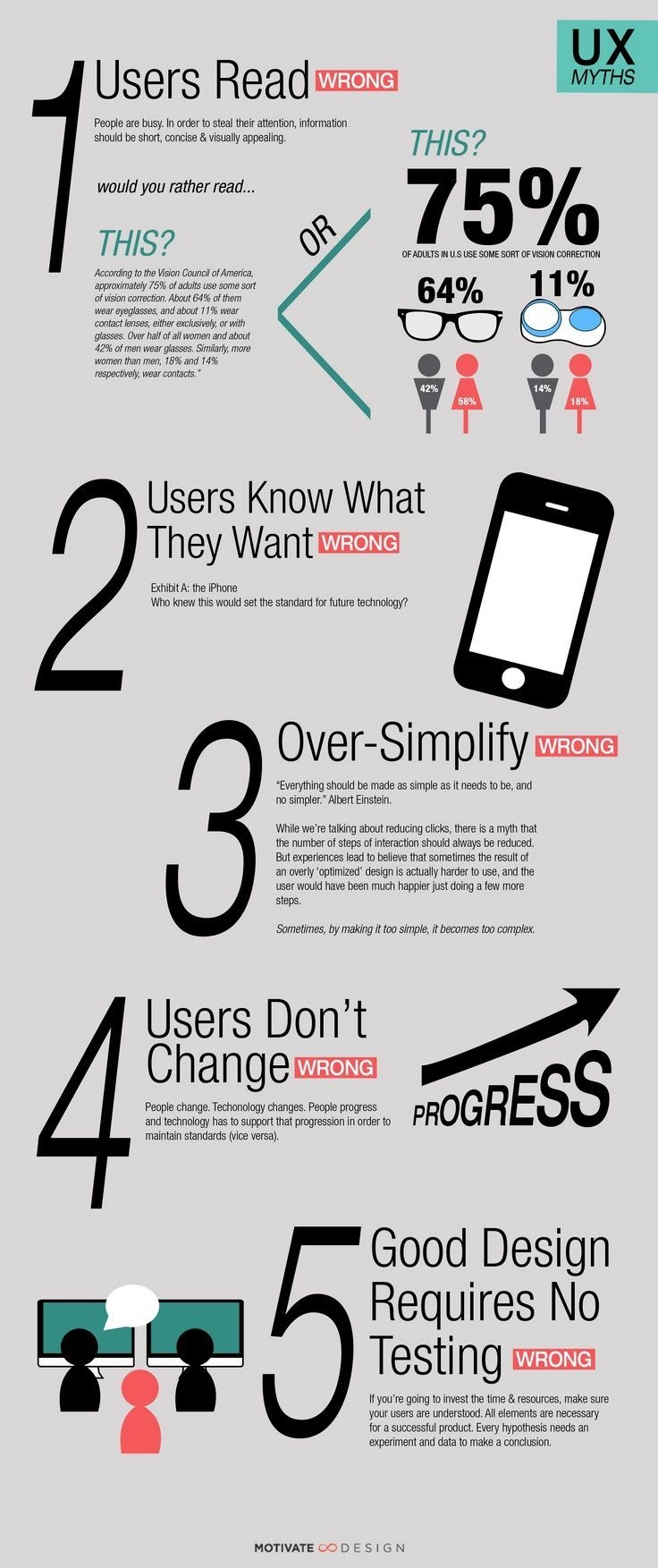
https://www.gestaltcoachingworks.com/relevant-gestalt-wisdom/
C.R.A.P
- Contrast
- Alignment
- Repetition
- Proximity
Options
More options you offer, more confusion comes up.
Cognitive Load
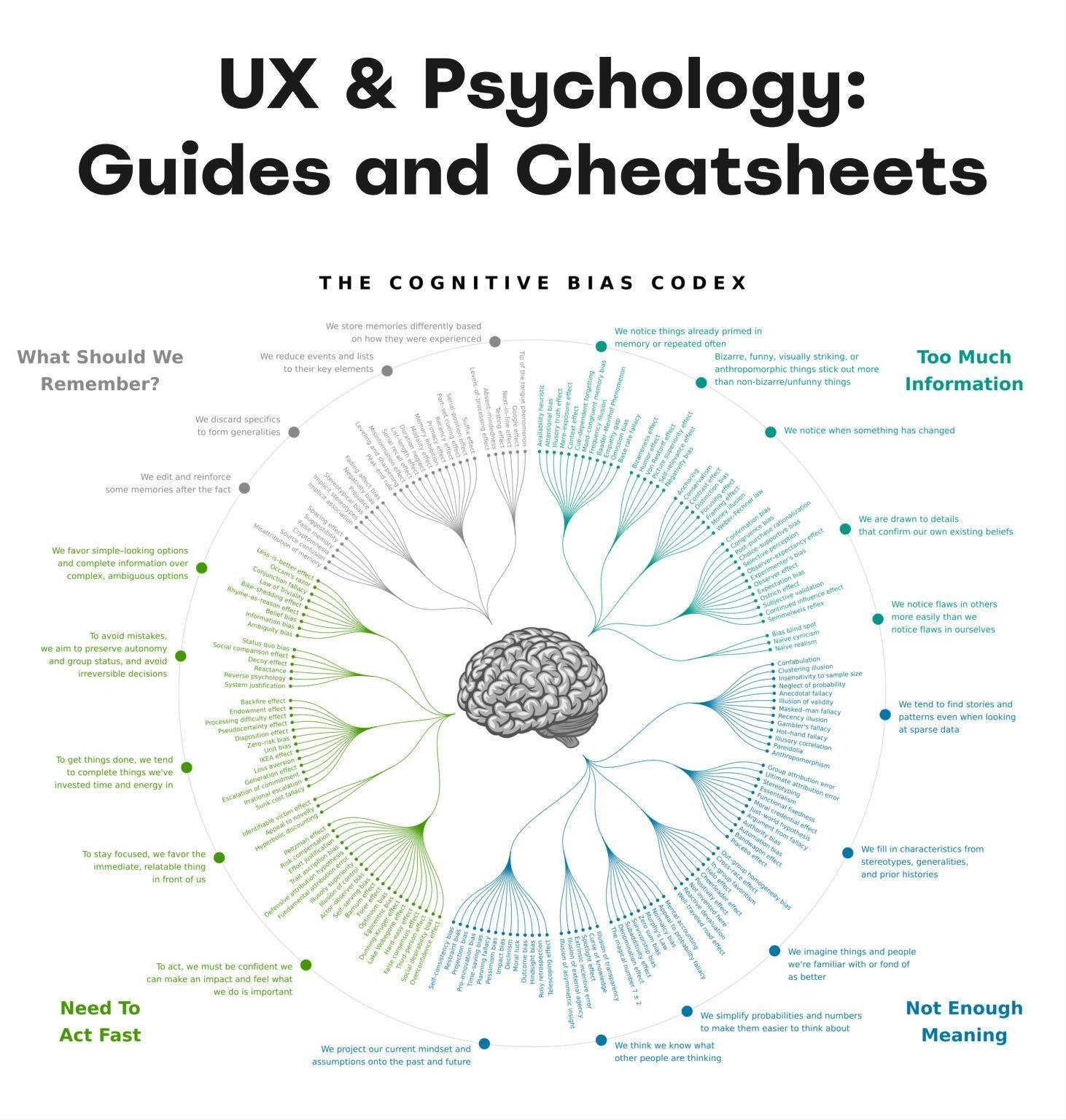
The mental effort required to learn how to use your app, affects how easily users find content and complete tasks.
Minimizing Cognitive Load
- Avoid visual clutter: redundant links, irrelevant images, and meaningless typography
- Eliminate Decision Making: Look for anything in your design that requires users to read text, remember information, or make a decision. Then look for alternatives: can you show a picture, re-display previously entered information, or set a smart default
Sizing tap targets
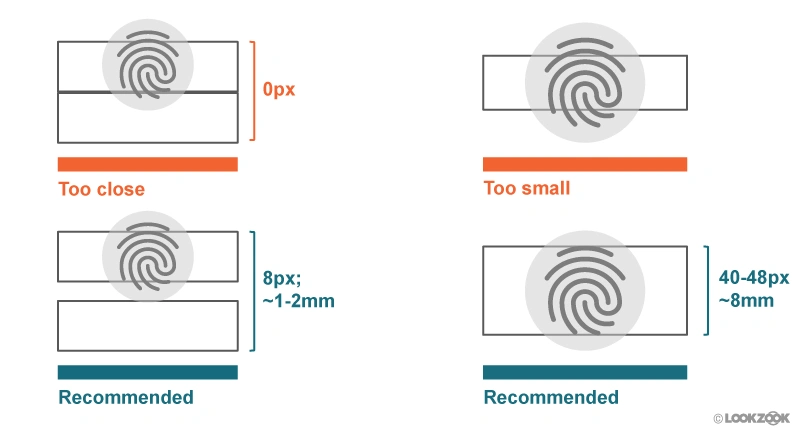
"Visual Contrast Sensitivity" and "Refractive Errors"
UX Tutorials
https://uigarage.net/ https://www.pttrns.com/ https://www.uxtoast.com/ https://ui-patterns.com/
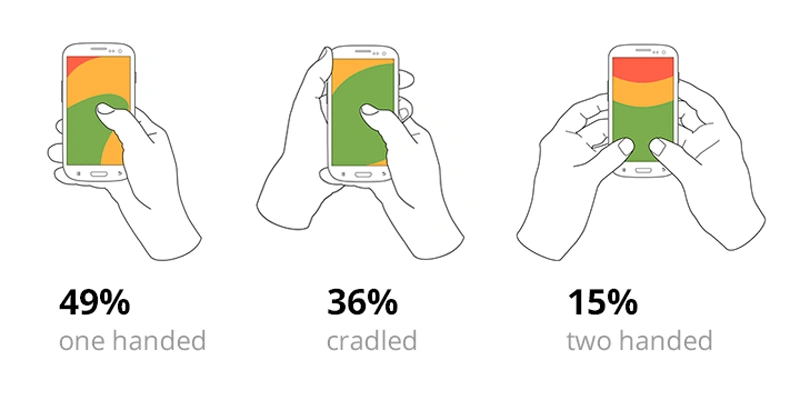
So when you’re designing your next article or product page, consider what you’re asking your users to do. Are you asking them to make a real decision and go someplace else? Or are you asking them to just scroll a little further to see what’s next? Cognitively, it’s easier to move a little where you are than to go somewhere else.

Problem Definition Problem Framing is a strategy and alignment workshop involving a team of key decision-makers, typically executive level. Problem Framing is a preliminary step that we have created to ensure effective outcomes from a Design Sprint.
We designed this strategy workshop as a response to facilitating Design Sprints where our clients did not know what the problem was, or if it even existed. Or alternatively, the problems we were tackling were too broad to allow a practical solution or too narrow to be worth the investment.
Search Many users skip the navigation menu altogether and rely on search/faceted search to drill down further. Faceted search can get complicated quick. From a development and cost perspective, but also a user perspective.
- Use faceted search when there are over 20 products within a category.
- Filter by price, color, size are basic faceted search options.
Navigation
Prioritize navigation options. Assign different priority levels (high, medium, low) to common user tasks. Give prominence in the UI to paths and destinations with high priority levels and frequent use. Use those paths to define your navigation.
Checkout UX
- Show total price and number of items in cart
- Friction is created when when people have to stop and think. Friction slows buyers down.
https://baymard.com/blog/current-state-of-checkout-ux?ref=mobbin
UX Design Strategy
- User Personas
- prioritize user tasks by importance
- content strategy
- usability test
User personas: User personas are fictional representations of the different types of users that will be using the website. They help define the needs, goals, and behaviors of the target audience and inform the content strategy.
User journey: The user journey is the path that a user takes to complete a task on the website. Understanding the user journey helps UX designers identify the information and content needed at each stage of the process.
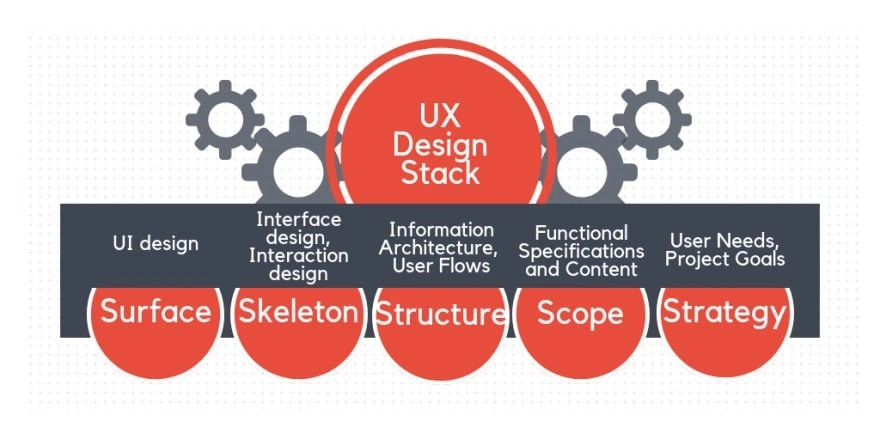
Information architecture: The information architecture is the structure of the website's content. It defines how the content is organized and presented to users, including the use of categories, tags, and navigation.
Content types: The types of content that will be used on the website must be defined, including text, images, videos, and interactive elements.
Content management system: The content management system (CMS) is the software platform used to create, edit, and publish content on the website. The CMS must be selected and configured to support the website's content strategy.
Content creation and maintenance process: The process for creating and maintaining website content must be defined, including roles and responsibilities, workflows, and editorial processes.
DO's and DON'Ts
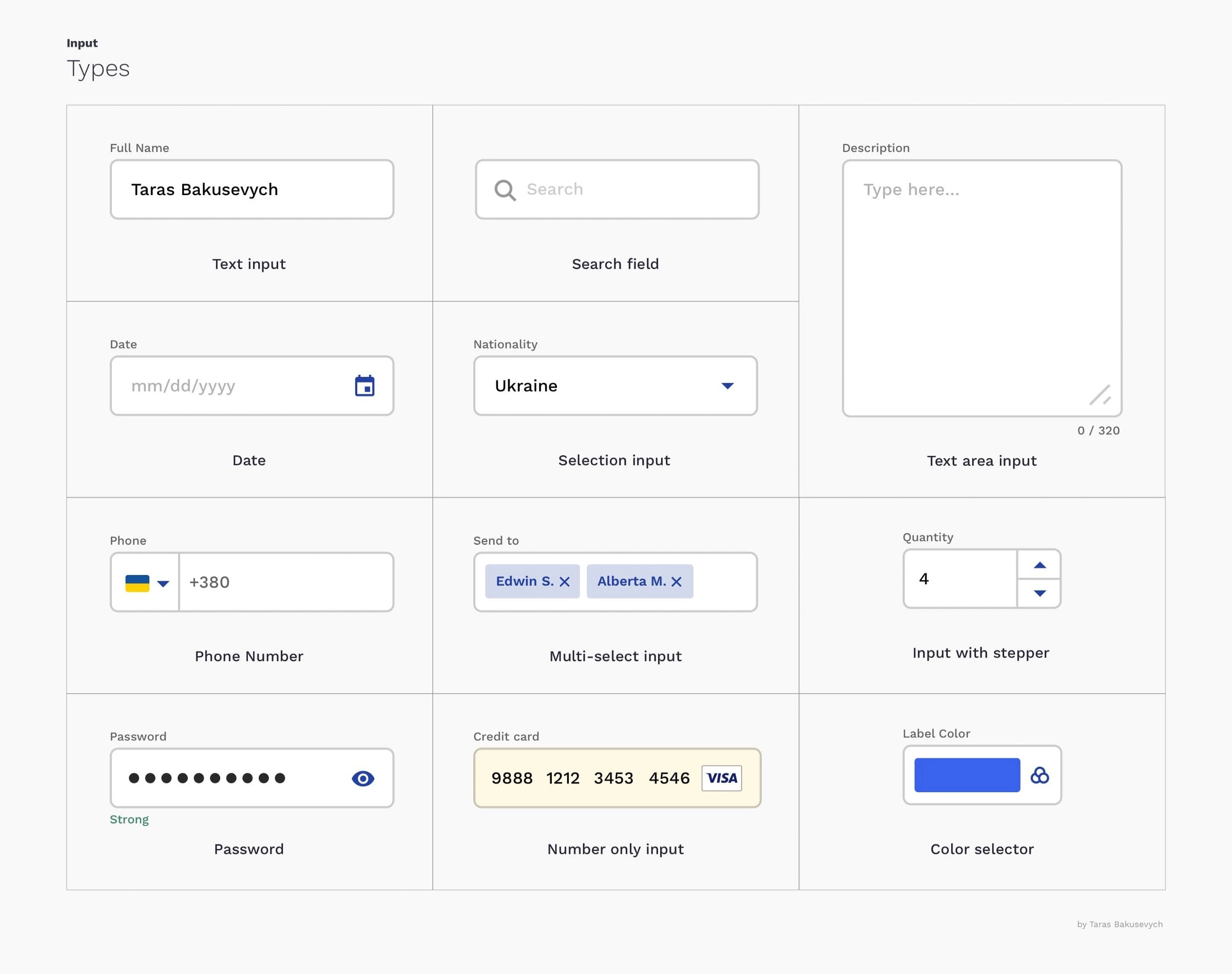
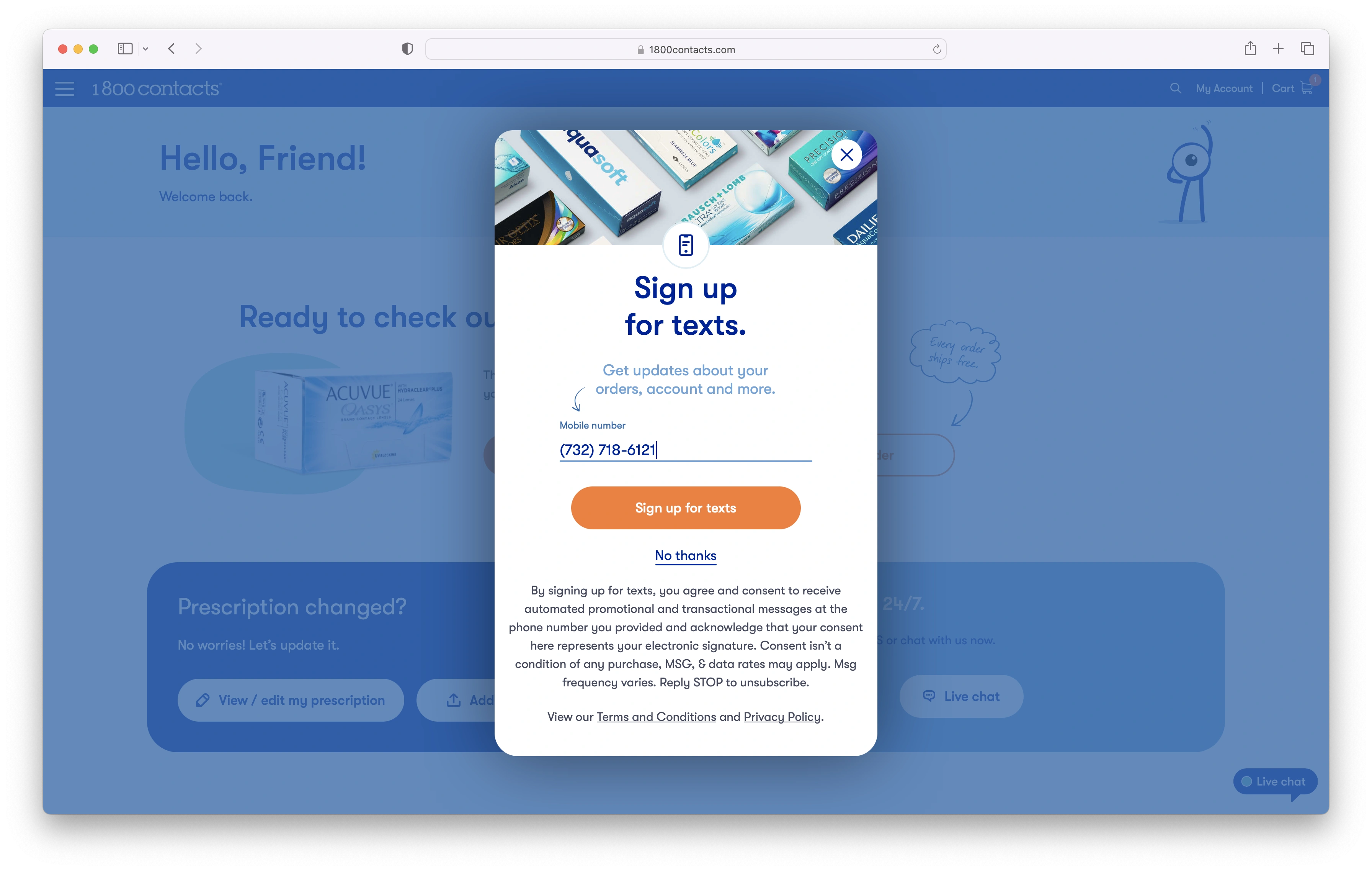
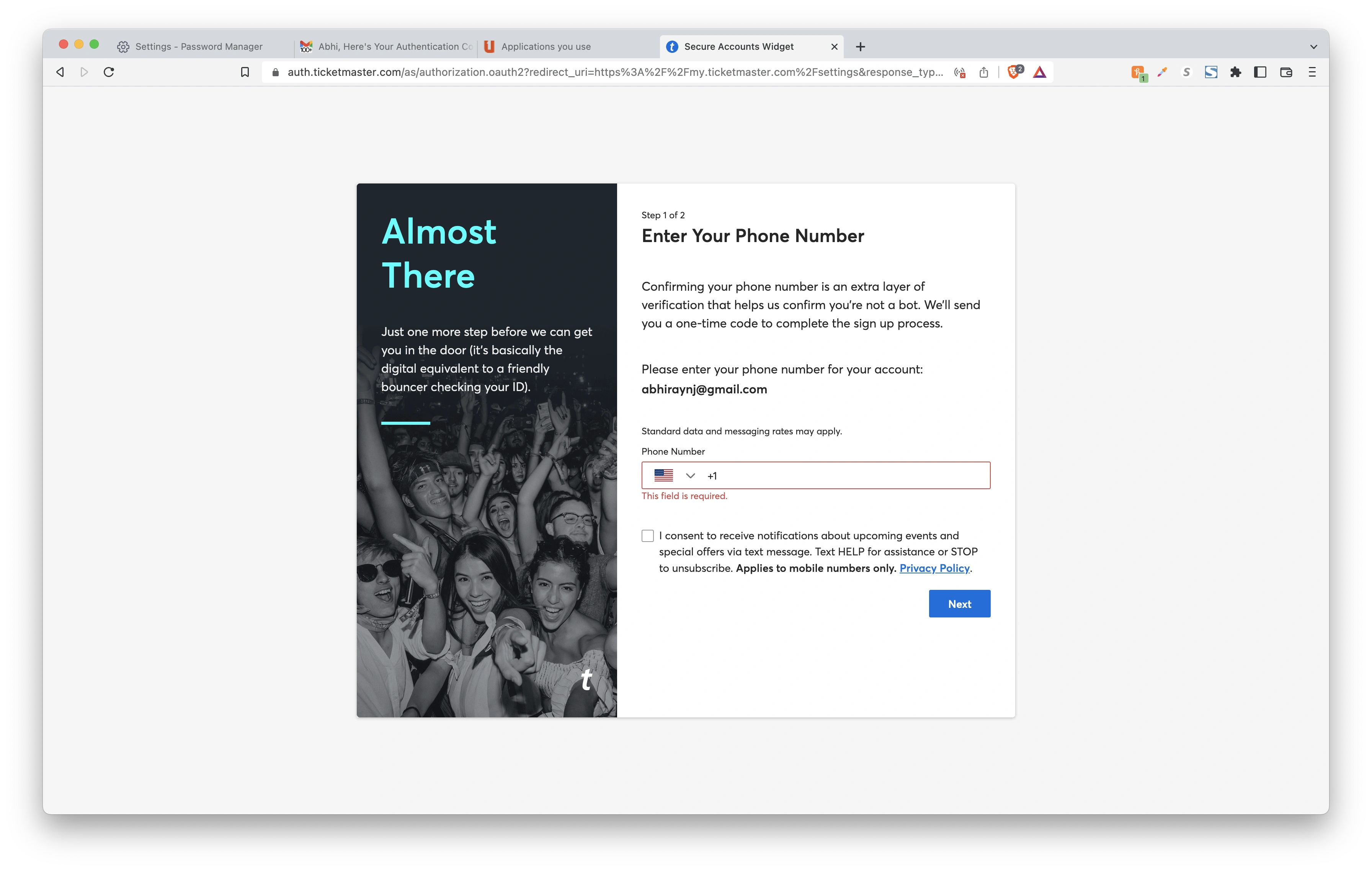
https://uxdesign.cc/text-fields-forms-design-ui-components-series-2b32b2beebd0
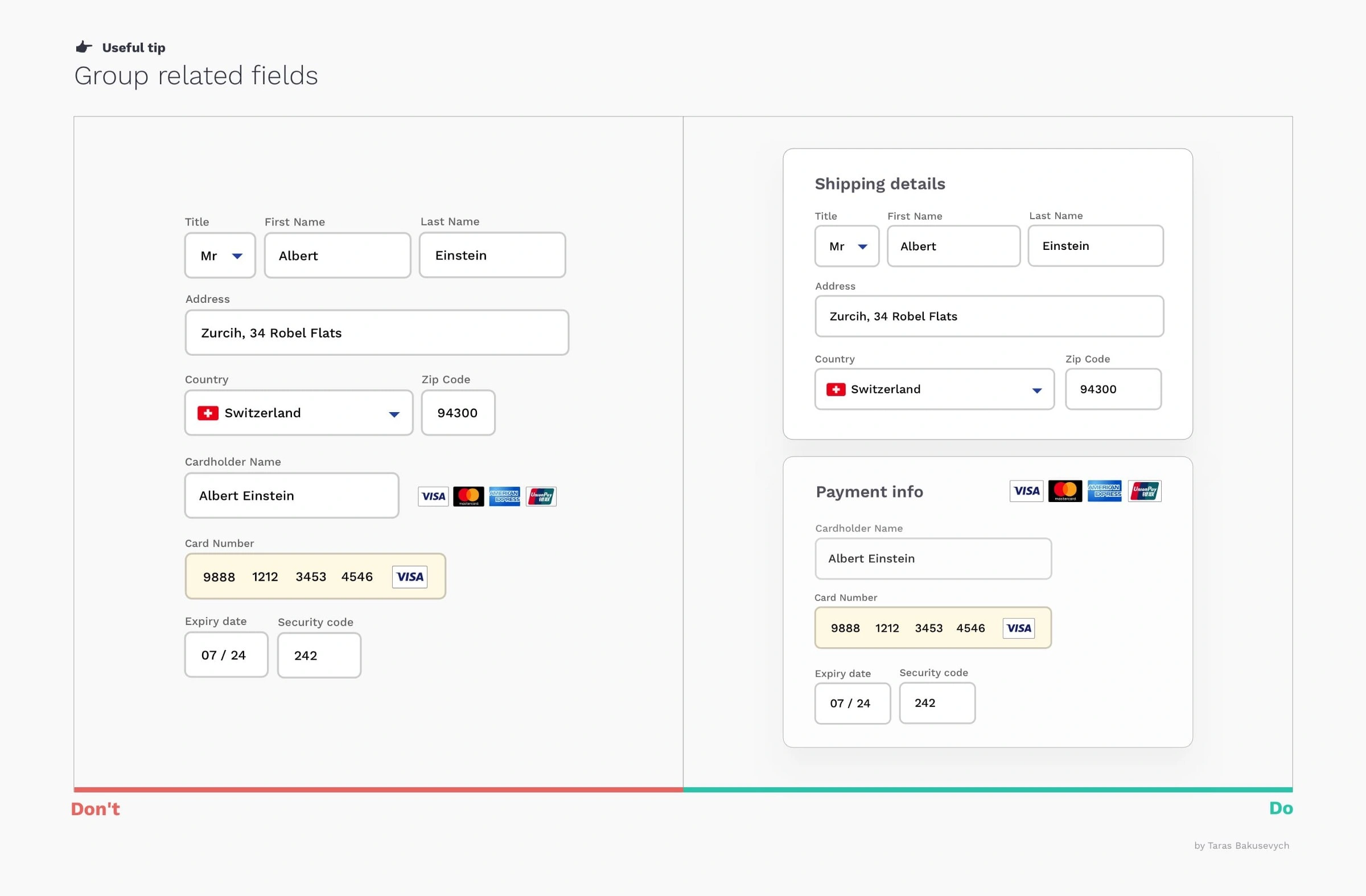
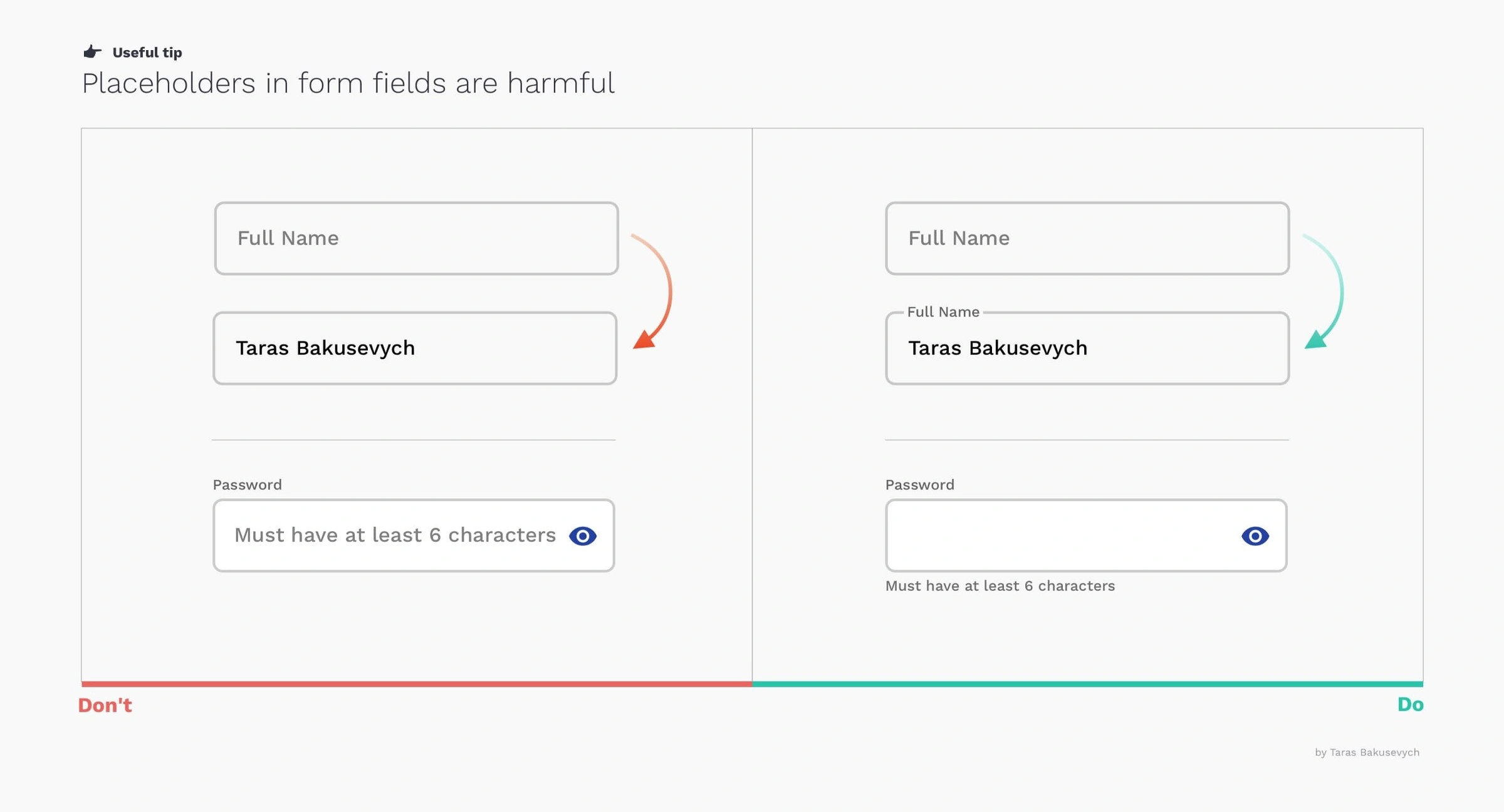
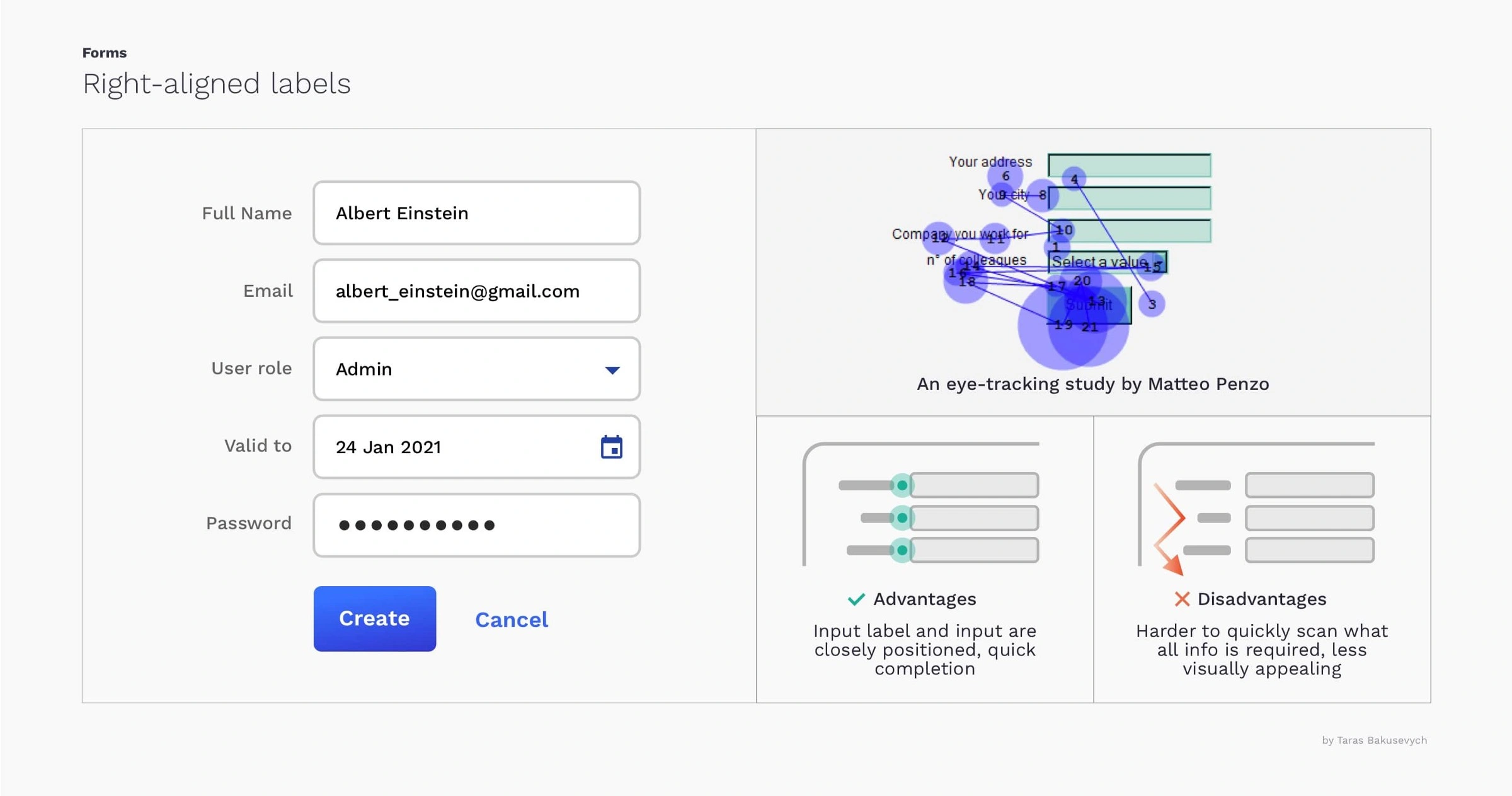
Design Comps
Software design comps, short for "design compositions," are visual representations of a software design concept that illustrate how the user interface will look and function. They are usually created in the early stages of software design to help stakeholders visualize the proposed design and provide feedback.
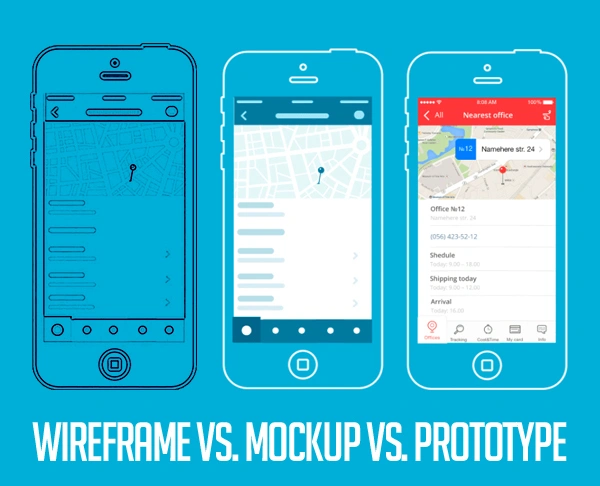
Software design comps may include sketches, wireframes, mockups, or high-fidelity prototypes, depending on the level of detail required. They typically include the layout of user interface elements, such as buttons, text fields, and images, as well as any other design elements that are critical to the overall look and feel of the design.
Design comps can be created using various tools, including graphic design software, prototyping tools, and specialized design software. They can be created by designers, UX/UI designers, or other members of the development team, depending on the skills and expertise required.
The purpose of design comps is to provide stakeholders with a clear visual representation of the proposed software design. This allows stakeholders to better understand the design concept and provide feedback on its functionality, usability, and overall effectiveness. Design comps can also be used to communicate the design concept to developers, who can use them as a basis for development.
Overall, software design comps are an essential tool in the software design process, helping to ensure that the final product meets the needs of stakeholders and provides an optimal user experience.
Accessibility
Avoid flashing or rapidly changing visuals: Some people with epilepsy or seizure disorders are sensitive to flashing or rapidly changing visuals. To accommodate these users, avoid using bright, flashing, or rapidly changing visuals in your design. If you must use such visuals, make sure they are not too bright, and limit their duration.
Provide alternative content: Providing alternative content, such as transcripts for videos and alternative text for images, can help users with seizure disorders access your content without triggering seizures. This also benefits users who may have other accessibility needs or preferences.
UI Best Practices
- relative font sizing
- audio alternatives to text content
Fluent UX principles refer to a set of design principles and guidelines developed by Microsoft to create user interfaces that are visually appealing, intuitive, and consistent across different devices and platforms. Fluent Design System, formerly known as "Metro," is the design language used by Microsoft for its software products, including Windows, Office, and various applications.
The Fluent UX principles aim to provide a seamless and immersive user experience by focusing on the following key aspects:
1. Light, Depth, and Motion: Fluent Design incorporates light, depth, and motion to create a sense of hierarchy and spatial relationships. It uses light and shadow effects, layered elements, and animations to guide users' attention and provide visual cues.
2. Material: Fluent Design emphasizes the use of materials and textures to convey a tangible and tactile feel. The use of materials helps users understand the behavior and interaction of different elements within the interface.
3. Scale: Fluent Design advocates for scalable interfaces that can adapt to different screen sizes and form factors. It ensures that the user interface elements are legible, accessible, and appropriately sized on various devices, including desktops, tablets, and smartphones.
4. Typography: Fluent Design emphasizes clear and readable typography. It encourages the use of font styles that are easy to read across different screen sizes and distances. Typography is also used to establish visual hierarchy and emphasize important information.
5. Motion: Fluent Design incorporates subtle and purposeful animations to enhance the user experience. Motion is used to provide feedback, transitions between screens, and convey a sense of continuity and fluidity.
6. Content-focused: Fluent Design puts content at the center of the user experience. It aims to minimize distractions and clutter, allowing users to focus on the task at hand. It emphasizes content-first design, ensuring that the interface supports the user's goals and objectives.
7. Consistency: Fluent Design promotes consistency across different applications and platforms. It provides a set of design patterns, controls, and guidelines to ensure a familiar and predictable user experience. Consistency helps users quickly learn and navigate through different interfaces.
By following these principles, designers can create interfaces that are visually appealing, engaging, and intuitive for users across a wide range of devices and platforms.
usability evaluation / Expert Review
Define the goals and objectives: Define the goals and objectives of the evaluation, such as identifying usability issues, improving user satisfaction, or reducing user errors.
Choose the evaluation method: Choose the appropriate evaluation method based on your goals and budget. Common methods include heuristic evaluation, cognitive walkthrough, user testing, and expert review.
Recruit participants: Recruit participants who represent your target audience. Depending on the evaluation method, you may need to recruit users, experts, or both.
Develop evaluation tasks and scenarios: Develop evaluation tasks and scenarios that are relevant to your goals and objectives. Tasks should be realistic and representative of the the user's goals and needs.
Conduct the evaluation: Conduct the evaluation with the participants and collect data on their performance and feedback. Depending on the evaluation method, you may use different techniques for data collection, such as observation, surveys, or interviews.
Analyze the data: Analyze the data collected from the evaluation to identify usability issues, strengths, and areas for improvement. Look for patterns and trends in the data to identify common issues.
Prioritize and report the findings: Prioritize the findings based on their severity and impact on the user experience. Report the findings to the stakeholders and provide recommendations for improvement.
Follow-up and iterate: Follow up on the findings and recommendations and iterate on the design to improve the user experience. Repeat the evaluation processas needed to ensure continuous improvement.
cognitive walkthrough
The purpose of performing a cognitive walkthrough in a UI application is to evaluate the usability of the application from the perspective of the user. A cognitive walkthrough is a type of usability evaluation that involves simulating a user's thought processes as they interact with the application to achieve a specific goal.
During a cognitive walkthrough, evaluators assume the role of the user and step through the application, attempting to complete a task or achieve a goal. They consider each step in the process and evaluate how easy or difficult it is to complete the task, based on their knowledge and assumptions of the user's mental model.
The goals of a cognitive walkthrough are to identify and evaluate potential usability issues in the application, including:
Navigation and flow: Whether the user can easily find and follow the path to complete the task.
Understanding and feedback: Whether the user can understand the information presented in the interface and receive appropriate feedback about their actions.
Cognitive load: Whether the user is presented with too much information or too many choices, making the task more difficult to complete.
Error prevention and recovery: Whether the user is able to avoid errors and recover from them if they occur.
By identifying and evaluating these potential usability issues, designers and developers can make changes to improve the user experience and make the application more intuitive and easy to use. Overall, a cognitive walkthrough is an effective method for evaluating the usability of a UI application and ensuring that it meets the needs and expectations of the user.
user-centered design
User research: This involves gathering information about the users, their needs, their behaviors, and their preferences. User research methods can include surveys, interviews, observations, and usability testing.
Personas: Personas are fictional representations of the target user group that are based on the information gathered through user research. Personas help designers to understand the users' goals, motivations, and frustrations.
User stories: User stories are short narratives that describe a user's interaction with a product or service. They help designers to understand the user's context and identify pain points in the user's journey.
Prototype testing: This involves creating prototypes of the product or service and testing them with users to gather feedback and identify areas for improvement. Prototyping methods can include low-fidelity sketches, wireframes, and high-fidelity interactive prototypes.
Usability testing: Usability testing involves testing the product or service with real users to identify any usability issues or problems. This can be done through observation and user feedback.
Iterative design: Iterative design involves making continuous improvements tothe design based on feedback from users. This process involves multiple cycles of designing, testing, and refining the product until it meets the needs of the users.
Information architecture: Information architecture involves organizing and structuring information in a way that makes it easy for users to find what they need. This can include creating site maps, navigation menus, and labeling systems.
User interface design: User interface (UI) design focuses on designing the interface of the product or service to make it user-friendly, visually appealing, and easy to use. This can include designing the layout, typography, color scheme, and other visual elements.
Overall, user-centered design activities help designers to create products or services that are tailored to the needs and preferences of the users. By involving users in the design process and continuously gathering feedback, designers can create products that are more intuitive, user-friendly, and effective.
Task analysis
Task analysis is a research method used in UX design to understand how users complete a specific task or set of tasks. The goal of task analysis is to break down a complex task into smaller, more manageable steps, and to identify the goals, actions, and decision points involved in each step.
Task analysis can be conducted through a variety of methods, including:
Observational research: Observing users as they complete a task can provide insight into how they approach the task, what steps they take, and where they encounter difficulties.
Interviews: Conducting interviews with users can provide insight into their thought processes and decision-making as they complete a task.
Surveys: Surveys can be used to gather quantitative data on how users approach a task, such as the amount of time it takes to complete each step.
Cognitive walkthroughs: Cognitive walkthroughs involve imagining how a user might complete a task and identifying potential points of confusion or difficulty.
Once the task has been broken down into smaller steps, the results of the task analysis can be used to inform the design of the user interface, to ensure that it supports the user's goals and needs throughout the task. For example, the design might include clear and concise instructions, visual cues to guide the user through the task, and feedback to confirm that each step has been completed successfully.
Task analysis is a useful tool for designing user interfaces that are intuitive, efficient, and effective. By understanding and addressing the needs and goals of users asthey complete a task, designers can create interfaces that are tailored to their needs, resulting in a better user experience.
User Experience Research
In the UX (User Experience) field, UXR stands for User Experience Research. UXR is the process of studying users' behaviors, needs, and attitudes through various research methodologies in order to design and improve products or services that meet their needs and expectations. User Experience Research helps UX designers and developers understand users' pain points, motivations, goals, and preferences, which inform the design of user-centric solutions. Some common UXR methods include user interviews, usability testing, surveys, and analytics. User Experience Research is a crucial part of the UX design process as it helps ensure that products and services are designed with users in mind and meet their needs and expectations.
the importance of conducting user-centered research when redesigning a website
The author emphasizes that what worked for a website in the past may no longer be effective in the present, and outlines a research process that can help guide the redesign. Here are the key points covered in the article:
Strategy: The article emphasizes the need for a well-defined strategy for the website redesign. It suggests identifying high-level internal goals beyond just updating the look and feel of the site, such as improving subscription and revenue systems, attracting more traffic, or enhancing the experience for existing audiences.
Search query research: Conducting in-depth research on how people are searching for the website and identifying related entities that search engines recognize as relevant to the business. Tools like Google Ads' keyword planner can be used to gather insights.
User survey: Carrying out a survey to gather feedback from active users and understand their needs and behaviors. Tools like Typeform can be utilized for this purpose.
Performance analysis: Analyzing past performance data to identify what content has resonated with audiences, which pages perform well in organic search or from direct sources, and what content is not working.
Social listening: Monitoring social media platforms and forums to understand how people discuss topics related to the business and identify opportunities for improvement. Tools like Buzzsumo, Brand 24, and RivalIQ can assist in this process.
Competitive research: Examining how competitors appear in search results and on social media, and understanding their optimization strategies and successful practices.
In-depth stakeholder interviews: Engaging with various stakeholders, including sales and marketing teams, technical collaborators, and content production or editorial staff, to gather their input and understand their requirements.
Technical requirements: Assessing the current technical setup of the website, including the database, audience data storage, content management system integration with email and social media, site speed, server setup, and security. This information will be included in the brief or request for proposal (RFP) documents for developers.
By following this research process, the article suggests that a website can be built to last several years, generate revenue from its content, save money on advertising, and cultivate a loyal audience. The insights gained from the research process can inform the website's design and content development strategy and reduce the need for frequent redesigns.
UX Governance
UX governance is the process of establishing and maintaining the standards, policies, and procedures that guide the design and development of user experiences within an organization. UX governance ensures that all products and services are designed with a consistent and coherent user experience that meets the needs of the target audience and aligns with the company's brand and business goals.
The goals of UX governance include:
Ensuring consistency: UX governance establishes standards and guidelines for the design of user experiences across all products and services. This ensures a consistent and coherent user experience that reflects the company's brand and values.
Improving usability: UX governance promotes user-centered design principles that prioritize the needs and goals of the target audience. This results in products and services that are easy to use, intuitive, and meet the needs of the target audience.
Reducing risk: UX governance establishes policies and procedures for user research, usability testing, and other UX activities that reduce the risk of product failure or negative user experiences.
Supporting innovation: UX governance encourages experimentation and innovation within a framework that ensures the user experience is consistent and aligned with the company's brand and business goals.
Some of the key components of UX governance include:
Design standards and guidelines: These define the visual and interaction design principles that guide the design of user experiences across all products and services.
User research and testing procedures: These establish the methods and processes for conducting user research and testing to ensure that user needs and goals are integrated into the design process.
Design review processes: These provide a mechanism for reviewing and approving design decisions to ensure that they align with the company's brand and business goals.
Training and education programs: These provide training and education to designers, developers, and other stakeholders on the principles and practices of user-centered design.
Metrics and analytics: These establish the metrics and analytics that are used to measure the success of UX efforts and to identify areas for improvement.
Overall, UX governance is a critical component of ensuring that user experiences are consistent, usable, and aligned with the company's brand and business goals. By establishing standards, policies, and procedures for UX design and development, organizations can create products and services that meet the needs of their target audience and drive business success.
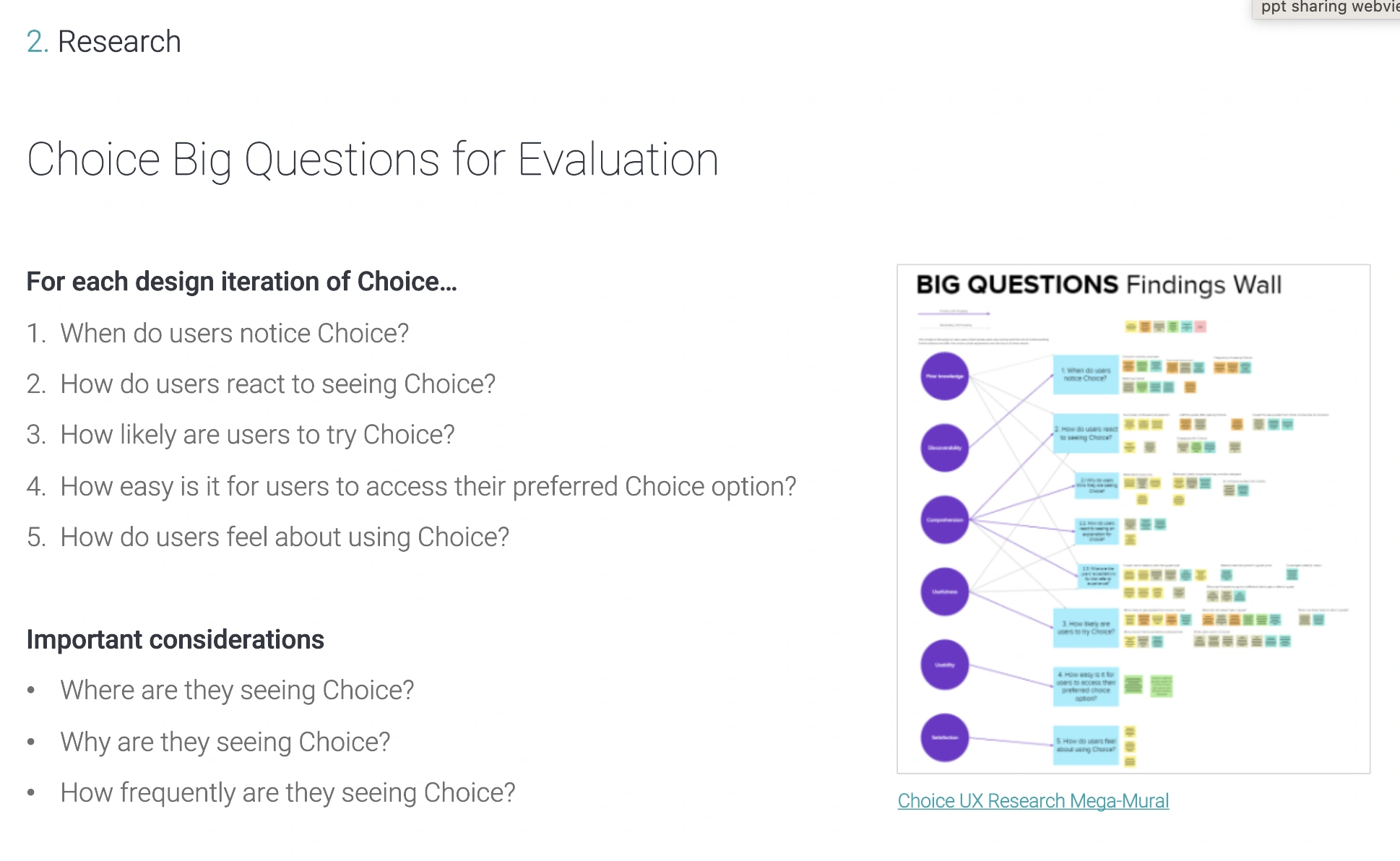
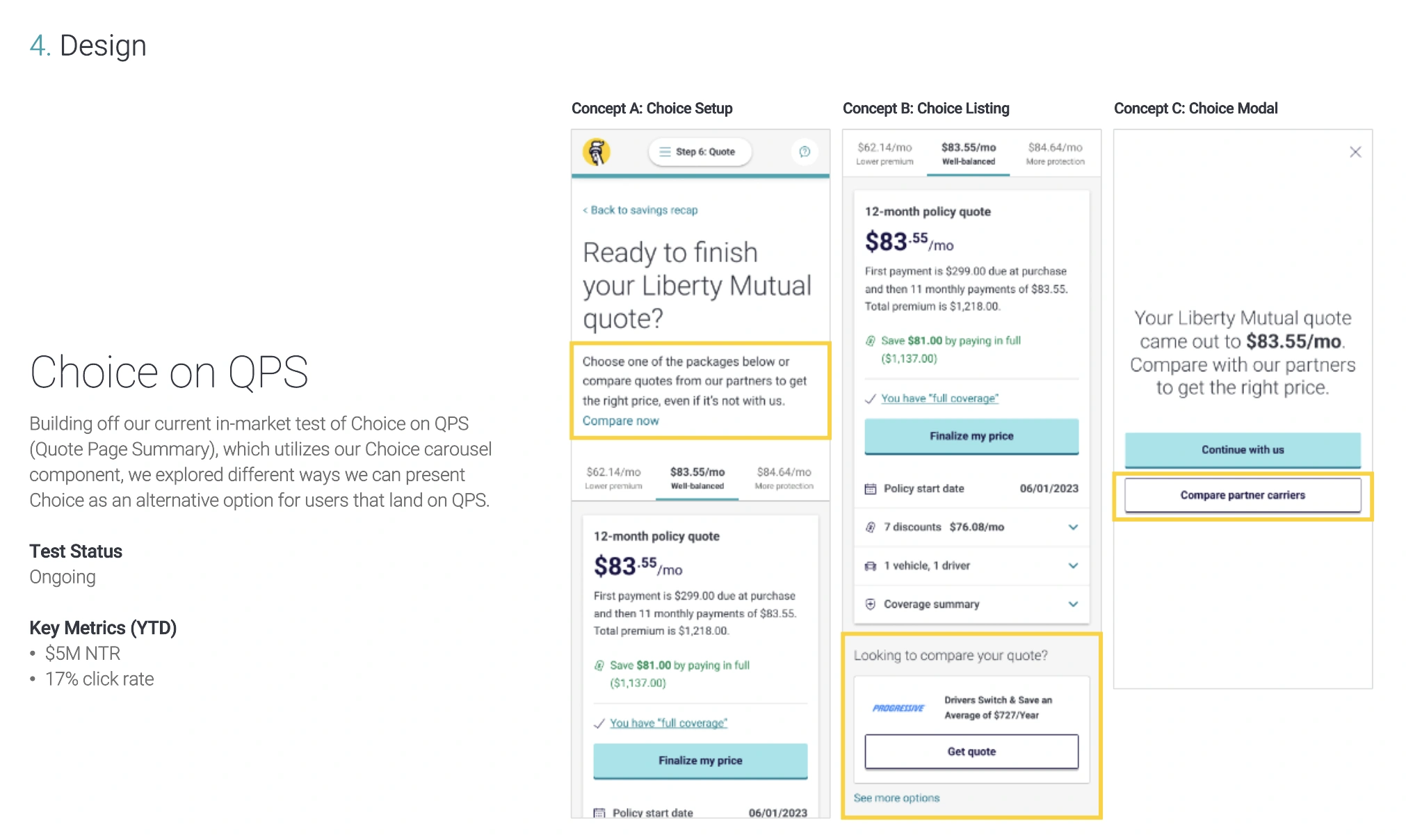
UX Choice
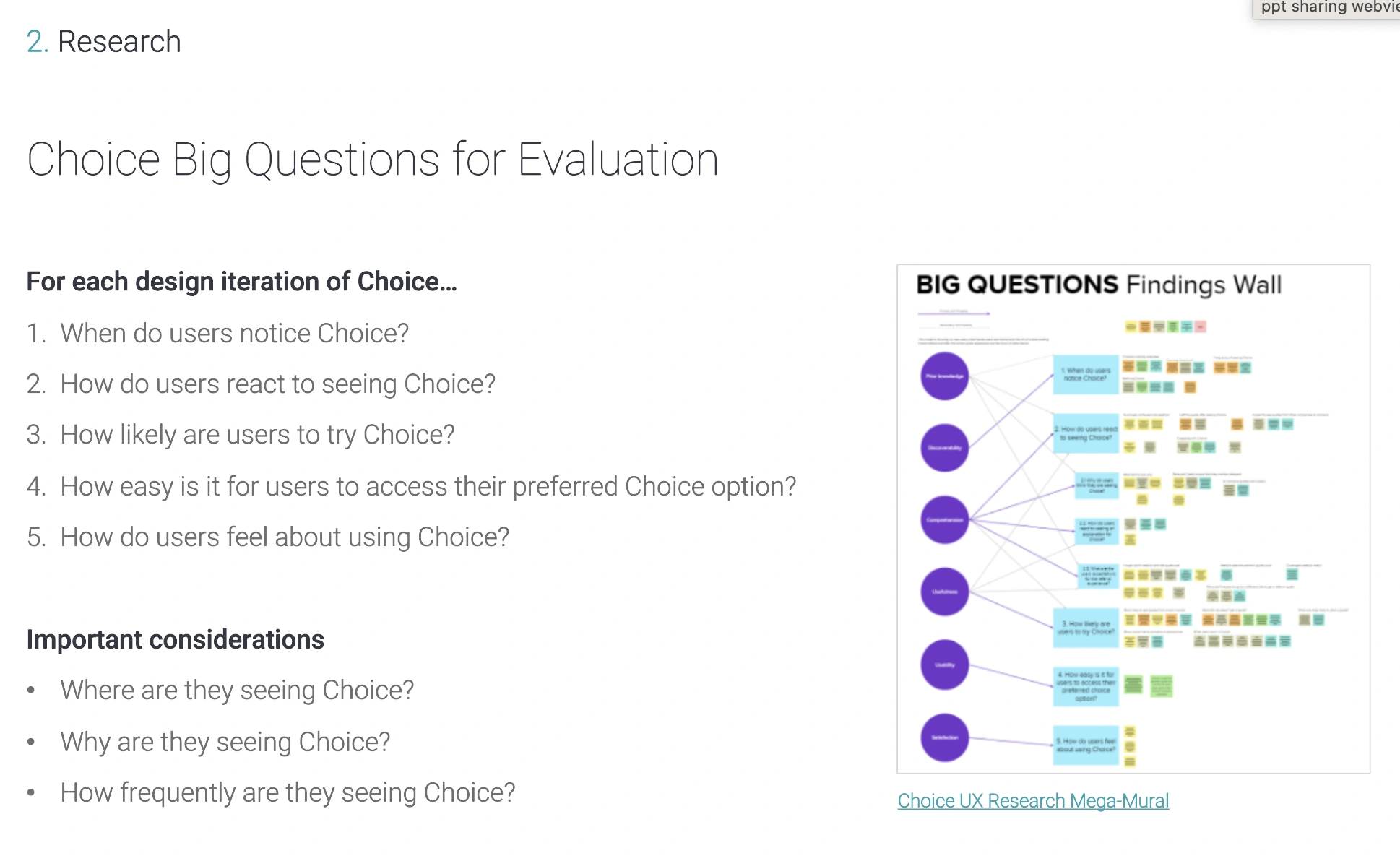
customers have concerns and confusion when they go to liberty mutual website and get an ad for other companies.
monetizing on leads more,
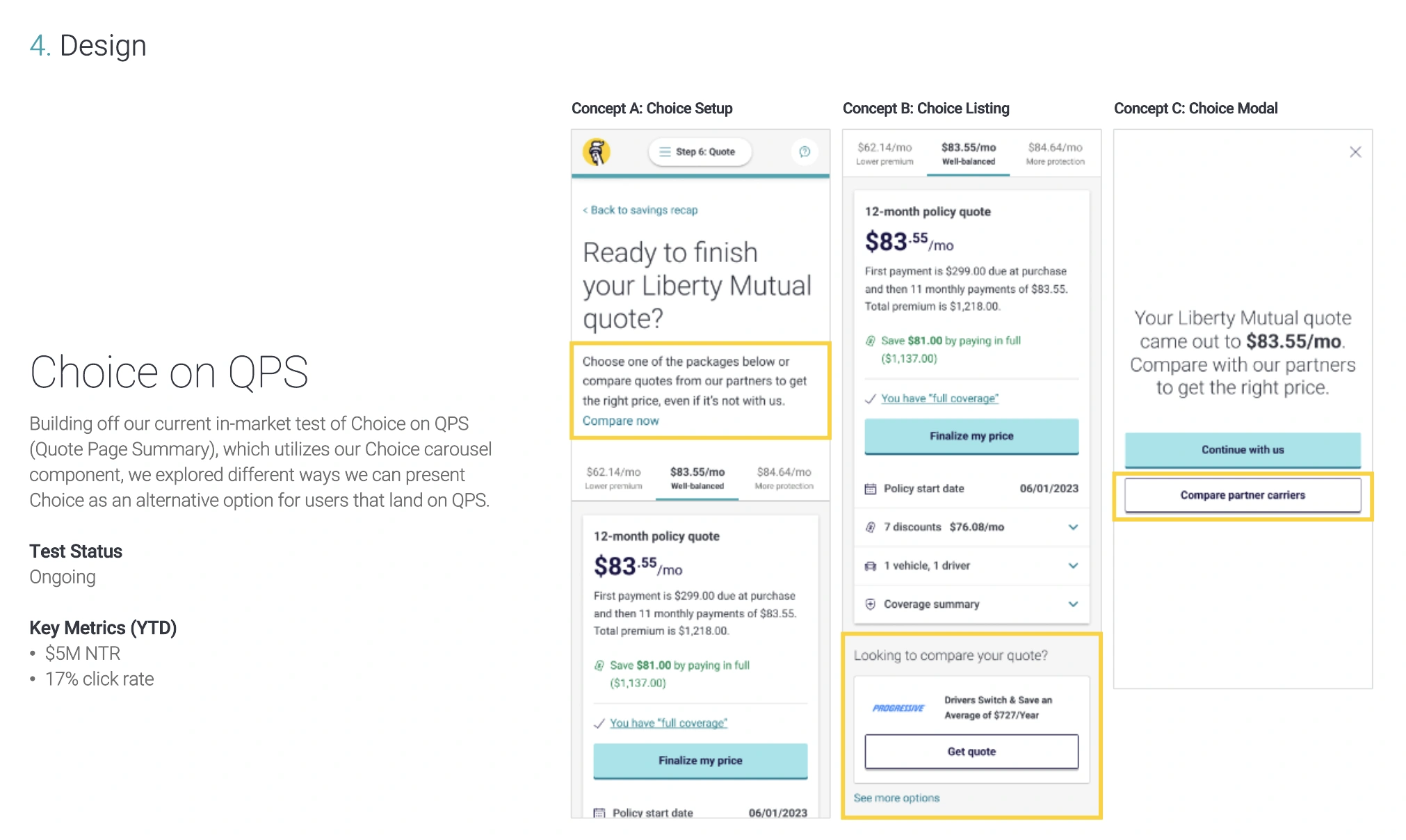
switching from old to new increased revenue