JAVASCRIPT
Table of Contents
history
Javascript: The first 20 years video
– initial success, 1997–1999: evidence of the interest in enriching interactive and dynamic web pages (dynamic HTML, named DHTML);
– stagnation decade, 1999–2009: different versions developed by different browsers, unsuccessful attempts to develop JavaScript on server-side. The design and development of jQuery was the survival response: providing a single access gate to JavaScript ("code once, run everywhere");
– revival, 2009: the release of the Ajax technology, the V8 fast compilation, the design of the "off-web" Node.js, the release of the object JSON, all these innovations woke up the JavaScript normalization;
– JavaScript as a generalist language, 2015 to present day: the broad adoption of ES5, then ES6 (Microsoft turns around the non-compliance of Internet Explorer by releasing Edge.), allows one to overcome many coding pitfalls and performance gains, making the JavaScript engines acceptable even for video and animation.
ES6
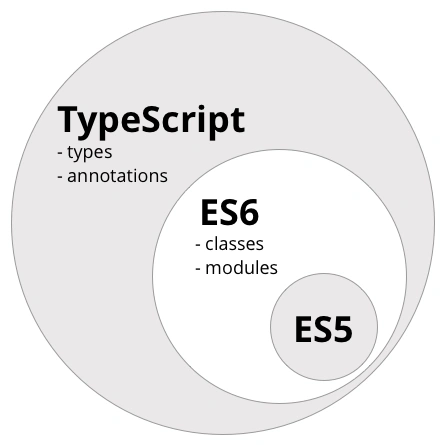
- Asynchronous Programming
- Classes
- Functions & Parameters
- Generators & Iterators
- Maps & Sets
- Modules
- Primitive Types
- Proxies & Reflection
- Typed Arrays
- Variables, Literals, & Assignments
package.json >> exports /main block scoped const / let supported in IE 11
docs
- https://developer.mozilla.org/en-US/docs/Web/JavaScript
- https://www.udacity.com/course/intro-to-javascript--ud803
- https://www.udacity.com/course/front-end-interview-prep--ud250
- https://www.positronx.io/
Basics
JavaScript is Interpreted and Run within an Ecosystem
JavaScript is a scripting language, whose interpretation and execution depend on a script engine that requires a "host", an environment providing basic objects, events and resources.
We must distinguish the "core JavaScript", common foundations of the language, and the embedded JavaScript that includes the objects of a specific environment (e.g. "client-side JavaScript").
Within the "web page ecosystem", the environment is the browser (the "window" object). We may also find the "workers", provided by the browser, but independent of the web page and the ecosystem of the Node.js modules, totally independent of any browser.
ECMAScript 6, 2016, 2017
- Strict Mode
- template literals
- duck typing
- lexical structure
- unicode
- semicolons
- white space
- case sensitive
- reserved words
Explain ECMAScript ?
ECMAScript is the standard on which Javascript is based on. It was created to standardize Javascript. It is commonly used for client-side scripting on the World Wide Web and used by Node Js for writing server applications and services.
Javascript is not a class-based language but rather a prototype-based language
responding to user interactions, updating dynamic content on a page
JavaScript Framework Fatigue
This has been a big issue, but I believe it’s fading rapidly now and evolving into different kind of problem. Let me explain:
2016 was a year in which a classic “tipping point” was reached on two major issues in web development — two issues that are intimately related, if not ultimately unified:
Framework Burnout
In my professional experience, the CRUD aspects of flutter just fly, but when native feature is are used my time estimations for competely out the window. Could be 2x to 10x the time sink that I expect. It’s reaaaally worth it to spec out an MVP feature list and list out all of the native features (blue tooth, gps, whatever) required. From there, research all of the plugins that could work on pubspec, and look at the GITHUB ISSUES. This is the zone you will be referring to when shit hits the fan. If prospects look grim, get prepared to learn native development on multiple platforms, or just build native. Flutter can handle a ton, and building native features out isn’t horrible. But planning ahead of time really can help mentally prepare you for when flutter can’t immediately support what you want to do
Linter | Linters are tools that analyze source code to detect problems based on formatting and code quality rules then output as warnings or errors. They are used to increase code quality, configured manually, and often run automatically when code changes.
Static Type Checkers - TypeScript
JavaScript only supports dynamic type checking, which means type safety is only verified at runtime; it brings the flexibility to the language but allows unexpected errors at runtime.
Static type checking, the process of checking type safety based on source code at compile-time, has several awesome benefits like caching errors early, limiting type errors, supporting auto-completion, generating documentation, and resulting in faster compilation.
Module Bundlers - Webpack
Module bundlers are tools that bundle JavaScript and non-JavScript modules into a bundle — web apps to run on browsers, backend apps to run on Node.js, or npm packages. Most of them can bundle JavaScript files into a single concatenated file or multiple files, but they are hugely different in the capability of bundling non-JavaScript files like css, json, png, xml, etc.
Module bundlers can be considered as limited task runners and built tools as well, like focusing on automating frontend tasks and generate a website only.

Reserved words
You can’t use as identifiers any of the following words because they are reserved by the language.
- break, do, instanceof, typeof, case, else, new, var, catch, finally, return, void, continue, for, switch, while, debugger, function, this, with, default, if, throw, delete, in, try, class, enum, const, export, import, implements, let, private, public, interface, package, protected, static, yield
Setting Default Values Correctly
someString = someString || "default value";
USE SEMICOLONS
- Automatic Semicolon Insertion (ASI)
- when curly brace followed by invalid token
- when new line comes before -- or ++ operator
- when new line continues from return break or throw
- javascript engine will insert semicolons if you don't but it's susceptible to unexpected bugs
Convert string to number
parseInt("string")
What is the difference between Call, Apply, and Bind?
https://www.geeksforgeeks.org/what-is-the-difference-between-call-and-apply-in-javascript/
call()
invoke a function with a given this value and arguments
apply()
invoke the function with a given this value and pass in arguments as an array
bind()
return a new function, allowing you to pass any number of arguments
Shared State any variable, object, or memory space that exists in a shared scope, or as the property of an object being passed between scopes. A shared scope can include global scope or closure scopes. Often objects are shared between scopes by adding properties to other objects
Variables
- A variable is a literal assigned to an identifier, so you can reference and use it later in the program.
- capitalization matters, use camel case
- Variables in JavaScript do not have any type attached. Once you assign a specific literal type to a variable, you can later reassign the variable to host any other type, without type errors or any issue.
- This is why JavaScript is sometimes referenced as “untyped”.
var a = 1;
var b = "lorem ipsum";
var c = { firstName: "Steve", lastName: "Jacobs" };
var d = [0,1,2,3,4,5];
var e = [ "apple", "orange", "mango" ]
var f = [
    { firstName: "Steve", lastName: "Jacobs" },
    { firstName: "Steve", lastName: "Jacobs" },
    { firstName: "Steve", lastName: "Jacobs" }
];
declaration vs assignment
var myVar;
The above declares a myVar variable with no value
Operators
Ternary Operator
Ternary Statement
possible to chain multiple conditions
function findGreaterOrEqual(a, b) {
  return (a === b) ? "a and b are equal" : (a > b) ? "a is greater" : "b is greater";
}
condition ? statement-if-true : statement-if-false;
function foo(x){
  if(x == 1){
    return x;
  } else {
    return x + 1;
  }
}
return x == 1 ? x : x + 1;
Conditionals
- if
- else
- else if
- while
switch statement
- is basically if else in a more eloquent way, use it as soon as you have multiple of different cases.
If statements vs switch cases
When to use
switchinstead ofifstatements?
Use switch instead of if when:
- You are comparing multiple possible conditions of an expression and the expression itself is non-trivial.
- You have multiple values that may require the same code.
- You have some values that will require essentially all of another value's execution, plus only a few statements.
Use
ifinstead ofswitchwhen:
- You want to test for the truthiness of an expression.
- You only have a single affirmative test.
- You need to evaluate different expressions for each branch.
What is the difference between null and undefined in JavaScript?
Ans: In JavaScript, null is a value that represents the intentional absence of any object value, while undefined is a value that represents the absence of a defined value. Hoisting is a JavaScript mechanism where variable and function declarations are moved to the top of their respective scopes during the compilation phase. This means that you can use a variable or function before it is declared, although it is generally considered best practice to declare them before use.
Equality Comparison Operators
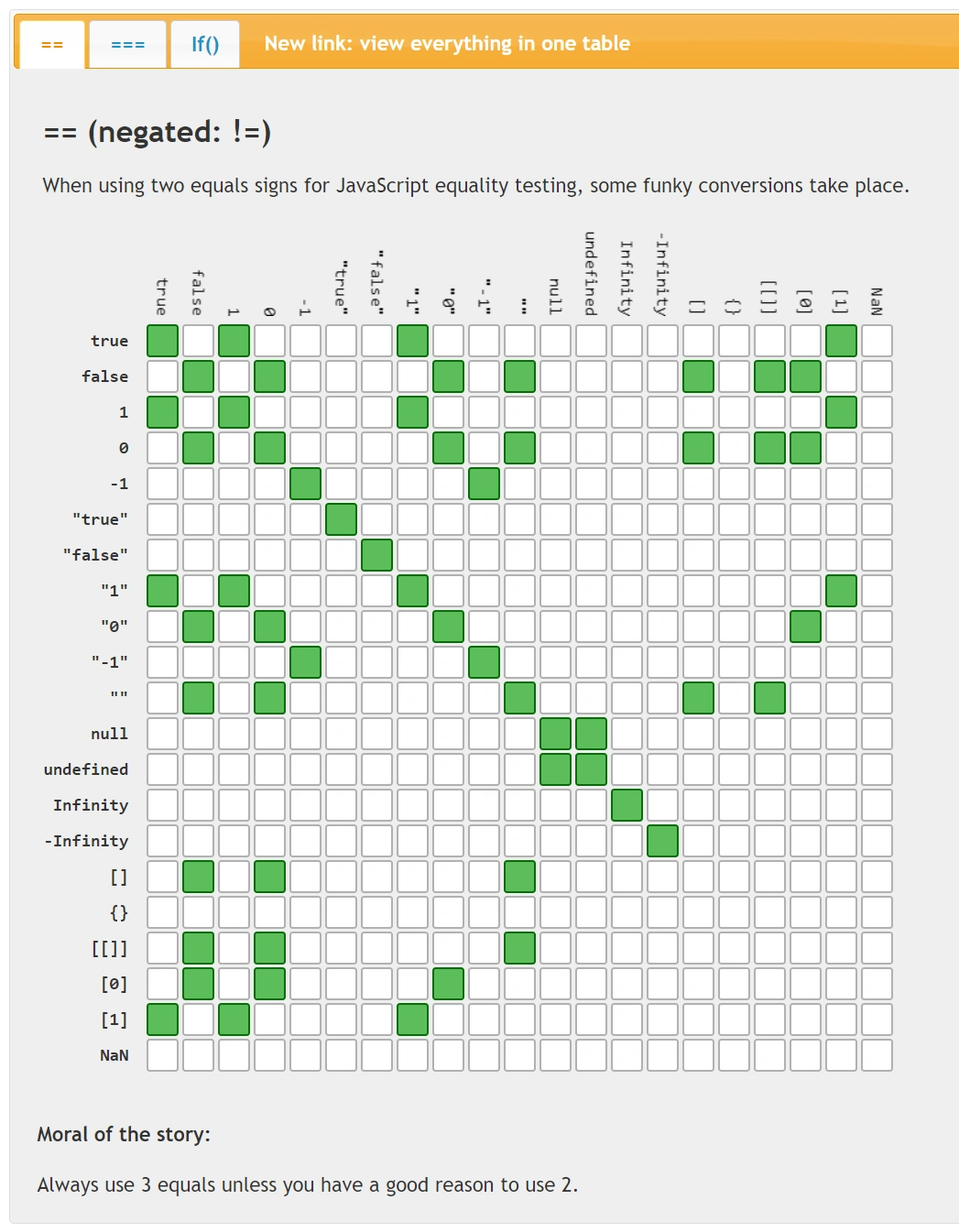
Strict ===, !==
Loose or Type Converting ==, !=
0 == false // true
0 === false // false
1 == "1" //true
1 === "1" // false
null == undefined // true
null === undefined // false
The !! (not not) operator in JavaScript
"bang, bang you're boolean"
Coerces oObject to boolean. If it was falsey (e.g. 0, null, undefined, etc.), it will be false, otherwise, true.
!oObject  //Inverted boolean
!!oObject //Non inverted boolean so true boolean representation
So !! is not an operator, it's just the ! operator twice.
Real World Example "Test IE version":
let isIE8 = false;
isIE8 = !! navigator.userAgent.match(/MSIE 8.0/);
console.log(isIE8); // returns true or false
If you ⇒
console.log(navigator.userAgent.match(/MSIE 8.0/));
// returns either an Array or null
but if you ⇒
console.log(!!navigator.userAgent.match(/MSIE 8.0/));
// returns either true or false
= assignment operator
After a value is assigned to a variable using the assignment operator, you can assign the value of that variable to another variable using the assignment operator.
var myVar;
myVar = 5;
var myNum;
myNum = myVar;
Identifier
An identifier is a sequence of characters that can be used to identify a variable, a function, an object. It can start with a letter, the dollar sign $ or an underscore _, and it can contain digits. Using Unicode, a letter can be any allowed char, for example an emoji 😄. The dollar sign is commonly used to reference DOM elements.
- Test
- test
- TEST
- _test
- Test1
- $test
const
- can't assign to a constant
- read only variable
- block scoping
Let
variables not declared but assigned a value from inside a function can be accessed from outside
LET: Both var and let are used for variable/ method declaration in javascript but the main difference between let and var is that var is function scoped whereas let is block scoped.
- function scope
- global scope
- no block scope
- let variables are scoped to the nearest block and are NOT hoisted
Scope
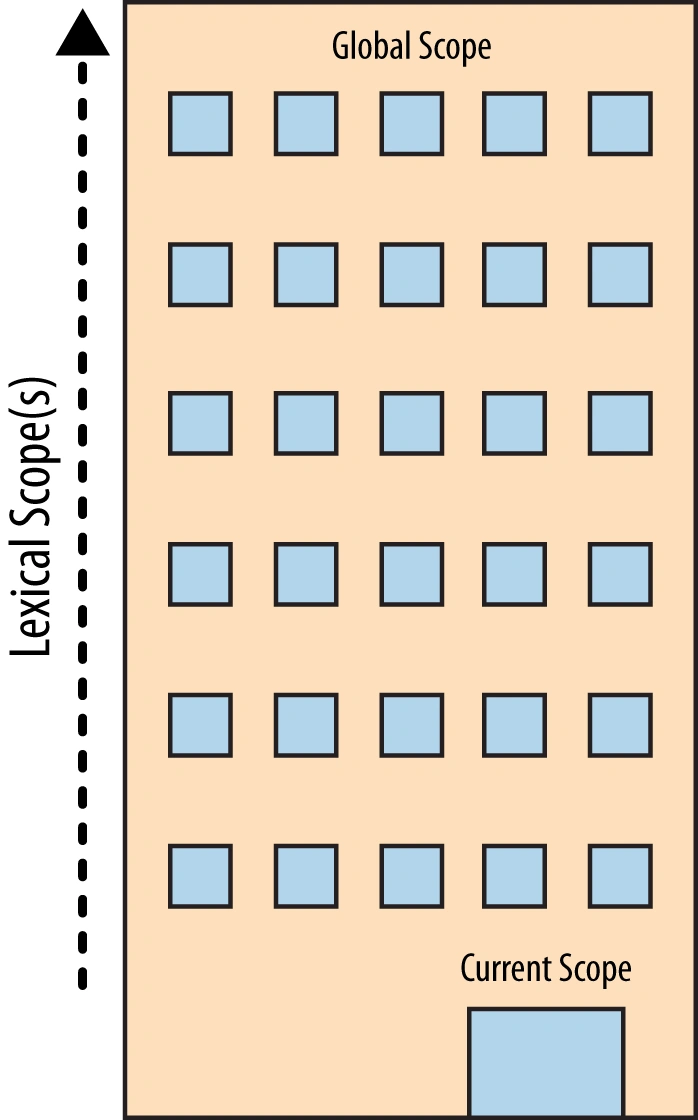
Scope is where variables and functions are accessible
Scope is simply a box with boundaries. 3 main types of scopes that provide distinct behavior: global scope, block scope and function scope (aka inner and outer). Each scope expects different things and has unique rules when it comes to variable definitions.
Why is this relevant?
- Separates logic
- Narrows down the focus
- Improves readability
- inner function has access to everything inside the outer
Scope: well-defined set of rules for storing variables in some location, and for finding those variables at a later time.
In Operator
For custom objects:
let myPets = {'cats': 'yes, 2', 'dogs': 'not currently ☹', 'horses': 'I wish!'};
console.log('cats' in myPets);
//returns true
You can only search for the properties, not the property values:
console.log('I wish!' in myPets);
//returns false
For arrays:
let jellyBeanFlavors = ['popcorn', 'root beer', 'booger', 'shoe leather'];
console.log('booger' in jellyBeanFlavors);
//returns false
'in' only works on index numbers for arrays, not the value at that index.
console.log(3 in jellyBeanFlavors);
//returns true
Since 'length' is an array property, we can use that with 'in':
console.log(length in jellyBeanFlavors);
//returns true

let emptyArray = [ ];
console.log(length in emptyArray);
//returns false
*View code online here*
Storage API
Session Storage
- available only when a browser's tab is opened
Local Storage
localStorage: survives on closing and reopening a browser
- to save something to localStorage
localStorage.setItem("email", "email@address.com");
//OR property style
localStorage.message = 'yea yea yea';
- retreive
localStorage.getItem()
//key name
localStorage.email
Advanced Vanilla
null-coalescing operator
In JavaScript, the null-coalescing operator, often represented by "??", is a relatively new addition introduced in ECMAScript 2020 (ES11). It provides a concise way to handle nullish (null or undefined) values and provide a default value in such cases.
The null-coalescing operator evaluates two operands and returns the right-hand side (RHS) operand if the left-hand side (LHS) operand is null or undefined. If the LHS operand is any other value (including false, 0, empty string, etc.), the operator returns the LHS operand.
The syntax for the null-coalescing operator is as follows:
LHS ?? RHS
Here's a simple example to illustrate its usage:
const username = null;
const defaultUsername = "Guest";

const selectedUsername = username ?? defaultUsername;

console.log(selectedUsername); // Output: "Guest"
In the example above, the username variable is null. The null-coalescing operator ?? checks if username is null or undefined. Since it is, the operator returns the RHS operand defaultUsername, which is then assigned to the selectedUsername variable.
The null-coalescing operator is particularly handy when working with optional values or when you want to provide default values for variables that might be null or undefined.
It's worth noting that the null-coalescing operator only checks for nullish values (null or undefined) and not other falsy values like an empty string, 0, or false. If you want to handle all falsy values, you can combine the null-coalescing operator with the logical OR operator (||) like this:
const value = null;
const defaultValue = "Default value";

const result = value ?? defaultValue || "Fallback value";

console.log(result); // Output: "Default value"
In the example above, if value is null or undefined, the null-coalescing operator returns defaultValue. However, if value is a falsy value other than null or undefined (e.g., an empty string), the logical OR operator || will evaluate the second operand, resulting in the "Fallback value" being assigned to result.
once
There are times when you prefer a given functionality only happen once, similar to the way you'd use an onload event. This code provides you said functionality:
function once(fn, context) {
 var result;

 return function() {
  if(fn) {
   result = fn.apply(context || this, arguments);
   fn = null;
  }

  return result;
 };
}
// Usage
var canOnlyFireOnce = once(function() {
 console.log('Fired!');
});

canOnlyFireOnce(); // "Fired!"
canOnlyFireOnce(); // nada
The once function ensures a given function can only be called once, thus prevent duplicate initialization!
getAbsoluteUrl
Getting an absolute URL from a variable string isn't as easy as you think. There's the URL constructor but it can act up if you don't provide the required arguments (which sometimes you can't). Here's a suave trick for getting an absolute URL from and string input:
var getAbsoluteUrl = (function() {
 var a;

 return function(url) {
  if(!a) a = document.createElement('a');
  a.href = url;

  return a.href;
 };
})();
// Usage getAbsoluteUrl('/something'); // https://davidwalsh.name/something The "burn" element href handles and URL nonsense for you, providing a reliable absolute URL in return.
isNative
Knowing if a given function is native or not can signal if you're willing to override it. This handy code can give you the answer:
;(function() {

  // Used to resolve the internal `[[Class]]` of values
  var toString = Object.prototype.toString;

  // Used to resolve the decompiled source of functions
  var fnToString = Function.prototype.toString;

  // Used to detect host constructors (Safari > 4; really typed array specific)
  var reHostCtor = /^[object .+?Constructor]$/;

  // Compile a regexp using a common native method as a template.
  // We chose `Object#toString` because there's a good chance it is not being mucked with.
  var reNative = RegExp('^' +
    // Coerce `Object#toString` to a string
    String(toString)
    // Escape any special regexp characters
    .replace(/[.*+?^${}()|[\]\/\\]/g, '\\$&')
    // Replace mentions of `toString` with `.*?` to keep the template generic.
    // Replace thing like `for ...` to support environments like Rhino which add extra info
    // such as method arity.
    .replace(/toString|(function).*?(?=\()| for .+?(?=\])/g, '$1.*?') + '$'
  );

  function isNative(value) {
    var type = typeof value;
    return type == 'function'
      // Use `Function#toString` to bypass the value's own `toString` method
      // and avoid being faked out.
      ? reNative.test(fnToString.call(value))
      // Fallback to a host object check because some environments will represent
      // things like typed arrays as DOM methods which may not conform to the
      // normal native pattern.
      : (value && type == 'object' && reHostCtor.test(toString.call(value))) || false;
  }

  // export however you want
  module.exports = isNative;
}());
// Usage isNative(alert); // true isNative(myCustomFunction); // false The function isn't pretty but it gets the job done!
insertRule
We all know that we can grab a NodeList from a selector (via document.querySelectorAll) and give each of them a style, but what's more efficient is setting that style to a selector (like you do in a stylesheet):
var sheet = (function() {
 // Create the <style> tag
 var style = document.createElement('style');

 // Add a media (and/or media query) here if you'd like!
 // style.setAttribute('media', 'screen')
 // style.setAttribute('media', 'only screen and (max-width : 1024px)')

 // WebKit hack :(
 style.appendChild(document.createTextNode(''));

 // Add the <style> element to the page
 document.head.appendChild(style);

 return style.sheet;
})();
// Usage
sheet.insertRule("header { float: left; opacity: 0.8; }", 1);
This is especially useful when working on a dynamic, AJAX-heavy site. If you set the style to a selector, you don't need to account for styling each element that may match that selector (now or in the future).
matchesSelector
Oftentimes we validate input before moving forward; ensuring a truthy value, ensuring forms data is valid, etc. But how often do we ensure an element qualifies for moving forward? You can use a matchesSelector function to validate if an element is of a given selector match:
function matchesSelector(el, selector) {
 var p = Element.prototype;
 var f = p.matches || p.webkitMatchesSelector || p.mozMatchesSelector || p.msMatchesSelector || function(s) {
  return [].indexOf.call(document.querySelectorAll(s), this) !== -1;
 };
 return f.call(el, selector);
}
// Usage matchesSelector(document.getElementById('myDiv'), 'div.someSelector[some-attribute=true]') There you have it: seven JavaScript functions that every developer should keep in their toolbox. Have a function I missed? Please share it!
encodeURIComponent()
Flow Control
- deferred object
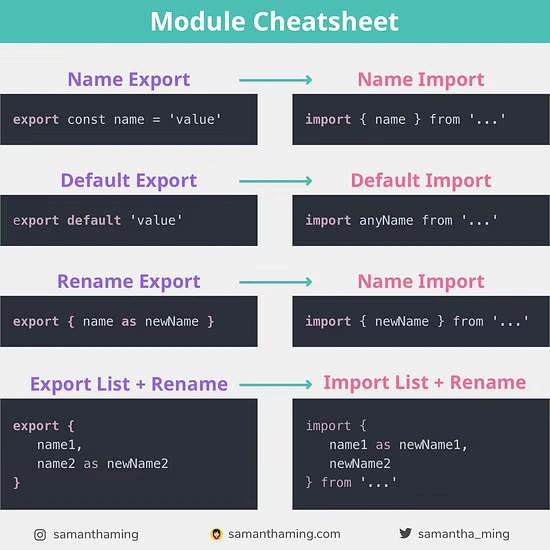
Import / Export
functions, objects, or primitive values
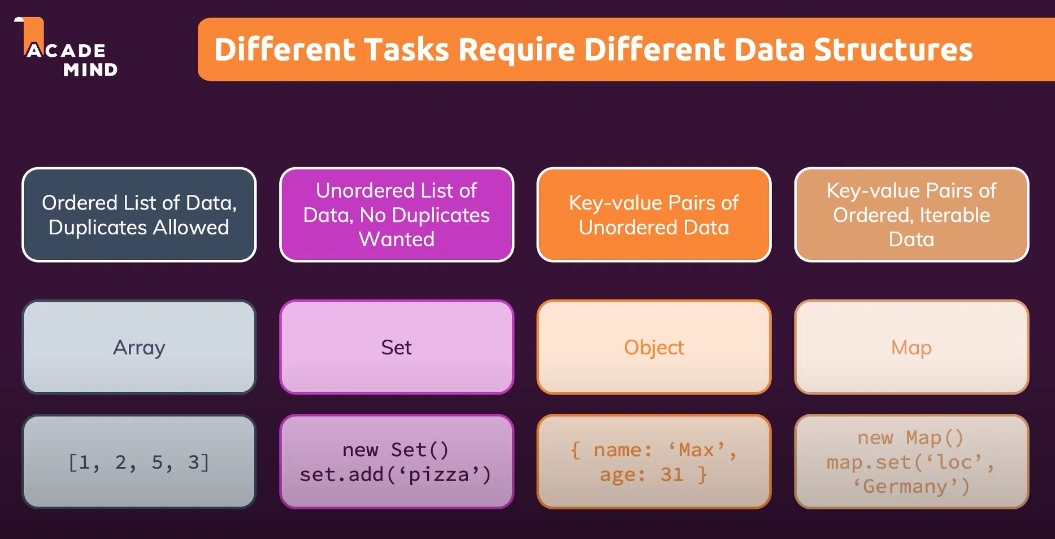
Data Structures
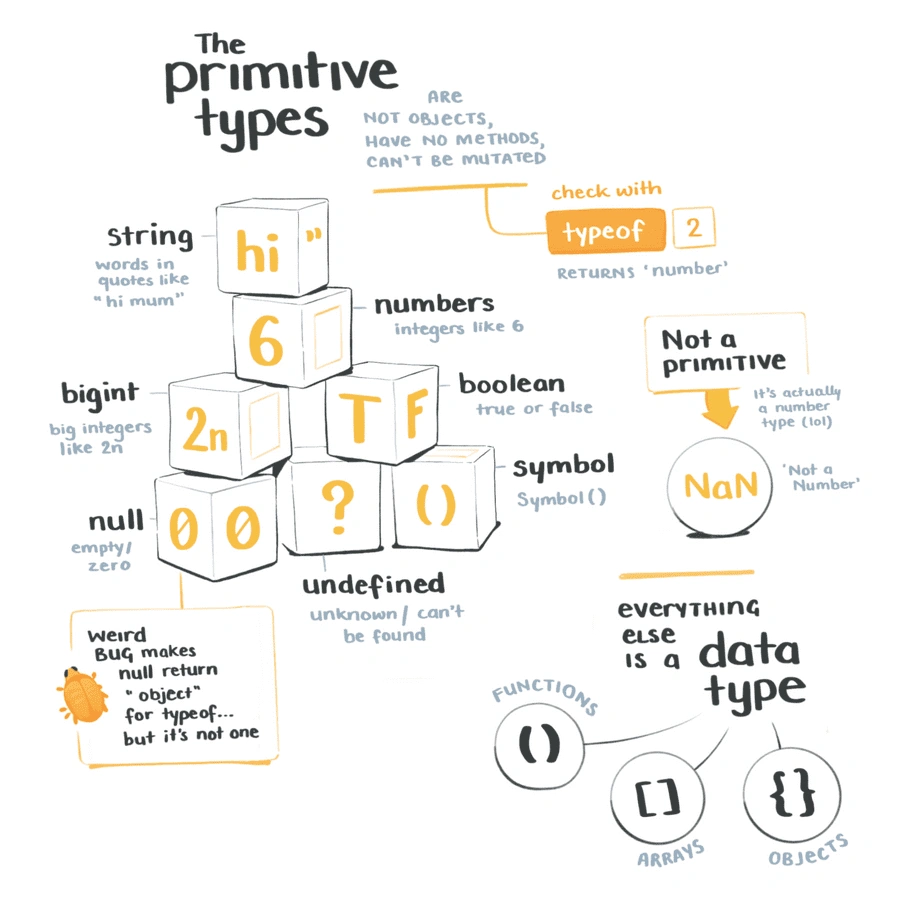
Composite (reference) Data Types
- Array
- Object
Primitive Data Types
- symbol
- number
- string
- Boolean
const price = 100; // This is a number
const tax = 20;
const productName = 'pikachu';
const isHungry = true;

const weird = tax + isHungry;
tax.slice(1,5);
productName.slice(1,5);
const total = price + tax;
Boolean Truthiness
All values in JavaScript have an intrinsic characteristic called truthiness which determines how a value will be evaluated in a Boolean context, such as in the argument expression of an if() statement. Values which coerce to the boolean primitive true are called truthy; all other values (which, necessarily, coerce to false) are called falsy.
There are exactly seven falsy values in JavaScript:
- false
- +0, -0, and NaN
- "" (the empty string primitive)
- undefined
- null
That’s it. Everything else is truthy, including “empty” objects, the string "false", and instances of Boolean object wrappers (e.g., created with new Boolean(false)).
Boolean Expressions that equal false
- null
- undefined
- "" (empty string)
- "yes" (all strings are true)
- 0
- NaN
Coercion
- does not enforce strict standards
- coerced equality
- 0 == false
- "0" == false
- "0" === false
- false == "false"
- false == null
- undefined == null
- typeof(null)
Special Data Types
- undefined: not even there to be null
- null
prototypes
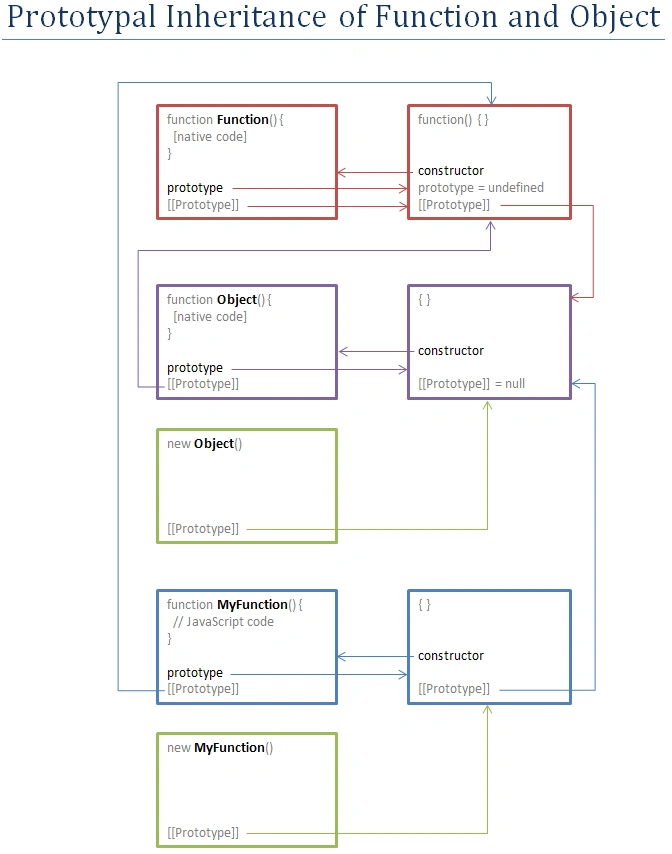
Prototypal Inheritance in JavaScript
A function's prototype is the object instance that will become the prototype for all objects created using this function as a constructor
Prototypes are objects that facilitate linking of objects and delegation of methods or properties
__proto__ Property
Function.prototype
a function can act as a
function object method constructor prototype object
Every JavaScript object has an internal property called [[Prototype]]. If you look up a property via obj.propName or obj['propName'] and the object does not have such a property - which can be checked via obj.hasOwnProperty('propName') - the runtime looks up the property in the object referenced by [[Prototype]] instead. If the prototype-object also doesn't have such a property, its prototype is checked in turn, thus walking the original object's prototype-chain until a match is found or its end is reached.
Some JavaScript implementations allow direct access to the [[Prototype]] property, eg via a non-standard property named proto. In general, it's only possible to set an object's prototype during object creation: If you create a new object via new Func(), the object's [[Prototype]] property will be set to the object referenced by Func.prototype.
This allows to simulate classes in JavaScript, although JavaScript's inheritance system is - as we have seen - prototypical, and not class-based:
Just think of constructor functions as classes and the properties of the prototype (ie of the object referenced by the constructor function's prototype property) as shared members, ie members which are the same for each instance. In class-based systems, methods are implemented the same way for each instance, so methods are normally added to the prototype, whereas an object's fields are instance-specific and therefore added to the object itself during construction.
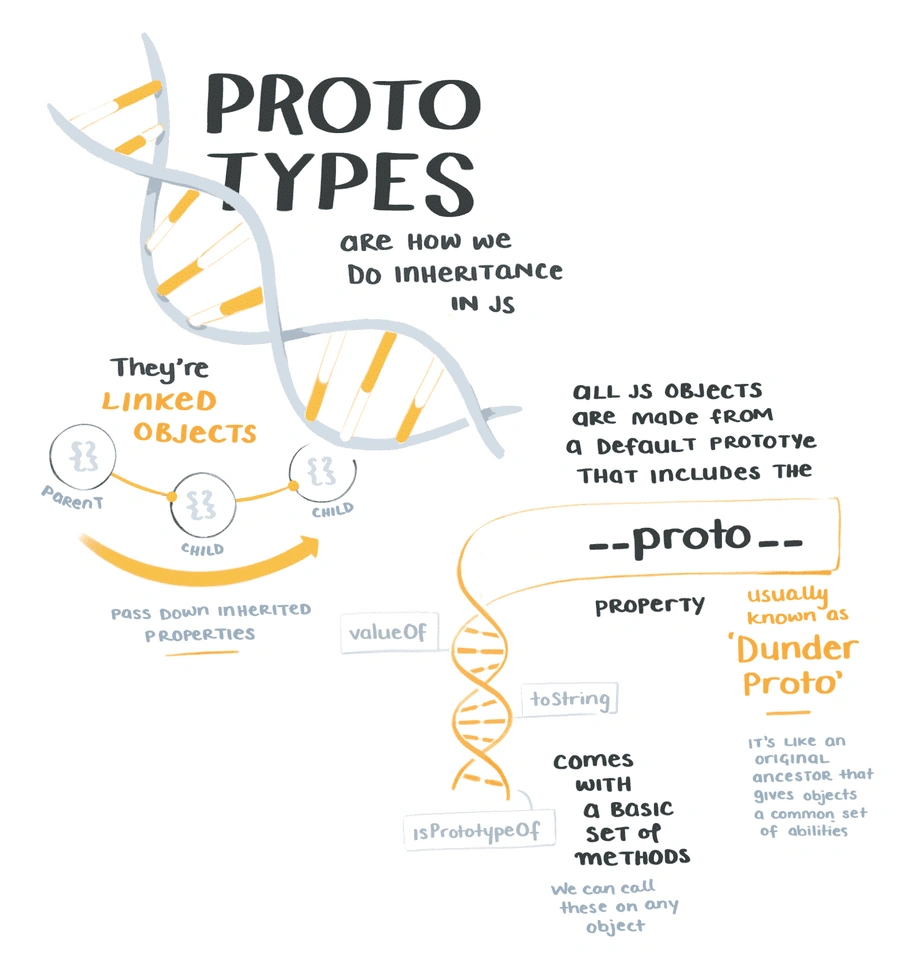
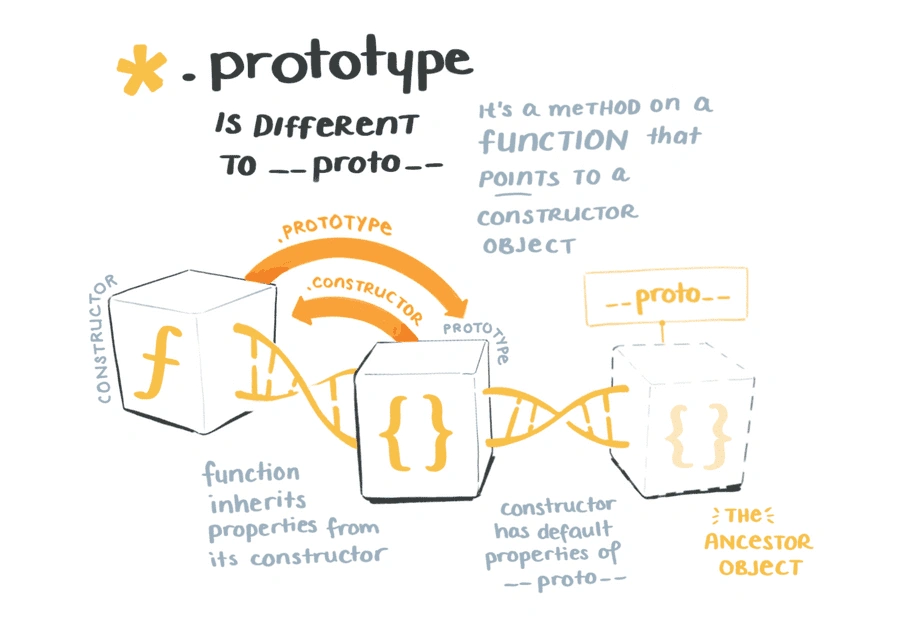
Prototype Chaining | Similar to inheritance in class based languages, chaining allows you to build new types of objects based on existing ones.
Literal
a value that is written in the source code, for example a number, a string, a boolean or also more advanced constructs, like Object Literals or Array Literals:
- 5
- 'Test'
- true
- ['a', 'b']
Object Literal
Bracket Notation vs Dot Notation
- bracket notation also lets you access a property name through other variable names var ref = jsonObj["property"];
Object Literal Notation
- var objectName = ;
Object Constructor
- var objectName = new Object();
- var objectName = new Object;
Object.create()
creates a new object, using an existing object as the prototype of the newly created object.
Duck Typing
- Add object to array
var friends = {
    bill: {},
    steve: {}
};

friends[bill] = {};
friends.steve = {};

var friends = new Object();

friends.bill = new Object();
friends.steve = new Object();
Delete
- you can't delete properties that were inherited
Enhanced Object Literals
Object literals are extended to support setting the prototype at construction, shorthand for foo: foo assignments, defining methods, making super calls, and computing property names with expressions. Together, these also bring object literals and class declarations closer together, and let object-based design benefit from some of the same conveniences.
var obj = {
    // __proto__
    __proto__: theProtoObj,
    // Shorthand for ‘handler: handler’
    handler,
    // Methods
    toString() {
     // Super calls
     return "d " + super.toString();
    },
    // Computed (dynamic) property names
    [ 'prop_' + (() => 42)() ]: 42
};
.sort
- by default, ascending order (smallest to largest) or alphabetical order
var a = [2,1,3,4,5]'
output("sort: " + a.sort(function(a,b){}));
//mutable
- the compare function can alter the sort order
const grades = [88, 94, 72, 99, 53, 77];
//sort the array from highest to lowest
grades.sort((a, b) => b - a);
console.log(grades);

//Sort the array from lowest to highest
grades.sort((a, b) => a - b);
console.log(grades);
.filter chaining
Iterator | any object that implements the Iterator protocol by having a next() method that returns a value property and a done property.
Generators
function* () {

yield
}
Destructuring
- Destructuring operation allows you to assign a set of variables from a data structure
- allows binding using pattern matching, with support for matching arrays and objects. Destructuring is fail-soft, similar to standard object lookup foo["bar"], producing undefined values when not found.
// list matching
var [a, , b] = [1,2,3];

// object matching
var { op: a, lhs: { op: b }, rhs: c } = getASTNode()

// object matching shorthand
// binds `op`, `lhs` and `rhs` in scope
var {op, lhs, rhs} = getASTNode()

// Can be used in parameter position
function g({name: x}) {
  console.log(x);
}
g({name: 5})

// Fail-soft destructuring
var [a] = [];
a === undefined;

// Fail-soft destructuring with defaults
var [a = 1] = [];
a === 1;
Set
- The Set object unique values of any type, whether primitive values or object references.
- we use the add() method to add elements to a Set
- Set objects are iterable, which means they can be used with for...of and destructuring
WeakSet
- The WeakSet is a type of Set where only objects are allowed to be stored
WeakMap
- the WeakMap is a type of Map where only objects can be passed as keys. Primitive data types, such as strings, numbers, booleans, are not allowed
- Individual entries in a WeakMap can be gargbage collected while the WeakMap itself still exists.
-
A WeakMap accepts only objects as keys whereas a Map,in addition to objects, accepts primitive datatype such as strings, numbers etc.
-
WeakMap objects doesn't avert garbage collection if there are no references to the object which is acting like a key. Therefore there is no method to retrieve keys in WeakMap, whereas in Map there are methods such as Map.prototype.keys() to get the keys.
-
There is no size property exists in WeakMap.
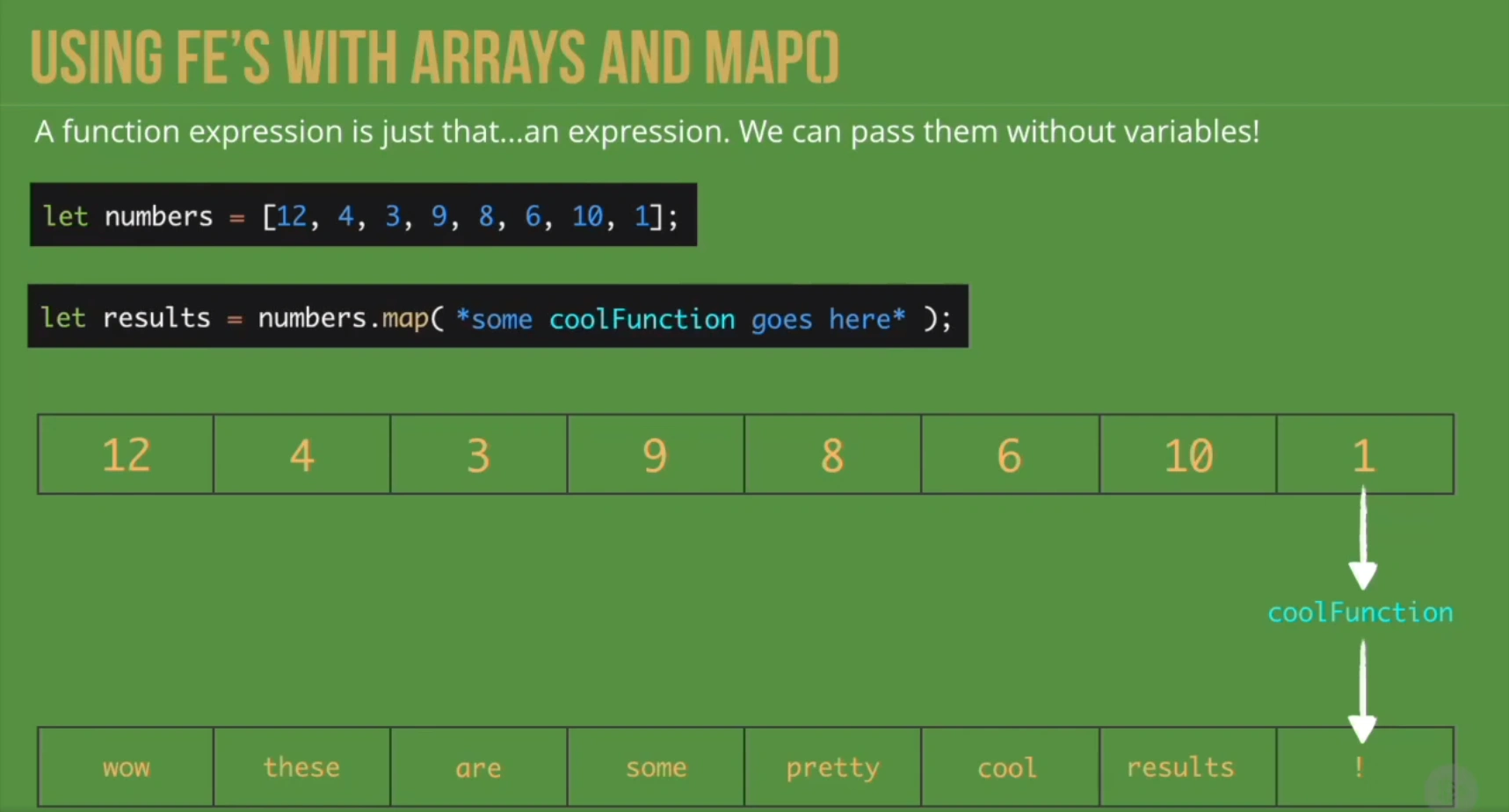
Maps - object keys, enumerable, garbage collection
- introduced in ES2015
- Just about anything you can do with forEach() you can do with map(), and vise versa.
- map() allocates memory and stores return values. forEach() throws away return values and always returns undefined.
- forEach() will allow a callback function to mutate the current array. map() will instead return a new array.
- You can think of map() as a for loop, that is specifically for transforming values.
var materials = [
  'Hydrogen',
  'Helium',
  'Lithium',
  'Beryllium'
];

console.log(materials.map(material => material.length));
// expected output: Array [8, 6, 7, 9]
Projection
- transform list a.k.a. projection (ex. map an enum to different objs)
var a = [2,1,3,4,5]
output("map " + a.map(function(i) {return i + 1; }));
//immutable
Object vs Map
| Similarities | Differences |
|---|---|
| both contain key-value pairs | Map does not contain default keys they must be set |
| both allow you to set, get, delete, read | Map does not allow for duplicate keys |
| _ | Map keys can be anything |
| _ | Map size property |
| If anything is a list, use a map. If it’s a single piece of data I.e a person, use an object. If you need to convert a map to an array, simply use Array.from(map.values()) or keys or entries. |
let totalReplies = new Map();

totalReplies.set("user", "Sam");
totalReplies.set("topic", "ES2015");
totalReplies.set("replies", ["Can't wait!", "So Cool"] );

for(let [key, value] of totalReplies){
    console.log(key + " = " + value);
}
- we use get() and set() to access values in Maps
.shift()
- using an array as a "queue"