Gitconfig
- gitkeep
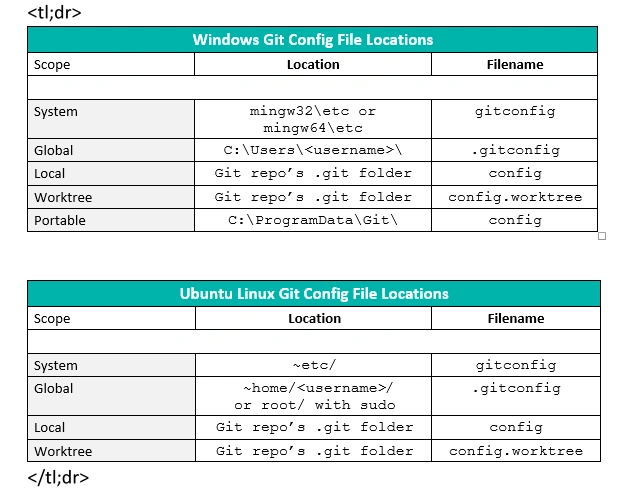
open git config
git config --global --edit
Create a git configuration file for your machine
using a shell command, open the configuration file for your first first commit
WINDOWS
default file location: C:\Users\["your OS username"]
shell COMMAND WINDOWS code C:\Users\["your OS username"]\.gitconfig
MAC
default file location: ~/.gitconfig
shell COMMAND MAC code ~/.gitconfig
To understand Git configuration, you should know that:
Git configuration variables can be stored at three different levels. Each level overrides values at the previous level
1. System level (applied to every user on the system and all their repositories)
- to view,
git config --list --system(may needsudo)- to set,git config --system color.ui true- to edit system config file,git config --edit --system
2. Global level (values specific personally to you, the user).
- to view,
git config --list --global- to set,git config --global user.name xyz- to edit global config file,git config --edit --global
3. Repository level (specific to that single repository)
- to view,
git config --list --local- to set,git config --local core.ignorecase true(--localoptional)- to edit repository config file,git config --edit --local(--localoptional)
How do I view all settings?
- Run
git config --list, showing system, global, and (if inside a repository) local configs- Rungit config --list --show-origin, also shows the origin file of each config item
How do I read one particular configuration?
- Run
git config user.nameto getuser.name, for example.- You may also specify options--system,--global,--localto read that value at a particular level.
OR
git config -l | grep user.email
[user]
  name = Username
  email = `example@email.com`
alias
https://gist.github.com/333fred/d3892f9ca21afa8ea518a161ddad764c https://davidwalsh.name/awesome-git-aliases
.gitconfig file
[alias]

co = checkout
del = branch -D
lg = !git log --pretty=format:\"%C(magenta)%h%Creset -%C(red)%d%Creset %s %C(dim green)(%cr) [%an]\" --abbrev-commit -30
s = status
My git config shortcuts
# This is Git's per-user configuration file.
[user]
# Please adapt and uncomment the following lines:
  name = your name here
  email = `email@address.com`

[alias]
s = status
sb = status -s -b
co = checkout
cob = checkout -b
del = branch -D
deleted = git log --diff-filter=D --summary
br = branch --format='%(HEAD) %(color:yellow)%(refname:short)%(color:reset) - %(contents:subject) %(color:green)(%(committerdate:relative)) [%(authorname)]' --sort=-committerdate
rso = remote show origin
lg    = log --color --graph --pretty=format:'%d%Creset %s - %C(bold blue)%an <%ae>%Creset %C(bold green)(%cr)%Creset' --abbrev-commit --date=relative
l  = log --graph --abbrev-commit --decorate=no --date=relative --format=format:'%C(03)%>|(26)%h%C(reset)  %C(04)%ad%C(reset)  %C(green)%<(16,trunc)%an%ae%C(reset)  %C(bold 1)%d%C(reset) %C(bold 0)%>|(1)%s%C(reset)' --all
ll  = log --color --graph --pretty=format:'%C(bold white)%H %d%Creset%n%s%n%+b%C(bold blue)%an <%ae>%Creset %C(bold green)%cr (%ci)' --abbrev-commit
lll   = log --stat --abbrev-commit


[color "branch"]
    local = yellow
    remote = red
    plain = normal

rh   = reset HEAD
rha  = reset --hard
rhh  = reset --hard HEAD
[init]
  defaultBranch = main

  # push
  ps = push                         # push
  psf = push -f                     # push force
  psu = push --set-upstream         # push with setting upstream
  psuo = push --set-upstream origin # push with setting upstream to be a branch in the origin remote
[credential]
  helper = osxkeychain
New Favorite
lg = log --color --graph --pretty=format:'%C(bold blue)(%cr)%Creset - %C(red)%an <%ae> -%Creset%C(bold green)%d%Creset %C(bold white)%s%Creset' --abbrev-commit --date=relative