SQL
Table of Contents
MySQL Setup Guide
download > MySQL WorkBench Setup Guide.pdf
Terms
| SQL Terms | definition |
|---|---|
| Deleting: Truncate | TRUNCATE command deletes all data from MySQL relation but keeps schema of that relation intact |
| API call | an individual transaction on your API. it contains the HTTP request, response, payload, custom metadata, and other data associated with the transaction. |
| Bare Metal Server | single tenant physical server, or bare metal server |
| Lookup | Your filter (aka Predicate) is satisfied by the nonclustered index which handles your search argument, but you're referencing at least one column that's not included |
| RID Lookup (Heap) | |
| Key Lookup (Clustered) | |
| Spool | A cache in query processor from lack of adequate indexes or uniqueness of information. Use Distinct. Implemented as hidden tables in tempdb (almost always a problem culprit) |
| Table Spool (Lazy Spool) | |
| Index Spool (Eager Spool) | |
| Table Spool (Eager Spool) | |
| Sort | ORDER BY, Merge Join, Stream Aggregation, Windowing. Does not scale well, performs worse relative to increasing the input size. Better to sort in the App Tier |
| Hash | Linear scale, but may heavily impact tempdb, common in warehouses, not good for OLTP, Hash Match, Hash Match (Aggregate) |
| Nested Loops (Serial) | Iterators. Best with a small outer input (top loop) |
| (Index) Scan | Iterators. Check predicates & expectations. Table Scan. Index Scan (Nonclustered) Clustered Index Scan |
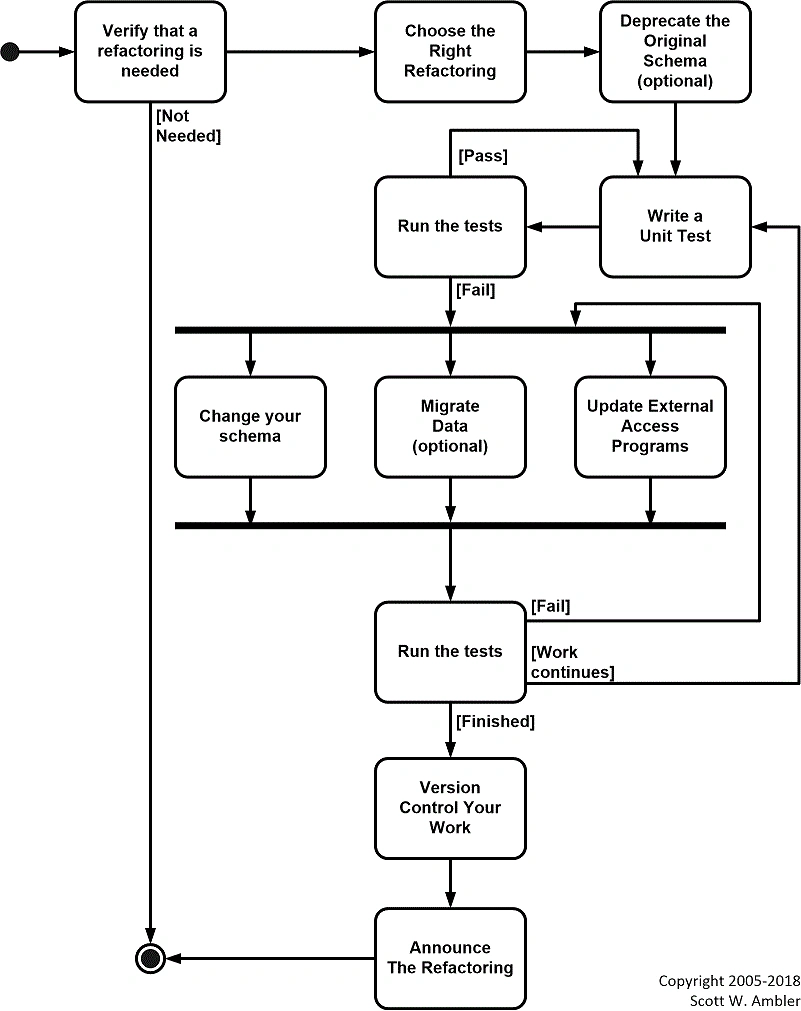
A database refactoring is a simple change to a database schema that improves its design while retaining both its behavioral and informational semantics. For the sake of this discussion a database schema includes both structural aspects such as table and view definitions as well as functional aspects such as stored procedures and triggers. An interesting thing to note is that a database refactoring is conceptually more difficult than a code refactoring; code refactorings only need to maintain behavioral semantics while database refactorings also must maintain informational semantics.
-
To safely fix existing legacy databases. The bottom line is that legacy databases aren't going to fix themselves, and that from a technical point of view database refactoring is a safe, simple way to improve data, and database, quality over time. My various surveys into data quality have consistently shown over the years that organizations suffer from data quality issues but in many cases do not have a realistic strategy in place to address them.
-
To support evolutionary development. Modern software development processes, such as DAD, XP, and Scrum, all work in an evolutionary manner. Data professionals need to adopt techniques, including this one, which enable them to work in such a manner.
-
To tune your database.. Part of your tuning efforts may include the (de)normalization of the schema.
2.2 Preserving Semantics
Permissions GRANT object Permissions
- tables
- schemas
- views
GRANT SELECT

PRIVILEGES
UPDATE
UPDATE
person p
SET
p.person_first_name = 'Bob'

WHERE
p.person_id = 0;
JOINs
Now that you’ve learned the basics of SQL, it’s time to move on to one of the most powerful concepts the language has to offer — the JOIN statement. A JOIN statement allows you to combine data in multiple tables to efficiently process large quantities of data. These statements are where the true power of a database resides.
- JOIN operator preferred in FROM clause
- older ANSI SQL-89 not recommended in WHERE clause might create Cartesian product
- usually based on Primary Key >> Foreign key relationships
Syntax
- INNER
- OUTER
- CROSS
- SELF
JOIN tables
- Literals
- Merging
- Nulls
- Predicates
- OLAP
- Pivoting
ALTER. Once you've created a table within a database, you may want to modify its definition. The ALTER command allows you to make changes to the structure of a table without deleting and recreating it. Take a look at the following command:
ALTER TABLE personal_info ADD salary money null
- nocheck constraint
Arguments
- column name
- database name
- schema name
- COLLATE
- ADD | DROP
- MAXDOP max_degree_of_parallelism
Stored Procedures
USE RhymeDB
GO --begin new batch

CREATE PROC spRhymes
AS
BEGIN
 SELECT
  RhymeWord
  , Syllables
  , Definition
 FROM

END

EXEC spRhymes
search text in views, triggers, stored procs, functions
DECLARE @searchstring VARCHAR(255), @notcontain Varchar(255)

SELECT @searchstring = 'foobar', @notcontain = ''

SELECT DISTINCT sysobjects.name AS [Object Name] ,
case when sysobjects.xtype = 'P' then 'Stored Proc'
when sysobjects.xtype = 'TF' then 'Function'
when sysobjects.xtype = 'TR' then 'Trigger'
when sysobjects.xtype = 'V' then 'View'
end as [Object Type]
FROM sysobjects,syscomments
WHERE sysobjects.id = syscomments.id
AND sysobjects.type in ('P','TF','TR','V')
AND sysobjects.category = 0
AND CHARINDEX(@SEARCHSTRING,syscomments.text)>0
AND ((CHARINDEX(@notcontain,syscomments.text)=0
or CHARINDEX(@notcontain,syscomments.text)<>0))
Aggregate Functions
SELECT COUNT (DISTINCT SalesOrderID) AS UniqueOrders,
AVG(UnitPrice) AS Avg_UnitPrice,
MIN(OrderQty) AS Min_OrderQty,
MAX(LineTotal) AS Max_LineTotal,
FROM Sales,SalesOrderDetail;
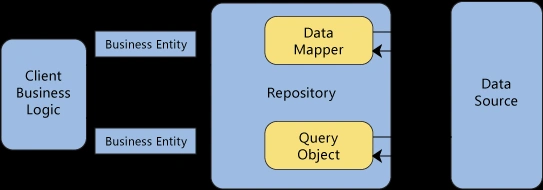
Server: connect to remote DB
ssh root@ip.address.0.1
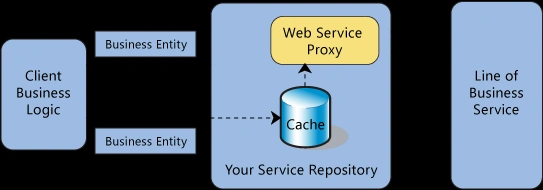
connection pool
A connection pool is a cache of database connections maintained so that the connections can be reused when future requests to the database are required. Connection pools are used to enhance the performance of executing commands on a database.
createConnection vs createPool
When you create a connection, you only have one connection and it lasts until you close it (or it is closed by the mysql server). You can pass it around by reference and re-use it, or you can create and close connections on demand.
A pool is a place where connections get stored. When you request a connection from a pool, you will receive a connection that is not currently being used, or a new connection. If you're already at the connection limit, it will wait until a connection is available before it continues. These pooled connections do not need to be manually closed, they can remain open and be easily reused.
Which you use is entirely up to you, as they both accomplish the same goal, just in two different ways.
The SQL INSERT INTO Statement
The INSERT INTO statement is used to insert new records in a table.
INSERT INTO table_name (column1, column2, column3, ...)
VALUES (value1, value2, value3, ...);
INSERT INTO table_name
VALUES (value1, value2, value3, ...);
INSERT INTO [table] (param1, param2, ... paramN)

VALUES ('Ambitious', 'Royalty', 'App Builders')
INSERT INTO
(word,
rhyme,
freq,
score,
flags,
syllables)
VALUES
(
 'bazooka',
    '',
    '',
    '',
    3
    )
DDL
The Data Definition Language (DDL) contains the commands used to create and destroy databases and database objects. After the database structure is defined with DDL, database administrators and users can use the Data Manipulation Language (DML) to insert, retrieve and modify the data contained within it.
CREATE DATABASE employees
Tables
- table names are singular
- Column Names are never repeated
CREATE TABLE personal_info (first_name char(20) not null, last_name char(20) not null, employee_id int not null)
USE. The USE command allows you to specify the database you want to work with within your DBMS.
View a virtual table generated on demand from a query SELECT Foreign Key can be null Primary Key column or set of columns
Column
Data Types
- String
- CHAR, VARCHAR
- Integer
- INT
- Float
- FLOAT
- Date and time
- DATE
Properties
- Default Value
- Auto Increment Value
- Null value
Output Table Schema
DESC `table_name`
Query
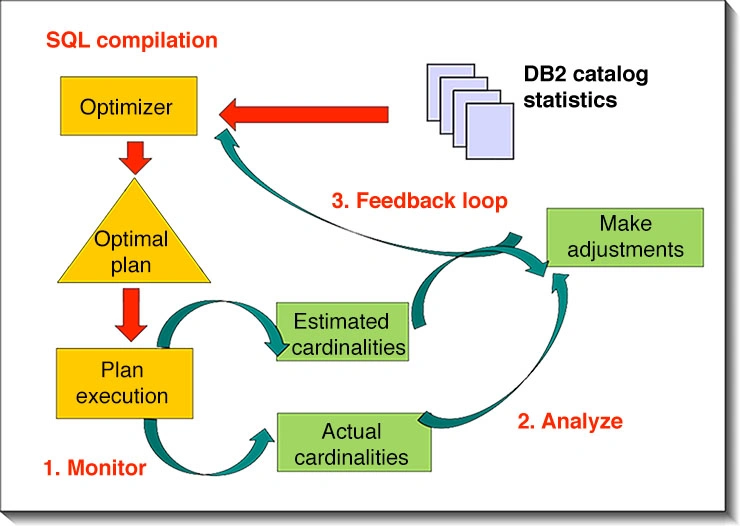
Cardinality
The ALTER USER statement in MySQL is used to modify the properties of a user account.
ALTER USER: This is the command to modify a user account.'root'@'localhost': This specifies the user account you want to modify. In this case, it is the 'root' user connecting from the 'localhost' host.IDENTIFIED BY 'username': This part sets the new password for the user. In the statement you provided, it sets the password to 'username'. Please note that it's not recommended to use 'username' as an actual password. You should replace it with a strong and secure password of your choice.
So, the ALTER USER 'root'@'localhost' IDENTIFIED BY 'username' statement changes the password for the 'root' user when connecting from the 'localhost' host to the MySQL database. The specific command you provided, ALTER USER 'root'@'localhost' IDENTIFIED BY 'username', is used to change the password for the MySQL user account 'root' when connecting from the 'localhost' host.
ALTER USER 'root'@'localhost' IDENTIFIED BY 'tac0tu3sday';