APIs
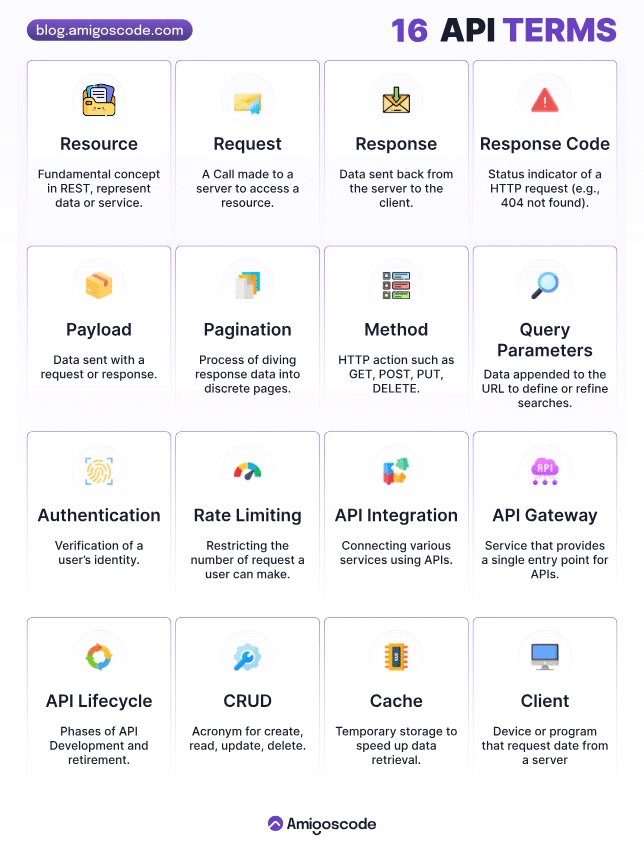
APIs can be used to:
- to access data
- to hide complexity
- to extend functionality
- security/privacy reasons.
Table of Contents
MySQL architecture enables you to select the right storage engine for your needs, and abstracts away all implementation details from the end users (application engineers and DBA) who only need to know a consistent stable API.
Application layer
Connection handling - each client gets its own connection which is cached for the duration of access) Authentication - server checks (username,password,host) info of client and allows/rejects connection Security: server determines whether the client has privileges to execute each query (check with show privileges command)
Server layer
Services and utilities - backup/restore, replication, cluster etc SQL interface - clients run queries for data access and manipulation SQL parser - creates a parse tree from the query (lexical/syntactic/semantic analysis and code generation) Optimizer - optimizes queries using various algorithms and data available to it(table level stats), modifies queries, order of scanning, indexes to use etc. (check with explain command) Caches and buffers - cache stores query results, buffer pool(InnoDB) stores table and index data in LRU fashion
Storage engine options
InnoDB: most widely used, transaction support, ACID compliant, supports row-level locking, crash recovery and multi-version concurrency control. Default since MySQL 5.5+. MyISAM: fast, does not support transactions, provides table-level locking, great for read-heavy workloads, mostly in web and data warehousing. Default upto MySQL 5.1. Archive: optimised for high speed inserts, compresses data as it is inserted, does not support transactions, ideal for storing and retrieving large amounts of seldom referenced historical, archived data Memory: tables in memory. Fastest engine, supports table-level locking, does not support transactions, ideal for creating temporary tables or quick lookups, data is lost after a shutdown CSV: stores data in CSV files, great for integrating into other applications that use this format … etc. It is possible to migrate from one storage engine to another. But this migration locks tables for all operations and is not online, as it changes the physical layout of the data. It takes a long time and is generally not recommended. Hence, choosing the right storage engine at the beginning is important.
General guideline is to use InnoDB unless you have a specific need for one of the other storage engines.
Naming Convention
API Endpoint:
- plural
- don't append version
Best Practices
- url structure
/api/v1/endpointincreases sustainability as app complexity and number of developers grows.
Versioning
since several different versions of the app could be running in the wild, the server needs to consolidate and handle the various requests coming in from new and legacy users alike.
RESTful API Best Practices
- forward proxy / gateways
- reverse proxy
- The general rule of thumb for building APIs for mobile is to make the client as dumb and thin as possible, while keeping all the heavy sorting, filtering, number crunching, data aggregating, and consolidation on the server. This leverages the more powerful hardware of the server and tries to keep the client logic simple while fetching and showing the data to the user as quickly as possible.
Apdex
Apdex is an industry standard to measure users' satisfaction with the response time of web applications and services.
Example Apdex score
During a 2 minute period a host handles 200 requests. The Apdex threshold T = 0.5 seconds (500ms). This value is arbitrary and is selected by the user.
- 170 of the requests were handled within 500ms, so they are classified as Satisfied.
- 20 of the requests were handled between 500ms and 2 seconds (2000 ms), so they are classified as Tolerating.
- The remaining 10 were not handled properly or took longer than 2 seconds, so they are classified as Frustrated.
The resulting Apdex score is 0.9: (170 + (20/2))/200 = 0.9.
HTTP-Server
npm i -g http-server
Swagger
CORS
- a policy or procedure: describe the request a service should receive
- so that you can allowing / preventing other endpoints from sharing
PUT and POST can both be used for Create and Update
- PUT and POST can both be used for Create and Update
PUT for Create
- all of the data needs to be submitted for the PUT request
- identifier is already known to the user
PUT for Update
- idempotent operation (produces the same result, regardless of how many times it's called)
POST is not idempotent
Web Access Control List
A web access control list (web ACL) gives you fine-grained control over the web requests that your API or Application Load Balancer responds to. You can allow or block the following types of requests:
- Originate from an IP address or a range of IP addresses
- Originate from a specific country or countries
- Contain a specified string or match a regular expression (regex) pattern in a particular part of requests
- Exceed a specified length
- Appear to contain malicious SQL code (known as SQL injection)
- Appear to contain malicious scripts (known as cross-site scripting)
You can also test for any combination of these conditions, or block or count web requests that not only meet the specified conditions, but also exceed a specified number of requests in any 5-minute period.
Disadvantages of Microservices
- it introduces complexity and challenges
NPM Package - jsonwebtoken
verifying JSON Web Tokens (JWTs) in JavaScript applications. JWTs are a compact, URL-safe means of representing claims between two parties. They are often used for authentication and authorization purposes in web applications.
Secrets
- sign
NPM Package - dotenv
The dotenv package is a popular tool used in Node.js applications to load environment variables from a .env file into the application's environment. Environment variables are typically used to store sensitive information or configuration values that can vary depending on the deployment environment (e.g., development, staging, production).
The .env file is a simple text file that contains key-value pairs, where each line represents an environment variable. For example:
DB_HOST=localhost
DB_PORT=5432
DB_USER=myuser
DB_PASSWORD=mypassword
The dotenv package provides a straightforward way to read the .env file and set the environment variables for the application. It allows developers to define and manage their application's configuration in a separate file, making it easier to customize the application's behavior without modifying the code.
To use the dotenv package, you typically install it via npm or yarn:
npm install dotenv
Then, in your Node.js application, you require the dotenv module and call the config method to load the environment variables from the .env file:
require('dotenv').config();
Once the config() method is called, the environment variables defined in the .env file become accessible through the process.env object. For example, process.env.DB_HOST would give you the value 'localhost' from the previous example.
By utilizing the dotenv package, developers can keep sensitive information secure, easily manage configuration across different environments, and provide a more flexible and modular approach to their Node.js applications.
I hope this clarifies the purpose and usage of the dotenv package. Let me know if you have any further questions!
To hide secrets from a Git repository using an .env file, you can follow these steps:
-
Create an
.envfile: In the root directory of your project, create a file named.env. This file will contain your secret environment variables. -
Add secrets to the
.envfile: Open the.envfile in a text editor and add your secret environment variables in the following format:SECRET_KEY=your_secret_key
API_KEY=your_api_key -
Add
.envto.gitignore: Create or open the.gitignorefile in the root directory of your project. Add a line with.envto the file. This will tell Git to ignore the.envfile and not include it in the repository. -
Access secrets in your code: In your code, you can access the environment variables defined in the
.envfile. The exact method depends on the programming language or framework you are using. For example, in Python, you can use a package likepython-dotenvto load the environment variables from the.envfile.Here's an example of how you can access environment variables in Python using
python-dotenv:from dotenv import load_dotenv
import os
# Load environment variables from .env file
load_dotenv()
# Access environment variables
secret_key = os.getenv("SECRET_KEY")
api_key = os.getenv("API_KEY")
# Use the secret environment variables in your code
```
Make sure to install the `python-dotenv` package by running `pip install python-dotenv` or using your preferred package manager. -
Safely share the code: After completing the above steps, you can safely share your code repository without exposing your secret values.
Remember to be cautious with your secret values and avoid hardcoding them in your code or sharing them publicly. Additionally, ensure that the .env file is not accidentally committed to the repository in any previous commits. If it has been committed, you'll need to remove it from the repository's history using Git commands like git filter-branch or git rebase before pushing the changes to a remote repository.
Loopback
npm i -g loopback-cli