Configuration
Compilation
just-in-time compilation
Ahead-of-Time Compilation
- One of the advantages of enabling AOT is faster application rendering.
- smaller bundle size.
- much higher possibility to spot compilation errors in templates
Webpack
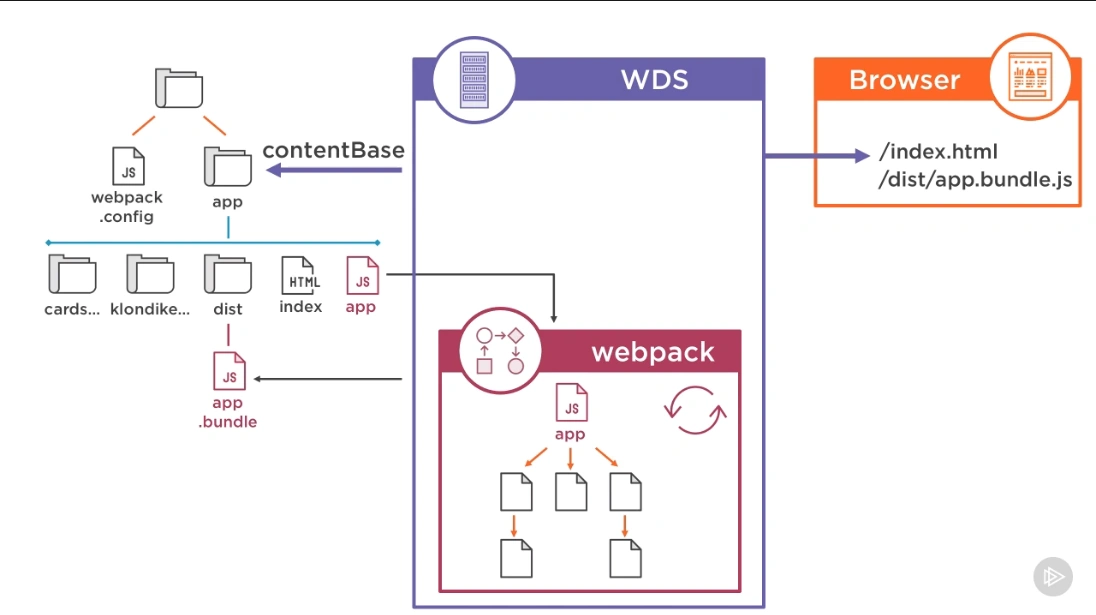
- Source Maps for debugging minified code
- Hot Module Reloading
- Webpack is an open source JavaScript module bundler, capable of transforming, bundling, or packaging just about any resource or asset
- If the corresponding plugins are included Webpack can take front-end assets like HTML, CSS, even images
- modules with dependencies and generates static assets representing those modules.
Dist Folder (Build)
https://itnext.io/how-to-optimize-angular-applications-99bfab0f0b7c polyfills.js scripts.js runtime.js styles.css main.js
polyfills.js is for making our application compatible for different browsers. Because we write the code with newest features and not all browsers support such features.
scripts.js contains the scripts we declare in the scripts section of angular.json file
"scripts": [
   "myScript.js",
]
runtime.js is the webpack loader. This file contains webpack utilities that are needed to load other files
styles.css contains all styles we declare in styles section of angular.json file
"styles": [
  "src/styles.css",
  "src/my-custom.css"
],
main.js contains all our code including components (ts, html and css codes), pipes, directives, services and all other imported modules (including third party).
As you can see over time main.js file will be bigger and bigger which is a problem as in order to see the website browser needs to download main.js file, execute, and render on the page which not only can be challenging for mobile users with slow internet, but also for desktops.
angular.json
- configurations for building, serving, testing, linting, and testing
Environment.ts tell the run-time you are running a production version of the code instead of developing the code locally.
Build command
ng build --configuration production --aot --stats-json
ng build --configuration production --output-hashing all
Before Angular 12: ng build --prod was the standard way to build for production. Between Angular 11 and 12 (likely): The ng build --prod command started issuing a deprecation warning, suggesting the use of ng build --configuration production instead. Angular 14 and onwards: ng build --prod no longer works, and you must use ng build --configuration production for production builds.
optimizing build size
- tree shaking
- angular.json
- build command