ionic
Table of Contents
History
Ionic today has millions of developers in its community, and those developers created over 3.5M apps just last year alone.
July 2025
https://youtu.be/zgjqxQ-WudQ?si=sRKaPIiEvkt_Sq7f
January 2024
https://www.youtube.com/watch?v=tbrJJkSYQ04
Install Ionic 7
npm i -g @ionic/cli
Create New Project
ionic start moderd-app blank --type angular
VS Code Extension
https://marketplace.visualstudio.com/items?itemName=ionic.ionic
Links
- ionic4
- ionic4
- https://www.reddit.com/r/ionic/
- https://www.freakyjolly.com/ionic-angular-material-how-to-install-material-and-use-its-components-in-ionic-app/
- https://www.hybapps.com/
- https://masteringionic.com/
- https://kickoffionic.com/
- https://blog.smartcodehub.com/tag/ionic-5/
- https://www.freakyjolly.com/ionic-4-make-http-calls-and-handle-responses-easily-using-an-interceptor/
- https://www.freakyjolly.com/ionic-4-httpclient-crud-service-tutorial-to-consume-restful-server-api/
- https://ionicthemes.com/tutorials
- https://github.com/Alexintosh/Awesome-Ionic
- https://www.djamware.com/post-sub-category/5845691a80aca7763489d872/ionic-framework
- https://www.joshmorony.com/category/ionic-tutorials
- https://codeburst.io/@apuravchauhan
- https://ionictheme.com/ionic3-tutorials-list-3/
- https://ionictheme.com/how-to-do-with-ionic3-l1/
- https://ionictheme.com/ionic4-capacitor-tutorials-list-1/
- https://medium.com/@paulstelzer/ionic-4-the-ultimate-theme-switcher-ab5a592cb1c4
- https://hackernoon.com/get-start-your-mobile-app-development-journey-with-ionic-8ecd8fa70c1e
- https://devdactic.com/start-devdactic/
- https://medium.freecodecamp.org/how-to-build-your-first-ionic-4-app-with-api-calls-f6ea747dc17a
- https://ionicacademy.com/http-calls-ionic/
- https://www.badgeup.io/
- https://www.djamware.com/
- https://market.ionic.io/starters/ionic-mp3-music-player
- https://www.ionicfirebaseapp.com/
- https://ionicframework.com/docs/api/navigation/IonicPage/
- https://github.com/busterc/awesome-cordova
- https://github.com/juarezpaf/ionic-adventures
- https://www.joshmorony.com/the-biggest-advantage-of-ionic-applications-web-views/
- https://levelup.gitconnected.com/cross-platform-mobile-apps-are-as-slow-as-you-make-them-9b73da52c901
Ionic CLI
Commands
New Project (START command)
ionic start PROJECT-NAME
ionic start
ionic start --list
ionic start myApp
ionic start myApp blank
ionic start myApp tabs --cordova
ionic start myApp tabs --capacitor
ionic start myApp super --type=ionic-angular
ionic start myApp blank --type=ionic1
ionic start cordovaApp tabs --cordova
ionic start "My App" blank
ionic start "Conference App" https://github.com/ionic-team/ionic-conference-app
ionic build

ionic cordova build android

ionic cordova run android --device
if that fails
ionic cordova platform remove android

ionic cordova platform add android

ionic cordova build android
Run on Android Device
ionic cordova run android --device
Build Process
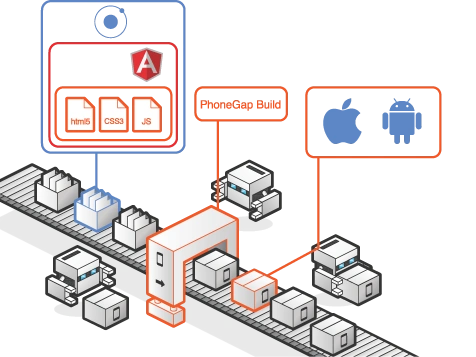
ionic prepare
- Reset plugins and platforms
If you're using XCode to test and run your code, after you change some part of the code you just have to run ionic prepare to update the iOS project which then again you continue to use in XCode.
Building
The cordova build command is a shorthand for the following, which in this example is also targeted to a single platform:
cordova prepare ios
cordova compile ios
In this case, once you run prepare, you can use Apple's Xcode SDK as an alternative to modify and compile the platform-specific code that Cordova generates within platforms/ios. You can use the same approach with other platforms' SDKs.
cordova preparecopies your assets over in preparation for compilation.
Debug - Ionic CLI debugging logging commands
ionic emulate ios --livereload --consolelogs --serverlogs
ionic emulate android --livereload --consolelogs --serverlogs

ionic run ios -l -c -s
ionic run android -l -c -s
- Safari’s Web Inspector with Remote Debugging for iOS
- Chrome DevTools with Remote Debugging for Android
TACO
Check for any missing Android dependencies: get the platform specific SDKs and requirements
taco install-reqs android
Ionic NPM Run Scripts
{  "browser-clean": "ionic cordova platform remove browser",
    "browser-build": "ionic cordova build browser --prod --release",
    "browser-view": "ionic serve --cordova --platform browser",
    "browser-deploy": "ionic build --prod --release && firebase deploy",
    "apple-clean": "ionic cordova platform remove ios",
    "apple-build": "ionic cordova platform add ios && ionic cordova prepare ios && ionic cordova build ios --prod --release",
    "apple-view": "open platforms/ios/imp.xcodeproj",
    "google-clean": "ionic cordova platform remove android",
    "google-build": "export ANDROID_HOME=~/Library/Android/sdk && export PATH=\\${PATH}:\\${ANDROID_HOME}/tools && export PATH=\\${PATH}:\\${ANDROID_HOME}/platform-tools && ionic cordova platform add android@6.4.0 && ionic cordova prepare android && ionic cordova build android --prod --release",
    "google-view": "export ANDROID_HOME=~/Library/Android/sdk && export PATH=\\${PATH}:\\${ANDROID_HOME}/tools && export PATH=\\${PATH}:\\${ANDROID_HOME}/platform-tools && ionic cordova run android --prod --device"}
v3
- https://www.joshmorony.com/converting-ionic-3-push-pop-navigation-to-angular-routing-in-ionic-4/
- https://moduscreate.com/blog/upgrading-an-ionic-3-application-to-ionic-4/
Sensitive Data: Android provides two mechanisms to store credentials: the KeyChain and the KeyStore. A KeyStore is bound to one specific application. Applications can not access credentials in KeyStores bound to other applications. If credentials need to be shared between applications, the KeyChain should be used. The user is asked for permission when an application attempts to access credentials in the KeyChain. Credential storage on iOS is provided by the Keychain. Credentials added to the Keychain are, by default, app private, but can be shared between applications from the same publisher. Cordova developers can use the credential storage mechanisms provided by Android and iOS via the SecureStorage (cordova-plugin-secure-storage) [7] plugin.
Package.json > config.xml
both places need any corresponding changes, but package.json should be the source of truth
Gradle Release | Pod | CocoaPod
Are you tired of manually adding ios dependencies in Cordova apps? Me too. Android has Gradle support out of the box, but CocoaPods get no love. That is until now. It looks for <pod> entries the config.xml and plugin.xml, creates the Podfile, updates the necessary configs and then runs pod update for you.
Build Hooks
https://github.com/nraboy/cordova-hooks
Hooks are pieces of code that you want to execute at certain points when building an app with Cordova. This folder is where you put your hooks. Remember that you can use hooks to execute specific code that can process, copy, or remove files before or after a specific cordova command is executed.
- represent special scripts which could be added by application and plugin developers or even by your own build system to customize cordova commands.
- Cordova hooks allow you to perform special activities around cordova commands.
- Platform-specific customizations are placed in merges/[platform-name], and are applied after the source files in the top-level www folder. This way, you can either add new source files for certain platforms, or you can override entire top-level source files with platform-specific ones.
www: This folder contains the source code for the user interface of the app. You’ll be spending most of your time in this folder. config.xml: This is the configuration file that is used for controlling the basic aspects and behavior of your app. Hooks are scripts that are run at various times in the build process.
<hook src="scripts/add-local-plugin-prefix.js" type="before_platform_rm" />
<hook src="scripts/remove-local-plugin-prefix.js" type="after_platform_rm" />
<hook src="scripts/remove-local-plugin-prefix.js" type="before_platform_add" />
<hook src="scripts/merge-platforms.js" type="after_platform_add" />
<hook src="scripts/merge-platforms.js" type="after_prepare" />
<hook src="scripts/remove-local-plugin-prefix.js" type="after_prepare" />
<hook src="scripts/add-local-plugin-prefix.js" type="before_plugin_rm" />
<hook src="scripts/remove-local-plugin-prefix.js" type="after_plugin_rm" />
Source Control
It is recommended not to check in platforms/ and plugins/ directories into version control as they are considered a build artifact. Your platforms and plugins will be saved in config.xml & package.json automatically. These platforms/plugins will be downloaded when cordova prepare is invoked.
many of the project's files and folders are build-time artifacts, created and used only during the build process, and not needed until it's time to build the project. All you really need are the following files and folders:
config.xml\hooks\\merges\(if you have one, the Cordova CLI doesn't make this folder automatically)\www\- https://ccoenraets.github.io/cordova-tutorial/
- https://www.studytonight.com/apache-cordova/
- http://ngcordova.com/docs/common-issues/
- https://cordova.apache.org/plugins/
- https://medium.com/@move4mobile/the-state-of-cross-platform-mobile-development-in-2019-da40fc2435d
- https://cordova.apache.org/
- https://instabug.com/blog/apache-cordova-development-tools/
- https://ccoenraets.github.io/cordova-tutorial/
- https://www.studytonight.com/apache-cordova/
- http://ngcordova.com/docs/common-issues/
Add platform-specific content
You can include platform-specific HTML, CSS, and JavaScript files to the merges folder of your project. The files you add to this folder do one of two things. They add content to a platform-specific build of your app, or, they override non-platform-specific content that uses the same file name.
LocalStorage
iOS - On iOS 8 the localStorage is sometimes cleared when memory is low, as you can read here.
I recently experienced it myself on an Ionic app I was working on. I got a notification on my iPhone that it was running low on memory and when I opened up the app the localStorage was empty. I had another app on my device that was using localStorage as well, but that one was not cleared.
Android - I haven't tested this extensively on Android, but if you read this thread, you'll see that there are several reports that localStorage doesn't work as expected.
So... Should I never use localStorage?
You should use localStorage only for data that does not need to be persisted. A good case would be caching data that you're retrieving from an external source. If localStorage is cleared unexpectedly, you can still get the data again.
Alternatives - For persisting user data, if you want to keep the users of your mobile app happy, you're better off using SQLite.
Android OS Alternatives https://lineageos.org/