Product Management
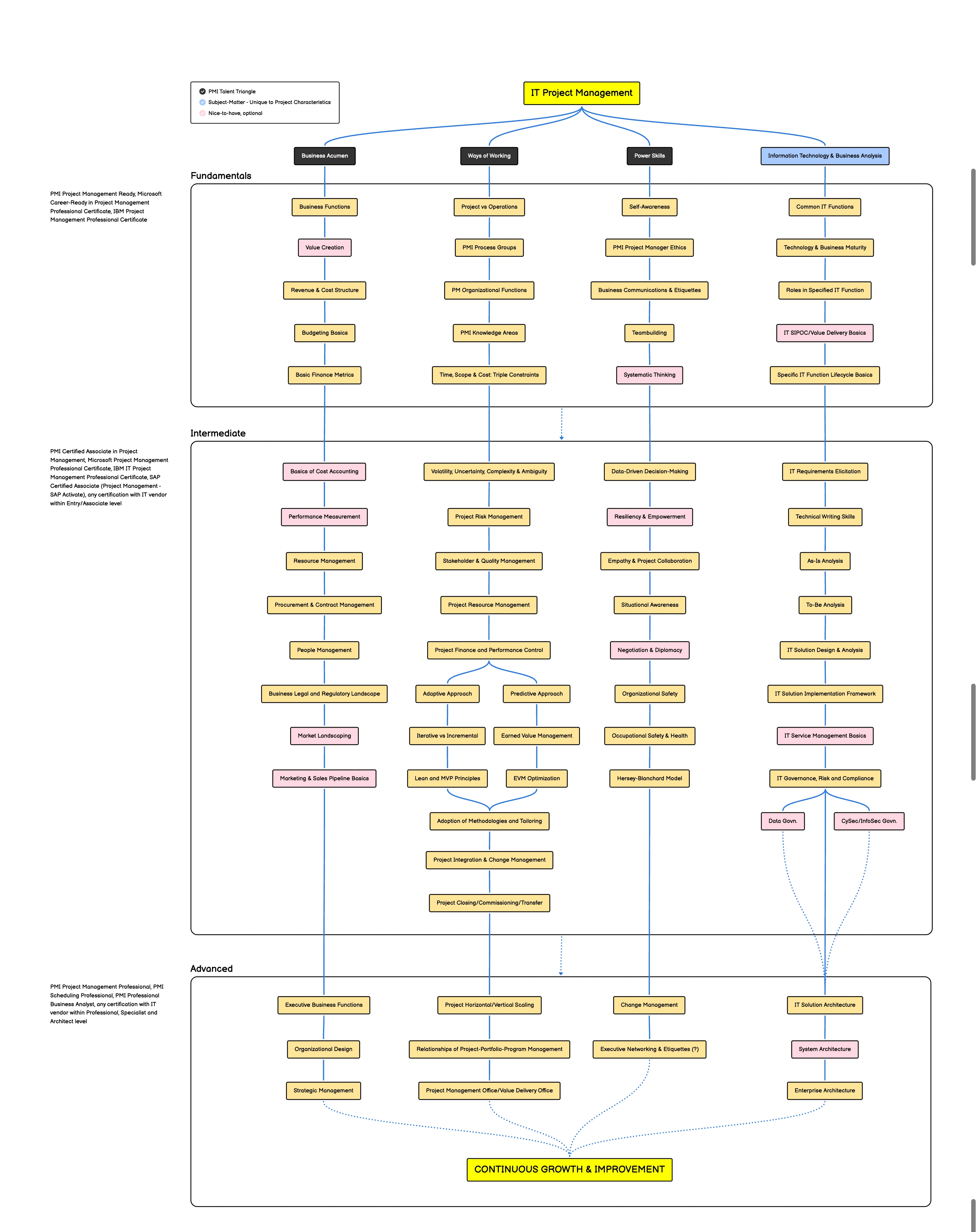
Product Management vs Project Management
project-managment.webp)
Product Management:
- Focus: The "what" and "why" of the product. They define the product vision, strategy, and roadmap. They are concerned with understanding the market, identifying user needs, and prioritizing features that will deliver value to customers and achieve business goals.
- Responsibilities:
- Market Research: Understanding customer needs, pain points, and market trends.
- Product Vision: Defining the long-term vision and strategy for the product.
- Roadmap Planning: Prioritizing features and releases based on customer value and business impact.
- User Feedback: Gathering and analyzing user feedback to inform product decisions.
- Collaboration: Working with engineering, design, and marketing teams to ensure alignment.
- Metrics: Product usage, customer satisfaction, retention, and revenue.
Project Management:
- Focus: The "how" and "when" of executing the product roadmap. They are responsible for planning, organizing, and executing projects to deliver features and releases on time and within budget.
- Responsibilities:
- Project Planning: Defining project scope, timelines, and resources.
- Task Management: Breaking down projects into smaller tasks and assigning them to team members.
- Risk Management: Identifying and mitigating potential risks to project timelines and budgets.
- Communication: Keeping stakeholders informed of project progress and any roadblocks.
- Execution: Ensuring that projects are executed efficiently and effectively.
- Metrics: On-time delivery, budget adherence, and project completion.
Key Differences:
- Scope: Product Management focuses on the entire product lifecycle, while Project Management focuses on specific projects within that lifecycle.
- Time Horizon: Product Management has a long-term vision, while Project Management focuses on shorter-term project timelines.
- Decision-Making: Product Management makes decisions about what to build, while Project Management makes decisions about how to build it.
In a SaaS startup:
- Collaboration is key: Product Managers and Project Managers must work closely together to ensure that the product vision is translated into successful projects.
- Agility is important: Both roles need to be adaptable and able to respond to changing market conditions and customer needs.
- Overlap may occur: In smaller startups, individuals may wear multiple hats and perform some aspects of both roles.
Example:
Imagine a SaaS startup developing a new customer relationship management (CRM) tool. The Product Manager would:
- Research the CRM market and identify key customer needs.
- Define the vision for the CRM tool and prioritize features like contact management, sales tracking, and reporting.
- Create a product roadmap outlining future releases and enhancements.
The Project Manager would:
- Develop a project plan for the initial release of the CRM tool, including timelines, resources, and tasks.
- Manage the development team to ensure that features are built on time and within budget.
- Communicate project progress to stakeholders.
By understanding the distinct roles of Product Management and Project Management, SaaS startups can effectively bring their product vision to life and deliver value to customers.
Who are the best managers? Steve Jobs
user-centered design process
activities that emphasize involving users throughout the design and development lifecycle.
- User Testing:
- This is the overarching term for evaluating a product or service by testing it with representative users.
- It involves observing users as they interact with mockups, prototypes, or even finished products.
- Usability Testing:
- A specific type of user testing that focuses on evaluating how easy and efficient it is for users to achieve their goals with the design.
- This is crucial for identifying usability issues early in the design process.
- Prototype Testing:
- Specifically refers to testing the functionality and usability of a prototype, which can range from low-fidelity wireframes to high-fidelity interactive mockups.
- Design Validation:
- This term is used to describe the process of confirming that the design meets the needs and expectations of the target audience.
- User Research:
- This is a broader term that includes various methods for understanding user needs, behaviors, and motivations. User testing is a key component of user research.
Agile Decision Making
Agile decision-making is a collaborative process that involves the entire team working together to make decisions quickly and effectively.
- Trial and error would likely have produced the right decision much faster than lengthy deliberation (think of learning to bike by riding versus being on the sidelines studying other people riding)
- Sometimes the right but lengthy decisions tend to condition an organization into thinking that all correct decisions are a function of spending a lot of time and that wrong decisions are results of not spending enough time. Invariably, when wrong decisions are made - despite much analysis - these organizations will take an equally long time to make the right decision. So in a given period of time they will make fewer right decisions than organizations that can cycle through decisions faster.
Identify the decision to be made: The first step in the agile decision-making process is to identify the decision that needs to be made. This may involve defining the problem, analyzing the situation, and gathering information.
Gather input from the team: In an agile environment, decision-making is a team effort. Gather input from all team members who have relevant information or expertise. Encourage open communication and active listening to ensure that everyone's opinions and ideas are heard.
Analyze options and evaluate trade-offs: After gathering input from the team, analyze the options and evaluate the trade-offs. Consider the risks, costs, and benefits of each option, and determine which option best aligns with the team's goals and objectives.
Make a decision: Once the options have been analyzed and evaluated, the team can make a decision. In an agile environment, decisions are typically made by consensus or through a collaborative process that involves the entire team.
Take action and iterate: After a decision has been made, take action and implement the decision. Monitor the results and iterate as necessary. In an agile environment, decisions are not set in stone and can be revisited and revised as the situation evolves.
Reflect and learn: After the decision has been implemented, reflect on the process and learn from the experience. Consider what went well and what could be improved, and use this knowledge to make better decisions in the future.
Brownfield development
Brownfield development in software refers to the process of working with and modifying existing software systems, typically legacy or mature applications, rather than starting from scratch with a new system. It involves making enhancements, updates, or modifications to an existing software solution to meet new requirements or address issues.
The term "brownfield" is derived from the construction industry, where it refers to the redevelopment or repurposing of land that has been previously used or developed. Similarly, in software development, brownfield projects involve working with existing codebases, databases, and infrastructure.
Brownfield development presents unique challenges compared to greenfield development (starting fresh), as developers need to consider the constraints and limitations imposed by the existing software architecture, design, and implementation. They must also carefully manage the impact of changes on the system's stability, compatibility, and performance.
Some common activities involved in brownfield development include:
-
Feature enhancements: Adding new functionality to an existing software system to meet evolving requirements.
-
Bug fixes: Identifying and resolving software defects or issues that arise in the existing system.
-
Technology upgrades: Upgrading underlying technologies, libraries, or frameworks to improve performance, security, or maintainability.
-
Integration with third-party systems: Integrating the existing software with external systems or services to enable new capabilities or data exchange.
-
Refactoring: Restructuring or optimizing existing code to improve maintainability, readability, or performance without changing its external behavior.
-
Modularization: Breaking down monolithic applications into smaller, more manageable modules or microservices.
-
Database migrations: Transforming or migrating data structures and schemas to accommodate new requirements or improve performance.
reasons to maintain the current technology
The decision to pursue greenfield development should be made after a thorough evaluation of the specific project requirements, technical considerations, and business objectives. Assessing the trade-offs and risks associated with each approach will help determine the most viable and beneficial path forward. Frameworks/Libraries require a deep understanding of the existing software system, its architecture, dependencies, and potential risks. It often involves careful planning to minimize disruptions and ensure the stability and reliability of the system throughout the development process. When considering whether to continue with an existing tech stack or start fresh with greenfield development, it's essential to communicate the following convincing reasons to maintain the current technology:
-
Time and Cost Efficiency: Building a software solution from scratch using a new tech stack can be time-consuming and expensive. By leveraging the existing tech stack, you can save significant development time and costs associated with learning new technologies, setting up infrastructure, and rewriting code. This allows the team to focus on adding value and delivering features more quickly.
-
Existing Expertise: The team members who have been working with the current tech stack have accumulated valuable knowledge and experience over time. They are familiar with the system's intricacies, best practices, and potential pitfalls. By continuing with the existing tech stack, you can leverage their expertise, which can significantly reduce the learning curve for new team members and ensure a smoother transition.
-
Stability and Reliability: Mature software systems built on an existing tech stack have typically undergone extensive testing, bug fixing, and refinement. They have a proven track record of stability and reliability in real-world environments. Starting from scratch introduces inherent risks and uncertainties associated with untested code and unproven technologies. By staying with the existing stack, you can benefit from the stability and reliability of the current system.
-
Seamless Integration: Existing software systems often have integrations with other internal or external systems, such as databases, APIs, or third-party services. Migrating to a new tech stack would require rebuilding these integrations, potentially causing disruptions and compatibility issues. By continuing with the current tech stack, you can ensure seamless integration with the existing ecosystem, minimizing disruptions and maintaining business continuity.
-
Incremental Improvements: Instead of discarding all progress made with the existing tech stack, it's often more beneficial to focus on incremental improvements. By identifying pain points, addressing technical debt, and gradually modernizing the system, you can achieve the desired outcomes without starting from scratch. This approach allows you to leverage the existing codebase, maintain feature parity, and prioritize enhancements based on user feedback and business needs.
-
User Experience and Feedback: If the existing software solution has an established user base, their feedback and familiarity with the current system should be considered. Abruptly introducing a new tech stack can disrupt the user experience, require additional training or support, and potentially alienate the existing user base. By continuing with the existing tech stack, you can maintain continuity, provide a seamless transition for users, and incorporate their feedback into iterative improvements.
buffet analogy
you can't eat everything at the buffet, some of you might be allergic to some things