(PWA) Progressive Web App
Links
https://web.dev/explore/progressive-web-apps
Firefox Taskbar Tabs
https://www.omgubuntu.co.uk/2025/03/firefox-nightly-supports-web-apps-taskbar-tabs
Navigator Object
The navigator object contains information about the browser and the operating system. It can be used to detect the browser version, the user's preferred language, and whether the browser is online or offline. Here are some key properties and methods of the navigator object:
navigator.userAgent: Returns the user-agent string for the browser.navigator.language: Returns the preferred language of the user.navigator.onLine: Returns a boolean indicating whether the browser is online.navigator.geolocation: Provides access to the device's geographical location.navigator.serviceWorker: Provides access to the Service Worker API.
Example Usage in Angular
import { Component, OnInit } from '@angular/core';

@Component({
  selector: 'app-navigator-info',
  template: `
    <div>
      <p>User Agent: {{ userAgent }}</p>
      <p>Language: {{ language }}</p>
      <p>Online: {{ online }}</p>
    </div>
  `
})
export class NavigatorInfoComponent implements OnInit {
  userAgent: string;
  language: string;
  online: boolean;

  ngOnInit() {
    this.userAgent = navigator.userAgent;
    this.language = navigator.language;
    this.online = navigator.onLine;
  }
}
Example Usage in React
import React, { useState, useEffect } from 'react';

const NavigatorInfo = () => {
  const [userAgent, setUserAgent] = useState('');
  const [language, setLanguage] = useState('');
  const [online, setOnline] = useState(true);

  useEffect(() => {
    setUserAgent(navigator.userAgent);
    setLanguage(navigator.language);
    setOnline(navigator.onLine);
  }, []);

  return (
    <div>
      <p>User Agent: {userAgent}</p>
      <p>Language: {language}</p>
      <p>Online: {online.toString()}</p>
    </div>
  );
};

export default NavigatorInfo;
Screen Object
The screen object contains information about the user's screen, such as its width, height, and color depth. This information can be useful for optimizing the layout and appearance of a web application based on the user's screen size.
screen.width: Returns the width of the screen in pixels.screen.height: Returns the height of the screen in pixels.screen.availWidth: Returns the width of the screen, excluding interface features like the taskbar.screen.availHeight: Returns the height of the screen, excluding interface features like the taskbar.screen.colorDepth: Returns the color depth of the screen in bits per pixel.
Example Usage in Angular
import { Component, OnInit } from '@angular/core';

@Component({
  selector: 'app-screen-info',
  template: `
    <div>
      <p>Screen Width: {{ screenWidth }}</p>
      <p>Screen Height: {{ screenHeight }}</p>
      <p>Available Width: {{ availWidth }}</p>
      <p>Available Height: {{ availHeight }}</p>
      <p>Color Depth: {{ colorDepth }}</p>
    </div>
  `
})
export class ScreenInfoComponent implements OnInit {
  screenWidth: number;
  screenHeight: number;
  availWidth: number;
  availHeight: number;
  colorDepth: number;

  ngOnInit() {
    this.screenWidth = screen.width;
    this.screenHeight = screen.height;
    this.availWidth = screen.availWidth;
    this.availHeight = screen.availHeight;
    this.colorDepth = screen.colorDepth;
  }
}
Example Usage in React
import React, { useState, useEffect } from 'react';

const ScreenInfo = () => {
  const [screenWidth, setScreenWidth] = useState(0);
  const [screenHeight, setScreenHeight] = useState(0);
  const [availWidth, setAvailWidth] = useState(0);
  const [availHeight, setAvailHeight] = useState(0);
  const [colorDepth, setColorDepth] = useState(0);

  useEffect(() => {
    setScreenWidth(screen.width);
    setScreenHeight(screen.height);
    setAvailWidth(screen.availWidth);
    setAvailHeight(screen.availHeight);
    setColorDepth(screen.colorDepth);
  }, []);

  return (
    <div>
      <p>Screen Width: {screenWidth}</p>
      <p>Screen Height: {screenHeight}</p>
      <p>Available Width: {availWidth}</p>
      <p>Available Height: {availHeight}</p>
      <p>Color Depth: {colorDepth}</p>
    </div>
  );
};

export default ScreenInfo;
manifest.json setup
The Web App Manifest is a key component for any website in 2025, even small static sites. This simple JSON file enhances user experience across all platforms by enabling "installation" capabilities and improving mobile presentation.
Required Meta Tags
Add these meta tags to your HTML <head> section:
<!-- Basic PWA support -->
<meta name="viewport" content="width=device-width, initial-scale=1.0">
<meta name="theme-color" content="#4285f4">
<meta name="mobile-web-app-capable" content="yes">
<meta name="apple-mobile-web-app-capable" content="yes">
<meta name="apple-mobile-web-app-status-bar-style" content="black-translucent">
<meta name="apple-mobile-web-app-title" content="Your Site Name">
<link rel="manifest" href="/manifest.json">

<!-- iOS icon support -->
<link rel="apple-touch-icon" href="/icons/icon-192x192.png">
Essential manifest.json Properties
For a minimal, effective web app manifest in 2025:
{
  "name": "Your Website Name",
  "short_name": "YourSite",
  "description": "A brief description of your website",
  "start_url": "/index.html",
  "display": "standalone",
  "background_color": "#ffffff",
  "theme_color": "#4285f4",
  "icons": [
    {
      "src": "/icons/icon-192x192.png",
      "sizes": "192x192",
      "type": "image/png",
      "purpose": "any maskable"
    },
    {
      "src": "/icons/icon-512x512.png",
      "sizes": "512x512",
      "type": "image/png"
    }
  ]
}
Property Breakdown for Small Sites
- name: Full name of your website (shown on install prompts)
- short_name: Abbreviated name (shown under app icons)
- description: Brief site description (improves SEO and install prompts)
- start_url: Entry point for your website when launched as an app
- display: How the site appears when installed:
standalone: Looks like a native app without browser UIminimal-ui: Shows minimal browser controls (good for simple sites)browser: Opens in standard browser (fallback option)
- background_color: Color of the splash screen shown during app launch
- theme_color: Determines browser UI colors in various contexts
- icons: Array of icons in different sizes:
- Must include at least 192x192 and 512x512 sizes
- Adding
"purpose": "any maskable"ensures proper display on all devices
Advanced Properties for Enhanced Experience
Even for small sites, these additional properties can improve user experience:
{
  "id": "/",
  "lang": "en-US",
  "dir": "ltr",
  "orientation": "any",
  "categories": ["your_category"],
  "screenshots": [
    {
      "src": "/screenshots/home.png",
      "sizes": "1280x720",
      "type": "image/png",
      "platform": "wide"
    }
  ],
  "shortcuts": [
    {
      "name": "Important Page",
      "url": "/important-page",
      "description": "Quick access to important information"
    }
  ]
}
Benefits for Small Static Sites
- Improved Discovery: Better presentation in search results
- Offline Access: Basic content available without internet
- Enhanced Mobile Experience: Feels more app-like on mobile devices
- Increased Engagement: "Add to Home Screen" increases return visits
- Future-Proofing: Prepared for upcoming web platform features
Implementation Strategy
For static sites, you can typically add manifest.json support with just these steps:
- Create the manifest.json file in your site root
- Add the required meta tags to your HTML
- Generate appropriate icons (use tools like Real Favicon Generator)
- Test with Lighthouse in Chrome DevTools
No backend or complex JavaScript required - these enhancements work for completely static sites.
Service Worker Considerations
Even the simplest sites benefit from a basic service worker for offline support:
// minimal-sw.js - place in your root directory
self.addEventListener('install', event => {
  event.waitUntil(
    caches.open('site-static-v1').then(cache => {
      return cache.addAll([
        '/',
        '/index.html',
        '/styles/main.css',
        '/scripts/main.js',
        '/offline.html'
      ]);
    })
  );
});

self.addEventListener('fetch', event => {
  event.respondWith(
    caches.match(event.request).then(response => {
      return response || fetch(event.request).catch(() => {
        if (event.request.mode === 'navigate') {
          return caches.match('/offline.html');
        }
      });
    })
  );
});
Register it with:
// Add to your main JS file
if ('serviceWorker' in navigator) {
  navigator.serviceWorker.register('/minimal-sw.js');
}
Design Goals
- Fluid Interface
- fluid interface
- app-like experience
- microinteractions
- transitions
- information architecture woven into UI
- Usage of System Fonts
- Microsoft (Segoe), Google (Roboto), Apple (San Francisco) or even Mozilla (Fira Sans)
- Touch Interactions
- Share Functionality
- Make non-interactive content unselectable
- when using web browser, a single tap on text could trigger a text selection action
user-select: none;
- Retain scroll position on previous page
- transition animations
- fast
- buttons change shape when activated
- https://codepen.io/nickmerritt/pen/YpVPbx
- card reveal details page animation
- login with facebook/google
- Purposeful animation
Modern Web App Concept
-
HTTPS,
-
caching/Offline mode,
-
Web push notifications,
-
“Add to Home Screen” prompts.
-
theme_color property to set the color of the toolbar
-
https://medium.com/appscope/designing-native-like-progressive-web-apps-for-ios-1b3cdda1d0e8
-
https://developer.mozilla.org/en-US/docs/Web/Progressive_web_apps/Installable_PWAs
-
https://blog.perfecto.io/progressive-web-applications/2018-state-of-progressive-web-apps-pwa-2/
-
https://www.netguru.com/codestories/few-tips-that-will-make-your-pwa-on-ios-feel-like-native
-
https://developers.google.com/web/updates/2018/12/badging-api
-
https://medium.com/quick-code/top-tutorials-to-learn-progressive-web-app-pwa-57bdf06af328
-
https://jaxenter.com/how-to-progressive-web-apps-141656.html
-
https://codeburst.io/top-5-frontend-development-topics-to-learn-in-2019-ee49df8bd492
Web App Manifest
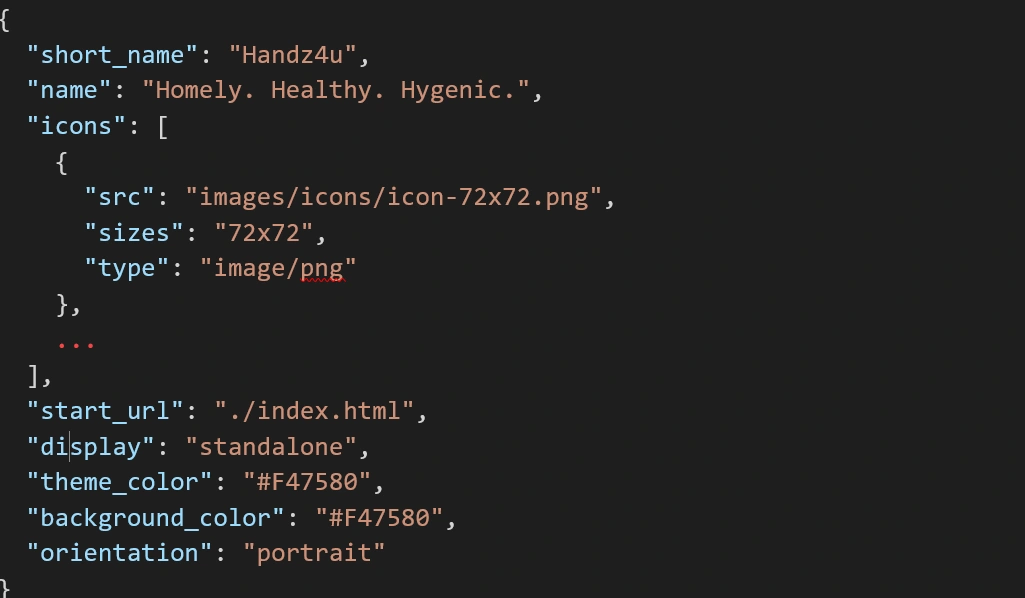
The web app manifest is a simple JSON file that tells the browser about your web application and how it should behave when 'installed' on the user's mobile device or desktop. Having a manifest is required by Chrome to show the Add to Home Screen prompt.
- Web App Manifest ===
Web App Manifest is a JSON file, which notifies a device as to how an application would behave on installation.
It contains the following properties:
- icons: Contains an array of icons that is displayed when the application is added to the device. It also contains the icons used for the splash screen.
- short_name: A short name to be displayed once an application is installed.
- name: A descriptive name for the same application.
- start_url: Refers to the file that has to be loaded first. In most cases, it is the entry point html file of the application.
- display: Determines the manner in which the application pops up on being installed.
- theme_color: The theme color denotes the color on the top of the headless webview created for the application.
- background_color: Denotes the background color of the splash screen created.
- orientation: Helps decide the display orientation of the application on a device. It can be restricted to a portrait or landscape mode, depending upon the use case.
Client-Side Storage Options for 2025
Even small static sites benefit from appropriate client-side storage in 2025. Here are the modern options with their best use cases:
Storage Options Comparison
| Storage Type | Capacity | Persistence | Synchronous | Best For |
|---|---|---|---|---|
| Cookies | ~4KB | Configurable via expiry | Yes | Authentication tokens, minimal user preferences |
| Local Storage | ~5-10MB | Until manually cleared | Yes | UI preferences, small cached data, theme settings |
| Session Storage | ~5-10MB | Until tab close | Yes | Form data, multi-step processes |
| IndexedDB | Up to available disk space | Until manually cleared | No (Promise-based) | Complex data, offline applications, large datasets |
| Cache API | Up to available disk space | Until manually cleared | No (Promise-based) | HTTP responses, assets, offline pages |
| File System Access API | Up to available disk space | Until manually cleared | No (Promise-based) | Direct file manipulation (with user permission) |
Essential Storage for Small Static Sites
For most small static sites, you'll need:
- Local preferences storage - Theme settings, language preferences, etc.
- Basic offline capability - Service Worker + Cache API
- Form data persistence - For multi-step forms or preventing data loss
Local Storage Implementation
// Simple wrapper for localStorage with type safety and error handling
const localStore = {
  // Store a value
  set: (key, value) => {
    try {
      localStorage.setItem(key, JSON.stringify(value));
      return true;
    } catch (error) {
      console.error('LocalStore set error:', error);
      return false;
    }
  },

  // Retrieve a value
  get: (key, defaultValue = null) => {
    try {
      const item = localStorage.getItem(key);
      return item ? JSON.parse(item) : defaultValue;
    } catch (error) {
      console.error('LocalStore get error:', error);
      return defaultValue;
    }
  },

  // Remove a value
  remove: (key) => {
    try {
      localStorage.removeItem(key);
      return true;
    } catch (error) {
      console.error('LocalStore remove error:', error);
      return false;
    }
  },

  // Check if storage is available
  isAvailable: () => {
    try {
      const testKey = '__storage_test__';
      localStorage.setItem(testKey, testKey);
      localStorage.removeItem(testKey);
      return true;
    } catch (e) {
      return false;
    }
  }
};

// Usage example
if (localStore.isAvailable()) {
  // Store user preferences
  localStore.set('theme', 'dark');
  localStore.set('fontSize', 16);

  // Retrieve user preferences
  const userTheme = localStore.get('theme', 'light'); // fallback to light
  document.body.classList.add(`theme-\\\${userTheme}`);
}
Modern Approaches to Storage Limitations
For static sites that need to store more data:
- IndexedDB for larger datasets: When local storage isn't enough
- Storage Manager API: Check available space before storing large data
- Content-addressed storage: For deduplicating assets across pages
- Persistent Storage: Request permission to avoid storage eviction
// Check and request persistent storage
async function requestPersistentStorage() {
  if ('storage' in navigator && 'persist' in navigator.storage) {
    // Check if storage is already persistent
    const isPersisted = await navigator.storage.persisted();

    if (!isPersisted) {
      // Request persistent storage
      const persisted = await navigator.storage.persist();
      return persisted ? "Persistence granted" : "Persistence denied";
    } else {
      return "Already persisted";
    }
  }
  return "Persistence not supported";
}

// Check available storage
async function checkStorageEstimate() {
  if ('storage' in navigator && 'estimate' in navigator.storage) {
    const estimate = await navigator.storage.estimate();

    // Format as MB with 1 decimal place
    const usedMB = (estimate.usage / 1024 / 1024).toFixed(1);
    const quotaMB = (estimate.quota / 1024 / 1024).toFixed(1);
    const percentUsed = ((estimate.usage / estimate.quota) * 100).toFixed(1);

    return {
      used: `\\\${usedMB} MB`,
      quota: `\\\${quotaMB} MB`,
      percentUsed: `\\\${percentUsed}%`
    };
  }

  return null;
}
Advanced Web Storage Technologies for 2025
1. Structured Storage API
The Structured Storage API, widely adopted by 2025, provides a more robust alternative to IndexedDB with a simpler interface:
// Opening a structured store
const store = await navigator.storage.getStructuredStore('app-data');

// Storing complex data
await store.set('user-profile', {
  id: 'user123',
  name: 'Alex Chen',
  preferences: {
    theme: 'dark',
    notifications: true
  },
  lastActive: new Date()
});

// Retrieving data with type safety
const profile = await store.get('user-profile');
2. Origin Private File System (OPFS)
The Origin Private File System has become an essential storage method for large-scale applications in 2025:
// Accessing the origin private file system
const root = await navigator.storage.getDirectory();

// Creating and writing to a file
const fileHandle = await root.getFileHandle('large-dataset.json', { create: true });
const writable = await fileHandle.createWritable();
await writable.write(JSON.stringify(largeDataset));
await writable.close();

// Reading from the file
const file = await fileHandle.getFile();
const contents = await file.text();
3. SharedArrayBuffer for Cross-Worker Storage
For high-performance applications requiring shared memory across web workers:
// Create a SharedArrayBuffer in the main thread
const sharedBuffer = new SharedArrayBuffer(1024 * 1024); // 1MB buffer
const sharedArray = new Uint8Array(sharedBuffer);

// Share with workers
const worker = new Worker('processor.js');
worker.postMessage({ sharedBuffer }, [sharedBuffer]);

// In the worker
self.onmessage = ({ data }) => {
  const { sharedBuffer } = data;
  const sharedArray = new Uint8Array(sharedBuffer);
  // Both threads can now read/write to this memory
};
4. Transactional Storage API
Enterprise applications benefit from the Transactional Storage API for ACID-compliant operations:
// Create a transaction
const db = await navigator.storage.getTransactionalStore('financial-data');
const transaction = db.transaction(['accounts', 'transfers'], 'readwrite');

try {
  // Perform operations atomically
  await transaction.store('accounts').update('account-1', (account) => {
    account.balance -= 100;
    return account;
  });

  await transaction.store('accounts').update('account-2', (account) => {
    account.balance += 100;
    return account;
  });

  await transaction.store('transfers').add({
    from: 'account-1',
    to: 'account-2',
    amount: 100,
    timestamp: Date.now()
  });

  // Commit the transaction
  await transaction.commit();
} catch (error) {
  // Transaction automatically rolls back on error
  console.error('Transaction failed:', error);
}
5. Encrypted Storage
With privacy concerns at the forefront, encrypted client-side storage has become standard by 2025:
// Generate an encryption key
const encryptionKey = await window.crypto.subtle.generateKey(
  { name: 'AES-GCM', length: 256 },
  true,
  ['encrypt', 'decrypt']
);

// Store the key securely (using the Credential Management API)
await navigator.credentials.store({
  id: 'storage-encryption-key',
  type: 'PasswordCredential',
  password: await exportCryptoKey(encryptionKey)
});

// Encrypt data before storing
async function encryptAndStore(key, data) {
  const iv = window.crypto.getRandomValues(new Uint8Array(12));
  const encoded = new TextEncoder().encode(JSON.stringify(data));

  const ciphertext = await window.crypto.subtle.encrypt(
    { name: 'AES-GCM', iv },
    key,
    encoded
  );

  // Store the encrypted data along with the IV
  await localStore.set('sensitive-data', {
    ciphertext: arrayBufferToBase64(ciphertext),
    iv: arrayBufferToBase64(iv)
  });
}

// Helper for exporting crypto keys
async function exportCryptoKey(key) {
  const exported = await window.crypto.subtle.exportKey('raw', key);
  return arrayBufferToBase64(exported);
}

// Helper for converting ArrayBuffer to Base64
function arrayBufferToBase64(buffer) {
  return btoa(String.fromCharCode(...new Uint8Array(buffer)));
}
6. Durable Storage with Quota Management
Enterprise applications in 2025 use quota management to ensure critical data persists:
// Request durable storage with specific quota
async function requestStorageQuota(megabytes) {
  if ('storage' in navigator && 'persisted' in navigator.storage) {
    // Request persistent storage permission first
    const isPersisted = await navigator.storage.persisted();
    if (!isPersisted) {
      const persisted = await navigator.storage.persist();
      if (!persisted) {
        console.warn('Persistent storage permission denied');
        return false;
      }
    }

    // Request specific quota
    if ('requestQuota' in navigator.storage) {
      const requestedBytes = megabytes * 1024 * 1024;
      try {
        const grantedBytes = await navigator.storage.requestQuota(requestedBytes);
        return {
          granted: true,
          requestedMB: megabytes,
          grantedMB: grantedBytes / 1024 / 1024
        };
      } catch (error) {
        console.error('Quota request failed:', error);
        return { granted: false, error };
      }
    }
  }
  return { granted: false, error: 'API not supported' };
}
7. Multi-Origin Coordinated Storage
For enterprise applications with multiple subdomains or related sites:
// In the primary application domain
async function shareDataWithSubdomain(key, value) {
  // Store the data locally first
  await localStore.set(key, value);

  // Notify subdomain of the change via BroadcastChannel
  const channel = new BroadcastChannel('cross-origin-storage');
  channel.postMessage({
    action: 'STORAGE_UPDATED',
    key,
    origin: window.location.origin,
    timestamp: Date.now()
  });

  // Also post to subdomain via window messaging if iframe exists
  const subdomainFrame = document.getElementById('subdomain-frame');
  if (subdomainFrame) {
    subdomainFrame.contentWindow.postMessage({
      action: 'STORAGE_UPDATED',
      key,
      origin: window.location.origin,
      timestamp: Date.now()
    }, 'https://subdomain.example.com');
  }
}

// In the subdomain
// Listen for storage updates
window.addEventListener('message', async (event) => {
  // Verify the origin is trusted
  if (event.origin === 'https://main.example.com') {
    const { action, key } = event.data;
    if (action === 'STORAGE_UPDATED') {
      // Fetch the updated data via a secure API
      const response = await fetch(`https://api.example.com/shared-storage/\\\${key}`, {
        credentials: 'include' // Include auth cookies
      });
      if (response.ok) {
        const data = await response.json();
        // Update local storage with the shared data
        await localStore.set(key, data);
      }
    }
  }
});
8. WebAssembly-Based Storage Engines
High-performance applications leverage WebAssembly storage engines in 2025:
// Initialize a WASM-powered SQLite instance
const sqliteModule = await import('/wasm/sqlite.js');
const db = await sqliteModule.initializeDatabase('app.db');

// Execute SQL queries directly in the browser
const results = await db.execute(`
  SELECT users.name, departments.name as department
  FROM users
  JOIN departments ON users.department_id = departments.id
  WHERE users.active = 1
  ORDER BY users.last_login DESC
  LIMIT 100
`);

// Create a virtual file system for the database
await db.persistToFileSystem({
  directory: 'databases',
  filename: 'app.db',
  autoSync: true,
  syncInterval: 30000 // sync every 30 seconds
});
9. Storage Worklet API
For complex applications requiring background storage operations:
// Register a storage worklet
await navigator.storage.addWorklet('/storage-worklet.js');

// Delegate storage operations to the worklet
const storageWorklet = navigator.storage.worklet;
await storageWorklet.compactDatabase('app-data');

// In storage-worklet.js
registerHandler('compactDatabase', async (databaseName) => {
  // Complex storage maintenance operations run in the background
  const db = await openDatabase(databaseName);
  await db.compact();
  await db.validate();

  // Report success
  return { success: true, sizeReduction: '24%' };
});
10. Cross-Device Synchronized Storage
Enterprise applications in 2025 offer seamless experiences across user devices:
// Using the Storage Sync API (based on WebSockets and IndexedDB)
const syncStorage = await navigator.storageSync.connect('enterprise-app', {
  serverUrl: 'wss://storage-sync.example.com',
  credentials: 'include',
  encryption: 'end-to-end',
  conflictResolution: 'timestamp-priority'
});

// Subscribe to specific data collections
await syncStorage.subscribe(['user-preferences', 'recent-documents']);

// Data changes are automatically synchronized
await syncStorage.set('user-preferences', {
  theme: 'dark',
  fontSize: 16,
  notifications: true
});

// Listen for changes from other devices
syncStorage.addEventListener('change', (event) => {
  const { collection, key, value, origin, deviceId } = event.detail;
  console.log(`Data updated from device \\\${deviceId}: \\${collection}.\\${key}`);

  // Apply UI updates based on synced changes
  if (collection === 'user-preferences') {
    applyUserPreferences(value);
  }
});
These advanced storage technologies enable enterprise-scale PWAs to handle complex data requirements while maintaining performance and security in 2025.
AppCache
- files always come from App Cache, even if you're online
Performance Optimization for 2025
Performance optimization is essential for all websites in 2025, regardless of size or complexity. Even small static sites benefit significantly from these optimizations.
Preload critical assets
<!-- Performance-optimized head section for a static site -->
<head>

  <link rel="preload" href="/fonts/critical-font.woff2" as="font" type="font/woff2" crossorigin>
  <link rel="preload" href="/images/hero.webp" as="image" imagesrcset="/images/hero-small.webp 400w, /images/hero.webp 800w" imagesizes="100vw">

</head>
Simple Service Worker for Caching Static Assets
For optimal performance in 2025, even the simplest sites benefit from a service worker that intelligently caches assets:
// Enhanced performance-focused service worker for 2025
// Save as sw.js in your root directory

// Cache version - change when you update assets
const CACHE_VERSION = 'v1';
const CACHE_NAME = `static-cache-\\\${CACHE_VERSION}`;

// Assets to cache on install
const STATIC_ASSETS = [
  '/',
  '/index.html',
  '/css/styles.css',
  '/js/main.js',
  '/offline.html',
  '/images/logo.webp',
  '/images/hero.webp',
  '/fonts/critical-font.woff2'
];

// Install event - cache static assets
self.addEventListener('install', event => {
  event.waitUntil(
    caches.open(CACHE_NAME)
      .then(cache => cache.addAll(STATIC_ASSETS))
      .then(() => self.skipWaiting())
  );
});

// Activate event - clean up old caches
self.addEventListener('activate', event => {
  event.waitUntil(
    caches.keys().then(cacheNames => {
      return Promise.all(
        cacheNames
          .filter(name => name.startsWith('static-cache-') && name !== CACHE_NAME)
          .map(name => caches.delete(name))
      );
    }).then(() => self.clients.claim())
  );
});

// Fetch event - serve from cache, fall back to network
self.addEventListener('fetch', event => {
  // For HTML navigation requests, use network-first strategy
  if (event.request.mode === 'navigate') {
    event.respondWith(
      fetch(event.request)
        .catch(() => caches.match('/offline.html'))
    );
    return;
  }

  // For static assets, use cache-first strategy
  if (
    event.request.url.includes('/images/') ||
    event.request.url.includes('/css/') ||
    event.request.url.includes('/js/') ||
    event.request.url.includes('/fonts/')
  ) {
    event.respondWith(
      caches.match(event.request)
        .then(cachedResponse => {
          if (cachedResponse) {
            return cachedResponse;
          }

          return fetch(event.request)
            .then(response => {
              // Don't cache non-successful responses
              if (!response || response.status !== 200) {
                return response;
              }

              // Clone the response to cache it and return it
              const responseToCache = response.clone();
              caches.open(CACHE_NAME)
                .then(cache => cache.put(event.request, responseToCache));

              return response;
            });
        })
    );
    return;
  }

  // For other requests, try network first, fall back to cache
  event.respondWith(
    fetch(event.request)
      .catch(() => caches.match(event.request))
  );
});
404 Page Optimization
An often-overlooked area for small sites is the 404 error page. A well-optimized 404 page can:
- Reduce bounce rates when users land on missing pages
- Offer guidance to find what they were looking for
- Be lightweight and load quickly
- Include proper HTTP status code (actually return 404)
- Maintain your site's branding and navigation

Enterprise-Scale PWA Considerations for 2025
Beyond the basic PWA implementation for small sites, enterprise and large-scale applications require additional considerations:
Architectural Patterns for Complex PWAs
-
Micro-Frontends Architecture
- Independently deployable frontend modules
- Vertical slicing of business domains
- Team autonomy with consistent user experience
- Shell application for shared resources and routing
-
Service Worker Management
- Versioned service worker deployment pipeline
- Automated cache invalidation strategies
- Progressive service worker rollouts with feature flags
- Regional service worker variations for global applications
-
Distributed Cache Management
- Cache partitioning for business domains
- Priority-based caching strategies
- Cache collision prevention across micro-frontends
- Secure sharing of cached resources
-
API Integration Layer
- Unified API gateway for microservices
- Edge-optimized API proxying
- Response transformation for offline compatibility
- Selective offline capability per endpoint
Advanced Manifest Features for Enterprise
{
  "id": "https://app.example.com/",
  "scope": "/app/",
  "related_applications": [
    {
      "platform": "play",
      "url": "https://play.google.com/store/apps/details?id=com.example.app",
      "id": "com.example.app"
    },
    {
      "platform": "itunes",
      "url": "https://apps.apple.com/app/example-app/id123456789"
    }
  ],
  "protocol_handlers": [
    {
      "protocol": "web+exampleapp",
      "url": "/app?action=%s"
    }
  ],
  "file_handlers": [
    {
      "action": "/app/open-file",
      "accept": {
        "application/pdf": [".pdf"],
        "application/vnd.example.doc": [".exd"]
      }
    }
  ],
  "handle_links": "preferred",
  "launch_handler": {
    "client_mode": ["focus-existing", "auto"]
  },
  "edge_side_panel": {
    "preferred_width": 480
  }
}
Multi-Team Collaboration Framework
-
Design System Integration
- Componentized PWA UI elements
- Shared offline-capable assets
- Theme coordination across teams
- Accessibility standards enforcement
-
Shared Authentication Layer
- Token persistence strategies
- Offline authentication patterns
- Cross-domain authentication coordination
- Auth state synchronization
-
Feature Flagging System
- Progressive feature rollout
- A/B testing infrastructure
- User segmentation for targeted features
- Offline-compatible feature flags
-
Analytics Framework
- Offline event collection and batching
- Prioritized data transmission
- Real User Monitoring (RUM) implementation
- Privacy-compliant data collection
Global Scale Considerations
-
Multi-Region Deployment
- Geo-distributed static assets via CDN
- Regional API endpoints
- Location-aware caching strategies
- Translation and localization infrastructure
-
Performance Budgeting
- Team-allocated performance budgets
- Automated performance regression testing
- Bundle size monitoring and alerts
- Metrics-driven optimization workflow
-
Compliance and Security
- Regional data sovereignty compliance
- Offline data encryption strategies
- Secure credential storage
- Regular security auditing