Web Development

Table of Contents

Tutorials
https://www.digitalocean.com/community/tutorials
State of JS
https://survey.devographics.com/en-US https://survey.stackoverflow.co/2023/ 2022
Tech Stack Analyzer - https://www.wappalyzer.com/
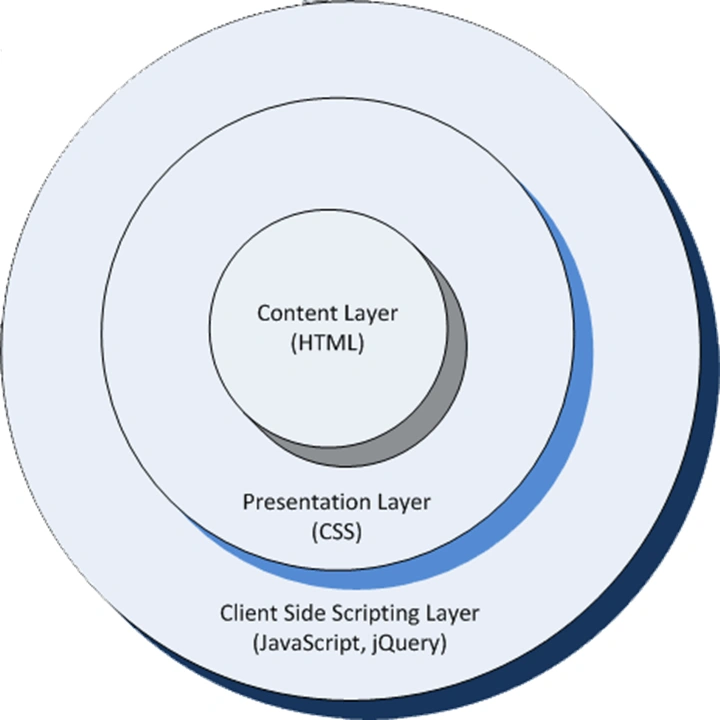
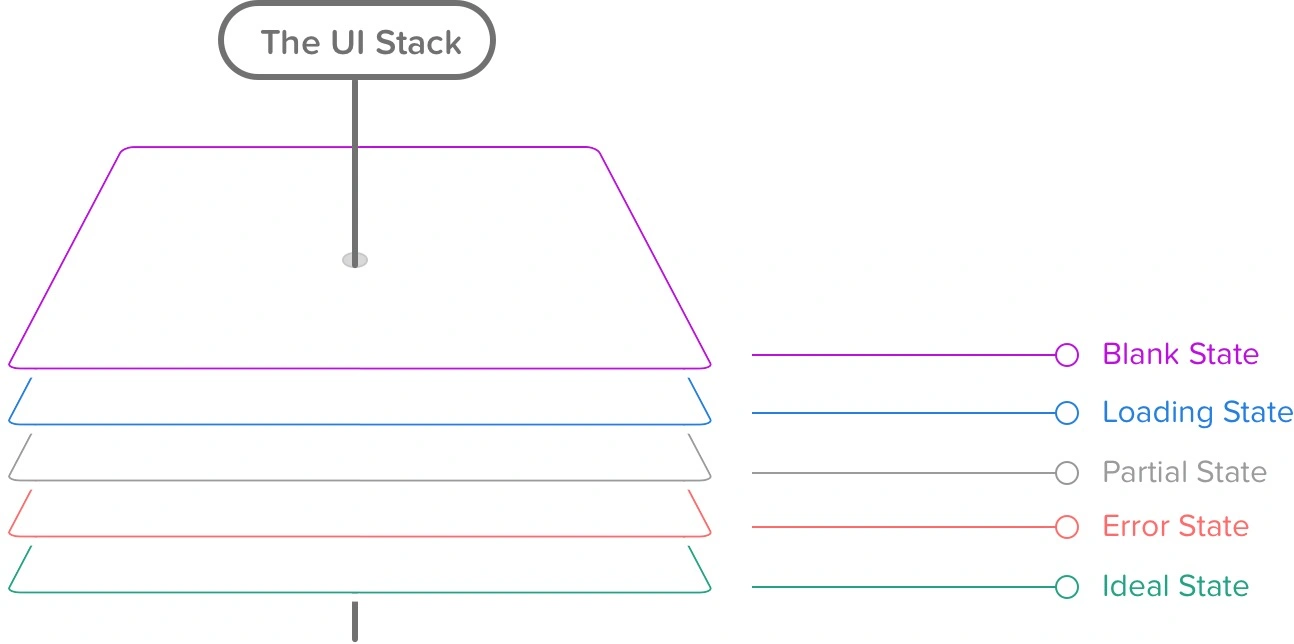
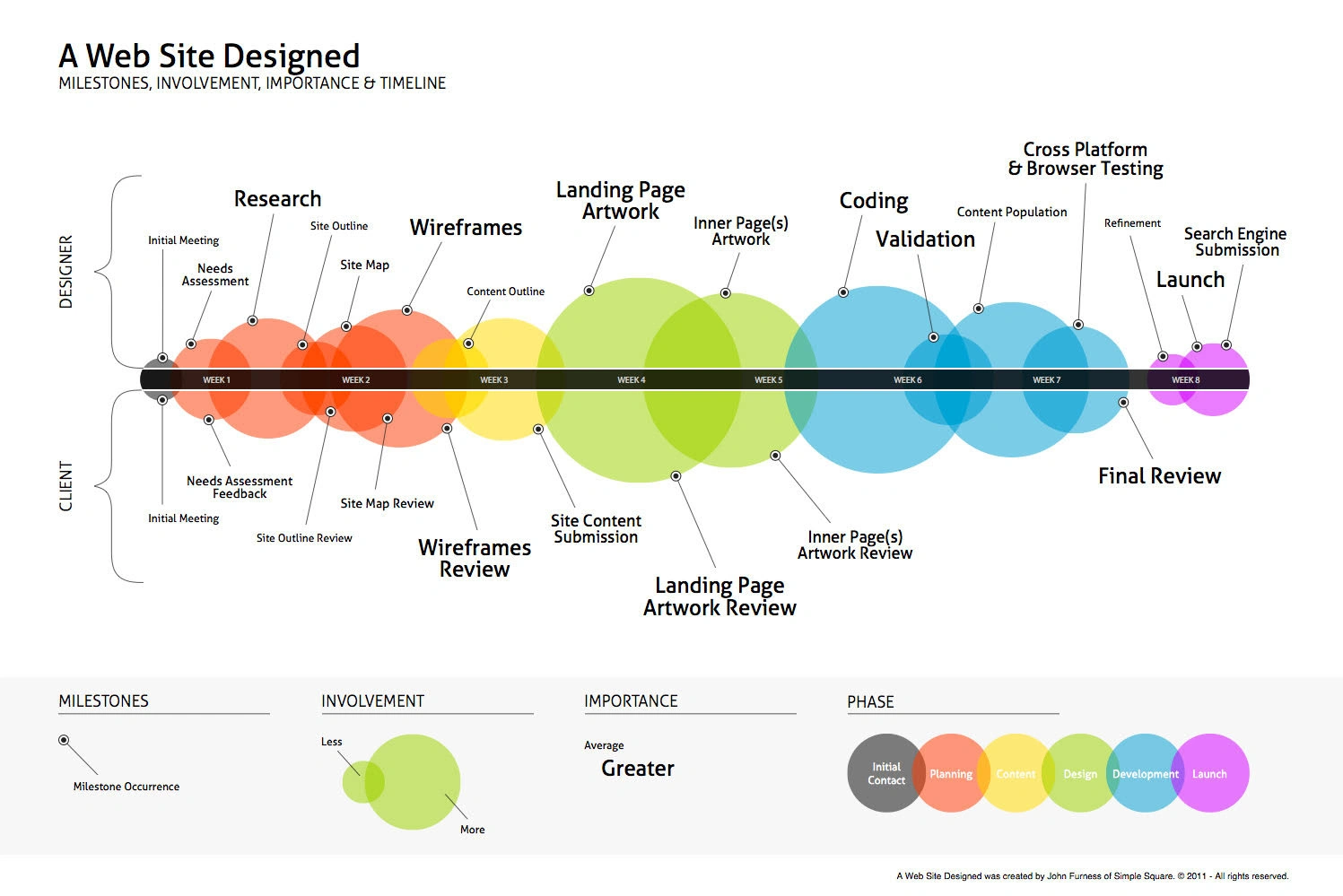
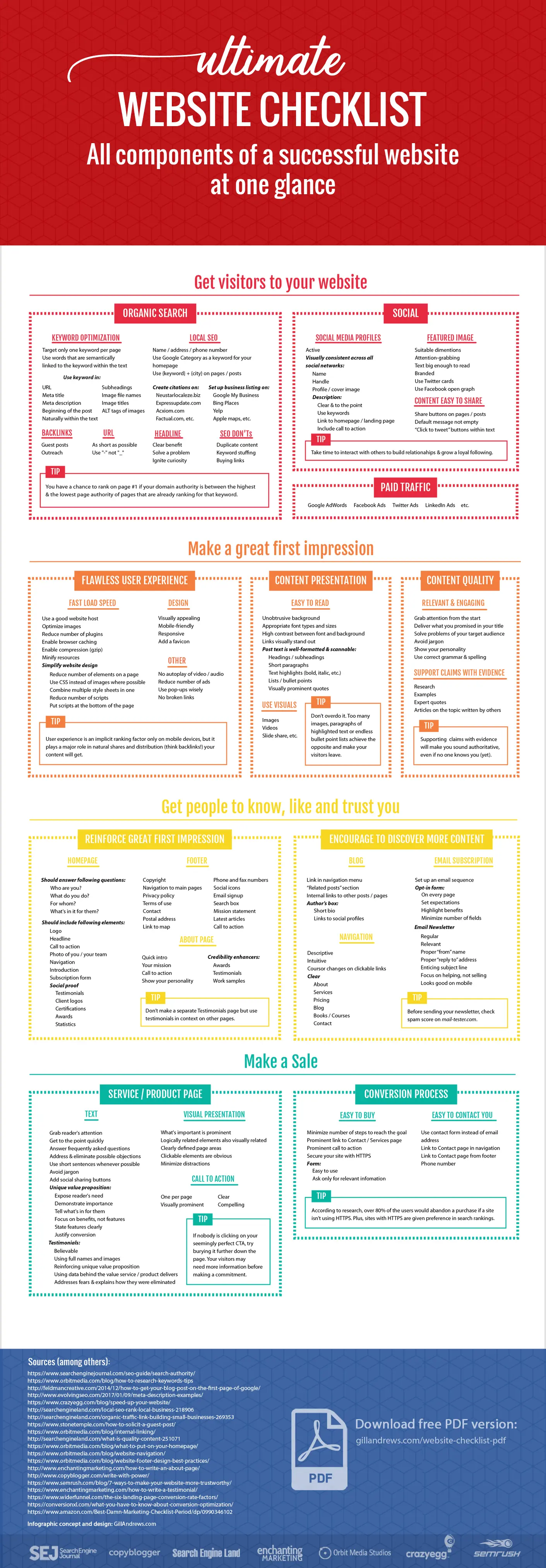
Launch A Web Dev Business website launch Checklist
 Top 22 Full Stack Developers to Follow in 2022
- https://frontend.horse/
- https://gitter.im/
- https://astro.build/
- https://kit.svelte.dev/
- https://openai.com/blog/chatgpt/
- https://turbo.build/
- https://pocketbase.io/
- https://surrealdb.com/
- https://medusajs.com/
- https://www.superblocks.com/
- https://remult.dev/
- https://fresh.deno.dev/
- https://www.replibyte.com/docs/introduction
- https://www.iredmail.org/
WEBSITES
- <www.w3schools.com>
- <www.geeksforgeeks.org>
- <www.programiz.com>
- <www.studytonight.com>
- <www.javatpoint.com>
- <www.freecodecamp.org>
- <www.soloearn.com>
- <www.guru99.com>
- <www.tutorialspoint.com>
APPS
- SoloLearn
- ProgrammingHub
- Grasshopper
- Mimo
MCQ PRACTICE
- <www.geeksforgeeks.org>
- <www.examveda.com>
- <www.cppbuzz.com>
- <www.sanfoundry.com>
- <www.indiabix.com>
- <www.avatto.com>
Q&A SITES
- stackoverflow.com
- <www.reddit.com>
- <www.quora.com>
- stackexchange.com COURSES (FREE + PAID)
<www.codecademy.com>
ONLINE EDITORS
- codepen.io
- codesandbox.io
- codeshare.io
- jsfiddle.net
- playcode.io
- stackblitz.com
- https://www.codeply.com/
ONLINE COMPILERS
DOWNLOAD EBOOKS
b-ok.asia BLOGS
- dev.to
- hackernoon.com
- hackr.io
links
- https://www.javascripttutorial.net/es6/
- https://www.programiz.com/javascript/ES6
- https://medium.freecodecamp.org/the-complete-javascript-handbook-f26b2c71719c
- https://www.robinwieruch.de/javascript-fundamentals-react-requirements/
- https://www.freecodecamp.org/news/tag/javascript/
- https://developer.mozilla.org/en-US/docs/Web/JavaScript
- https://www.udacity.com/course/intro-to-tensorflow-lite--ud190
- https://www.udacity.com/course/intro-to-javascript--ud803
- https://www.udacity.com/course/front-end-interview-prep--ud250
- https://www.positronx.io/
Loading & Execution
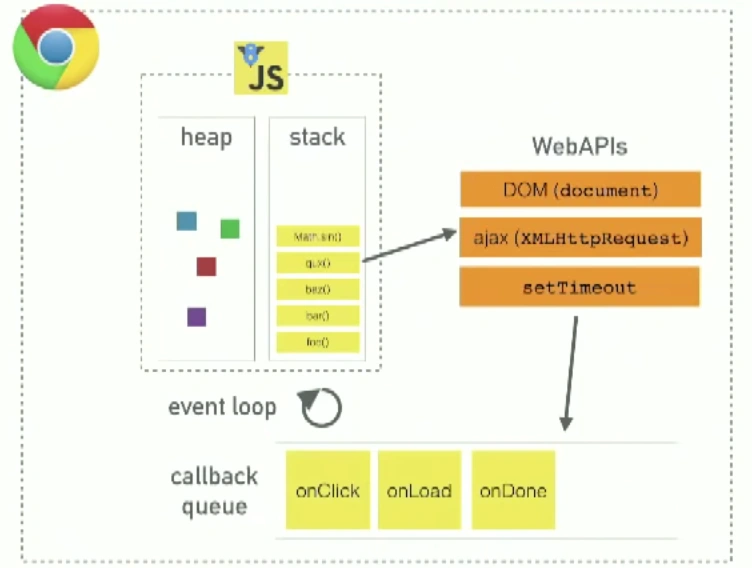
- responsiveness is the most important usability issue. because of Javascript’s blocking nature, nothing else can happen while the code is being executed. in browsers only a single process, either UI updates (UI painting?) or javascript execution can happen at any moment.
- avoid loading blank white page with good script positioning. browser doesn’t start to display elements until the body tag is reached
- parallel dl’s of js code by placing all js codes at the bottom of body
- concatenate js files into one script tag
- DOM allows you to create almost any part of HTML doc using js
Quizzes
https://www.scrum.org/open-assessments/scrum-open https://www.w3docs.com/quiz/
Books
- https://freefrontend.com/reactjs-books/
- https://www.freetechbooks.com/
- https://www.onlineprogrammingbooks.com/
- https://www.programming-books.io/
- https://goalkicker.com/
- https://it-ebooks.info/
- https://it-ebooks-search.info/
- https://www.free-ebooks.net/search/ux+design
- https://www.programmer-books.com/?s=ux+design
https://theprogrammingexpert.com/
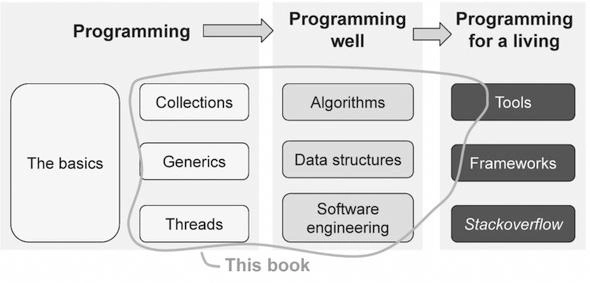
stages of skill mastery
- https://free-for.dev/#/
- https://hackernoon.com/12-great-free-tools-for-developers-in-2022
- https://webcode.tools/
- https://github.com/bradtraversy/design-resources-for-developers
- https://github.com/microsoft/PowerToys/releases/tag/v0.61.1
- https://lifeat.io/app?space=545
- https://riptutorial.com/
News
https://thehackernews.com/ https://cybermagazine.com/
Other Links
https://www.algoexpert.io/product?r=ads&gclid=Cj0KCQjwk8b7BRCaARIsAARRTL4SO3oBdhBi36e8RSP6LFDznS_3LYrlJ2Xt5b1v1_YbsePqP4U2UgQaAk8XEALw_wcB https://illustrated.dev/ https://hackr.io/ https://www.geeksforgeeks.org/ https://fireship.io
- https://freelearningshelf.com/ stackskills
- https://www.incredibleme.com/blog
- https://github.com/jwasham/coding-interview-university
- https://github.com/kamranahmedse/developer-roadmap
- https://microservices.io/index.html
- https://www.algoexpert.io/product?r=ads&gclid=Cj0KCQjwk8b7BRCaARIsAARRTL4SO3oBdhBi36e8RSP6LFDznS_3LYrlJ2Xt5b1v1_YbsePqP4U2UgQaAk8XEALw_wcB
- https://www.geeksforgeeks.org/
- https://github.com/jwasham/coding-interview-university
- https://github.com/kamranahmedse/developer-roadmap
- https://microservices.io/index.html
- https://www.algoexpert.io/product?r=ads&gclid=Cj0KCQjwk8b7BRCaARIsAARRTL4SO3oBdhBi36e8RSP6LFDznS_3LYrlJ2Xt5b1v1_YbsePqP4U2UgQaAk8XEALw_wcB
- https://www.geeksforgeeks.org/
- https://www.levels.fyi/?compare=Google,Facebook,Microsoft&track=Software%20Engineer
- https://skillsoniq.com/
- https://nikitahl.com/learn-css-by-playing-games
- https://resources.tandymgroup.com/embed-job-seeker-resources/how-to-handle-job-references-like-a-pro
NJ DOL - metrix learning
Blogs
Coding Game
- codedex
- https://www.30secondsofcode.org/
- https://www.frontendmentor.io/
- https://leetcode.com/
- http://coderace.me/
- http://codekata.com/
Automation
- https://github.com/moby/buildkit
- https://github.com/moby/moby/pull/37151
- https://github.com/genuinetools/img
- https://bazel.build/
- https://martinfowler.com/articles/continuousIntegration.html
- https://www.katalon.com/
- https://saucelabs.com/pricing
- https://www.qasymphony.com/blog/100-plus-best-software-testing-tools/
E-Commerce Cart
https://github.com/dvbondoy/peddler-pos https://github.com/kiptechie/ionicShoppingCart
static-site-generators
State Management
- gives a pattern to follow, follow a set of rules
- a common way to answer all state-related questions
- defines how data flows in app
- Global State
- State, Data, View
stateless application
In cloud development, a stateless application refers to an application design paradigm where the application's state or data is not stored on the server or any persistent storage. Instead, all the necessary information to process a request is contained within the request itself. The server or compute resource responsible for handling the request does not need to maintain any session-specific information between requests.
Stateless applications are designed to be horizontally scalable, meaning that they can handle increased traffic by adding more instances of the application without requiring shared state between instances. Each request can be processed independently by any available instance, and the absence of shared state simplifies the deployment and management of the application in a cloud environment.
Stateless applications are commonly used in cloud-native architectures, microservices, and serverless computing models. They offer several advantages, including improved scalability, fault tolerance, and resilience. Since there is no reliance on server-side state, it becomes easier to distribute incoming requests across multiple instances or scale up or down based on demand.
However, it's important to note that not all applications can be designed as stateless. Certain types of applications, such as those that require session management or persistent user data, may need to maintain state. In such cases, techniques like session management, caching, or external storage systems can be employed to handle the stateful aspects while keeping the core application stateless.
examples of applications are well-suited for a stateless design
It's important to note that while these examples can be designed as stateless applications, it doesn't mean that they are always implemented in a stateless manner. The specific design choices and requirements of an application will determine whether a stateless approach is appropriate or if some form of state management is necessary.
-
RESTful APIs: REST (Representational State Transfer) APIs are commonly designed as stateless applications. Each API request contains all the necessary information for the server to process it, and the server does not need to maintain any session-specific state between requests. This makes it easier to scale and distribute the API across multiple instances.
-
Web Applications: Many web applications can be designed as stateless, especially those that follow the principles of Single Page Applications (SPAs). In SPAs, the client-side application handles most of the state and data management, while the server-side component primarily serves as an API endpoint. The server-side component doesn't need to store any user-specific state between requests.
-
Microservices: Microservices architecture promotes the development of small, independent services that can be deployed and scaled individually. Each microservice is typically designed to be stateless, focusing on a specific business capability or function. They communicate with each other through APIs or messaging systems, and the absence of shared state makes it easier to scale and replace individual microservices.
-
Serverless Functions: Serverless computing platforms, such as AWS Lambda or Azure Functions, are inherently stateless. Functions are triggered by events and executed in isolated instances, without preserving any state between invocations. Each function execution is independent, and the platform manages the scaling and resource allocation.
-
Batch Processing: Applications that perform batch processing, such as data extraction, transformation, and loading (ETL) pipelines, can often be designed as stateless. Each batch job processes a specific set of data without relying on previous job results or maintaining intermediate state between executions.
Keyboard
https://www.w3.org/TR/uievents-code/#key-media https://javascript.info/keyboard-events http://www.adamthings.com/post/2015/02/13/angular-directive-escape-key-function/ https://developer.mozilla.org/en-US/docs/Web/API/KeyboardEvent/key https://www.bennadel.com/blog/3088-native-key-combination-event-binding-support-in-angular-2-beta-17.htm https://coryrylan.com/blog/listening-to-angular-key-events-with-host-listeners https://developer.mozilla.org/en-US/docs/Web/API/KeyboardEvent/key/Key_Values https://www.bennadel.com/blog/2816-managing-user-input-key-events-across-views-in-angularjs.htm https://github.com/angular/material/issues/1953
Display Mode
-
If your web app has custom navigation buttons, or detailed navigational menu where the user can click and go forward and backwards, choose “Standalone” or “Fullscreen”.
-
If your web app is a standard website and needs the browser UI for the user to navigate, go for “Minimal-UI”.
-
If your web app is a game or an interactive page, use “Fullscreen”.
-
unless you have a specific reason, do not choose "browser"
value | Description |
|---|---|
fullscreen | Opens the web application without any browser UI and takes up the entirety of the available display area. |
standalone | Opens the web app to look and feel like a standalone native app. The app runs in its own window, separate from the browser, and hides standard browser UI elements like the URL bar, etc. |
minimal-ui | This mode is similar to fullscreen, but provides the user with some means to access a minimal set of UI elements for controlling navigation (i.e., back, forward, reload, etc). Note: Only supported by Chrome on mobile. |
browser | A standard browser experience. add to home screen is never displayed |
Performance
performance - first meaningful paint https://web.dev/measure/ https://smalldev.tools/
App Response Time
- Up to 150 ms: great user experience
- 150ms – 300 ms: good/acceptable user experience
- Over 300 ms: degraded user experience
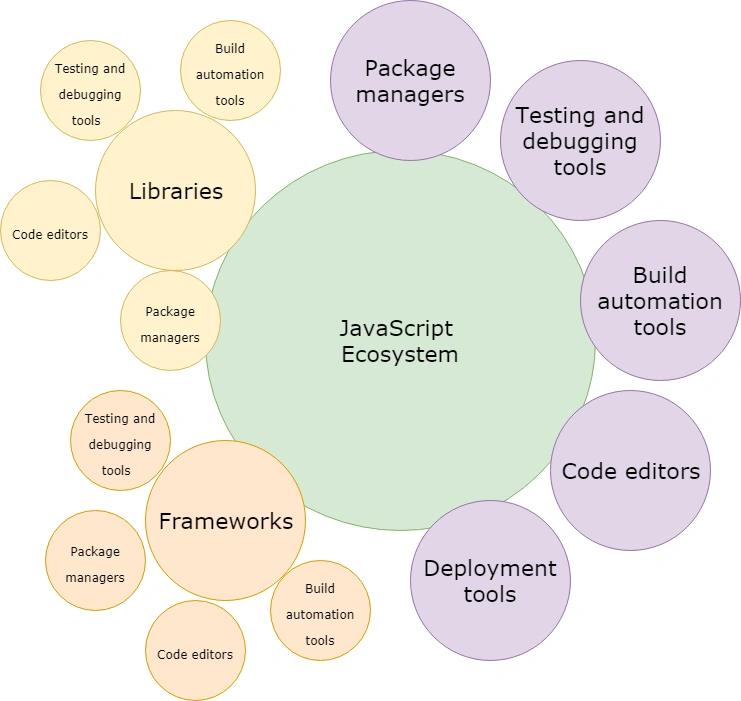
Frameworks
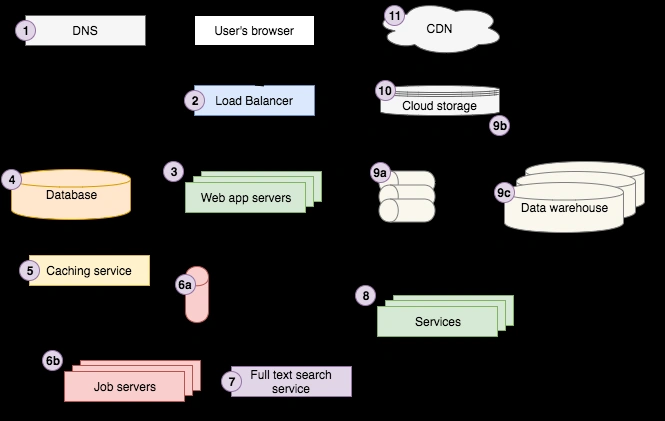
Framework | a set of libraries Library | perform specific operation
Random
- https://dev.to/worldindev/400-javascript-interview-questions-with-answers-2fcj
- http://getbem.com/
- https://www.bento.io/
- https://bestofjs.org/
- https://juristr.com/blog/
- https://refactoring.com/catalog/
- https://codeburst.io/does-js-really-do-that-43f17bc01e9b
- https://www.smashingmagazine.com/2019/01/front-end-performance-checklist-2019-pdf-pages/
- https://github.com/hellerve/programming-talks
- https://github.com/JanVanRyswyck/awesome-talks
- https://github.com/jwasham/coding-interview-university
- https://github.com/sdmg15/Best-websites-a-programmer-should-visit
- https://github.com/trimstray/the-book-of-secret-knowledge
- https://github.com/yangshun/tech-interview-handbook
- https://blog.ionicframework.com/how-i-built-launched-an-app-in-2-weeks-to-40000-users-with-ionic/
- https://httparchive.org/
- https://indepth.dev/
- https://javascript30.com/
- https://developer.mozilla.org/en-US/docs/Learn/Getting_started_with_the_web/JavaScript_basics
- https://javascript.works-hub.com/learn/
- https://gist.github.com/maxogden/4bed247d9852de93c94c
- https://learnjavascript.online/
- https://jskatas.org/#bundle-es6-katas
- https://addyosmani.com/resources/essentialjsdesignpatterns/book/
- https://martinfowler.com/
- https://martinheinz.dev/blog/33
- https://github.com/micromata/awesome-javascript-learning
- https://molily.de/robust-javascript/
- https://scrimba.com/
- https://codetheweb.blog/javascript-functions/
- https://www.thecrazyprogrammer.com/
- https://blog.usejournal.com/the-index-funds-of-a-developers-career-7135e34a5063
- https://javascript.info/
- https://medium.com/tag/software-development
- https://simpleprogrammer.com/
- https://cube.dev/blog/dataviz-ecosystem-2021/
- https://blog.bitsrc.io/understanding-the-for-of-loop-in-javascript-8aded97d7ef8
- https://help.github.com/en/articles/understanding-the-search-syntax
- https://medium.freecodecamp.org/want-amazing-free-coding-tutorials-subscribe-to-these-youtube-channels-b91f154db543
- https://ydkjs-exercises.com/
- https://www.npmjs.com/package/gulp-ng-annotate
- https://github.com/Esteban-Rocha
- https://developer.mozilla.org/en-US/docs/Web/JavaScript
- https://www.udacity.com/course/intro-to-javascript--ud803
- https://www.udacity.com/course/front-end-interview-prep--ud250
- https://www.positronx.io/
- https://devconquer.com/
- https://javascript.plainenglish.io/can-we-store-javascript-objects-in-localstorage-b887181a7886
- https://amp.dev/
- http://bradfrost.com/blog/post/atomic-web-engineering/design/
- https://www.codeply.com/
- https://www.keycdn.com/blog/sass-vs-less/
- https://soundcloud.com/invisionapp/sets/designengineeringhandbook
- https://github.com/cymcsg/Awesome-Mobile-UI
- https://www.briefbox.me/pages/good-finds
- https://mostly-adequate.gitbook.io/mostly-adequate-guide/
- https://thecodeplayer.com/
- https://www.pwabuilder.com/
- https://every-layout.dev/
- https://ui-design.io/
- https://medium.com/tag/software-development
- https://blog.feedspot.com/programming_blogs/
- https://uxdesign.cc/ui-cheat-sheet-spacing-friendships-e37a6fccc407
- https://uxdesign.cc/ui-designers-do-you-need-to-shift-focus-in-2021-f0bf22d755b3
- https://www.uplabs.com/
- https://www.shopify.com/partners/blog/using-animation-to-improve-mobile-app-user-experience
- https://ux.christmas/2020
- https://uxdesign.cc/ux-portfolio-tips-and-best-practices-f02e09a53923
- https://web.dev/vitals/#core-web-vitals
- https://en.ryte.com/wiki/Main_Page
- https://tutorialsclass.com/
- https://metapreview.app/
- https://metatags.io/
- https://www.emergeinteractive.com/insights/detail/rich-video-previews-in-ios-macos-messages/
- https://www.rollingstone.com/
- http://erc721.org/
- https://start.y.at/?utm_referrer=https%3A%2F%2Fy.at%2Fsign-in
- https://awwwards.com
- https://www.awwwards.com/15-great-chrome-extensions-for-web-designers-and-developers.html
- https://www.matuzo.at/blog/html-boilerplate/ https://cssbattle.dev/ https://www.sitepoint.com/ https://www.smashingmagazine.com/ https://uxplanet.org/ https://onextrapixel.com/ https://medium.com/front-end-weekly https://bigfrontend.dev/ https://gist.github.com/rxaviers/7360908 https://simpleprogrammer.com/figma-ui-ux-engineering/design/ https://roadmap.sh/angular https://github.com/antonkomarev/github-profile-views-counter https://www.producthunt.com/products/background-generator-2?utm_source=Daily%20Digest&utm_medium=newsletter&utm_campaign=20751_2023-05-09&utm_term=featured#background-generator-2 https://www.producthunt.com/posts/ai-job-interview-coach?utm_campaign=21048_2023-05-22&utm_medium=newsletter&utm_source=Daily+Digest&utm_term=featured https://resources.workable.com/interview-questions/ https://refactoring.com/catalog/ https://uxdesign.cc/the-precipitous-rise-of-figma-and-fall-of-invision-435f07e8d1b6 https://www.cutout.pro/ https://www.dailyui.co/ https://ydkjs-exercises.com/ https://github.com/cloudcommunity/Free-Certifications https://www.frontendmentor.io/challenges?types=free https://frontend.horse/ https://www.udacity.com/course/front-end-interview-prep--ud250 https://www.smashingmagazine.com/2019/01/front-end-performance-checklist-2019-pdf-pages/ https://roadmap.sh/frontend https://freefrontend.com/ https://codeburst.io/ https://www.codeply.com/ https://soundcloud.com/invisionapp/sets/designengineeringhandbook https://medium.com/@aliciadrinkwater/design-thinking-for-product-market-fit-cb01f5b20672 https://soundcloud.com/invisionapp/sets/designopshandbook https://devhints.io/ https://devikaai.co/ https://preview.devin.ai/ https://mobbin.com/browse/web/apps https://dschool.stanford.edu/resources/design-thinking-artifacts https://adamfard.com/blog/dont-trust-users https://www.downgraf.com/ https://justgetflux.com/ https://hackr.io/ https://www.flowmapp.com/ https://github.com/cymcsg/Awesome-Mobile-UI https://github.com/donnemartin/system-design-primer https://roadmap.sh/design-system https://www.nativewind.dev/ https://creativebeacon.com/
Digest
In web application development, a digest refers to a mechanism that ensures the integrity of data transmitted between the client and the server. It is commonly used in web frameworks and applications that implement a form of two-way data binding or have a need to track changes in data.
The purpose of a digest is to detect if any data has been modified or updated since the last check. It does this by calculating a unique hash or checksum value based on the content of the data. The digest value is then compared to the previous digest value to determine if there have been any changes.
Here's a simplified workflow of how a digest is typically used in web applications:
-
Initialization: When the web application loads or a specific component is initialized, an initial digest value is calculated for the data being tracked.
-
Data Binding: The web application establishes a data binding between the client-side interface (e.g., HTML form inputs) and the corresponding data model or server-side data.
-
Digest Cycle: Periodically or in response to specific events (such as user interactions), the web application initiates a digest cycle. During this cycle, the application scans the tracked data and recalculates the digest value based on the current content.
-
Digest Comparison: The new digest value is compared to the previous digest value. If they match, it indicates that the data has not changed since the last check, and no further action is needed. However, if the digest values differ, it signifies that the data has been modified.
-
Action on Digest Mismatch: When a digest mismatch occurs, the web application can trigger various actions. For example, it may update the user interface to reflect the new data, send an update request to the server, or perform any necessary data synchronization tasks.
Digests are commonly used in frameworks like AngularJS (version 1.x) and similar libraries that implement two-way data binding. They help optimize performance by selectively updating only the parts of the interface that have changed, reducing unnecessary re-rendering or network requests.
Overall, a digest mechanism provides a way to efficiently track changes in data and ensure consistency between the client and the server in web applications.
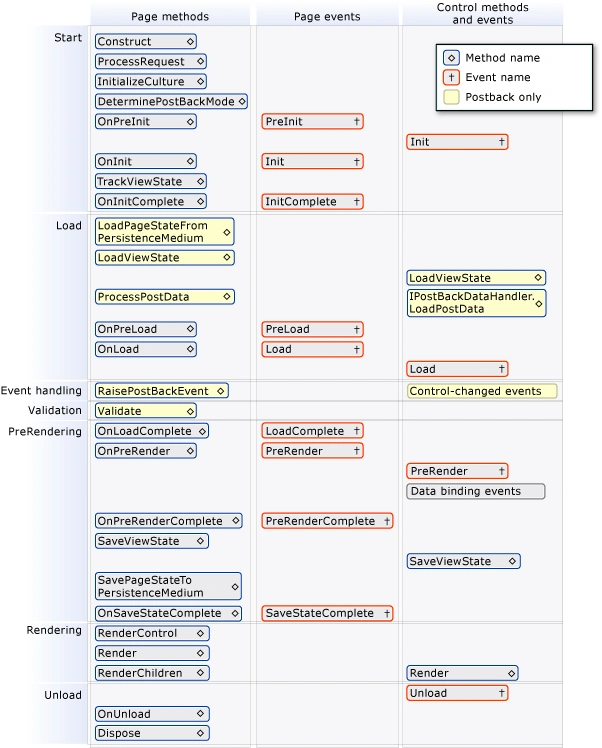
Watcher Function
In web application development, a watch function is a feature provided by some frameworks or libraries that allows developers to monitor changes to a specific property or expression and perform actions in response to those changes.
The watch function is typically used in the context of two-way data binding or reactive programming paradigms, where the application's data model is linked to the user interface elements. It enables developers to observe changes to data and trigger custom logic or update the user interface accordingly.
Here's how a watch function typically works:
-
Property/Expression Monitoring: The developer specifies a property or an expression to be watched. This can be a data property, a computed value, or any other value that can change over time.
-
Watcher Registration: The watch function is called, passing in the property or expression to be watched and a callback function that will be executed when the value changes.
-
Value Change Detection: The framework or library internally monitors the specified property or expression for changes. It may use techniques like dirty checking or dependency tracking to detect modifications.
-
Callback Execution: When the value being watched changes, the registered callback function is triggered. The callback function can then perform any necessary actions, such as updating the UI, triggering additional logic, or dispatching events.
Watch functions provide a way to reactively respond to changes in the application's data model without explicitly polling or manually checking for updates. They promote a more declarative programming style, where the developer specifies what should happen when certain values change, rather than imperatively defining the steps to be taken.
Frameworks like Vue.js, AngularJS (version 1.x), and React (with additional libraries like MobX or Redux) offer watch functions or similar mechanisms to facilitate reactive programming and efficient UI updates based on data changes.
By leveraging watch functions, developers can build more responsive and interactive web applications that automatically respond to changes in data, ensuring a synchronized and up-to-date user interface.
Events
event emitter - provide a framework for issuing events and subscribing to them.
- Emitting name events
- registering and unregistering listener functions
Whenever an HTTP request is received by a HTTP server. We want the server to call a function defined in our code which handles the request and returns some response.
Event Emitter
Communication for multiple independent components. in Node, Angular, JS Frameworks, the EventEmitter is a module that facilitates communication/interaction between objects in Node.
- Kind of link a pub/sub or observer design pattern, but not exactly
In web application development, an event emitter is a programming construct or component that facilitates the communication and coordination of different parts of an application by emitting and listening to events.
An event emitter is typically used in event-driven architectures, where actions or interactions within the application trigger events that can be handled and responded to by other parts of the system. It enables loose coupling and decoupling of components, allowing them to communicate without direct dependencies.
Here's how an event emitter typically works:
-
Event Definition: The event emitter defines the types of events that can be emitted. Each event is identified by a unique name or identifier.
-
Event Emission: When a specific action or condition occurs, the event emitter emits (or raises) an event by providing the event's name and any associated data or payload.
-
Event Listeners: Other components or modules in the application can register event listeners (also known as event handlers or subscribers) to listen for specific events emitted by the event emitter.
-
Event Handling: When an event is emitted, the event emitter notifies all the registered event listeners that are interested in that particular event. The event listeners can then execute their respective logic or perform actions based on the event and its associated data.
Event emitters can be implemented using various patterns and techniques, such as the Observer pattern, the Publish-Subscribe pattern, or as part of a broader messaging system.
In web development, event emitters are commonly used in frameworks and libraries to handle user interactions, respond to browser events, or facilitate communication between different components of an application. For example, in JavaScript, the DOM (Document Object Model) provides event emitters for handling user events like clicks, keypresses, or form submissions.
Additionally, many JavaScript frameworks and libraries, such as Node.js, Vue.js, and EventEmitter.js, provide their own event emitter implementations that allow developers to create custom events and establish communication channels within their applications.
By utilizing event emitters, web developers can build modular, extensible, and loosely coupled applications where different parts of the system can interact and respond to events in a decoupled manner, promoting better code organization and maintainability.
- subscribe
- emit
- unsubscribe
dependency injection
In web application development, dependency injection is a design pattern and technique that allows components or objects to be loosely coupled by providing their dependencies from external sources instead of creating them internally. It is a way to manage and resolve dependencies between different parts of an application.
In traditional programming, when an object requires another object or service to perform its functionality, it creates or instantiates that dependency internally. However, with dependency injection, the responsibility of creating and providing dependencies is delegated to an external entity or framework.
Here's how dependency injection typically works:
-
Dependency Definition: Dependencies are defined as interfaces or abstract classes that describe the required functionality without specifying the concrete implementation.
-
Dependency Injection Container: A dependency injection container or framework is used to manage the dependencies. It acts as a central registry or container that holds information about dependencies and their configurations.
-
Dependency Injection: When an object or component needs a dependency, instead of creating it internally, it requests the dependency from the container. The container resolves the dependency by finding an appropriate implementation and provides it to the requesting object.
-
Injection Types: Dependency injection can be done through different mechanisms:
- Constructor Injection: Dependencies are provided through the constructor of the object.
- Setter Injection: Dependencies are set using setter methods.
- Interface/Property Injection: Dependencies are assigned directly to public properties of the object.
-
Configuration: The container is typically configured with the necessary bindings between interfaces and their concrete implementations. This configuration can be done through code, configuration files, or annotations.
Dependency injection offers several benefits in web application development:
-
Loose Coupling: Components are not tightly coupled to their dependencies, making it easier to modify, replace, or test them independently.
-
Testability: Dependencies can be easily mocked or replaced during unit testing, allowing for more isolated and comprehensive tests.
-
Reusability: Components can be reused in different contexts or scenarios by providing different implementations of their dependencies.
-
Separation of Concerns: Dependency injection helps separate the responsibility of creating objects from their usage, promoting better code organization and maintainability.
-
Modularity: Components can be developed and maintained independently, as they rely on well-defined interfaces instead of concrete implementations.
Dependency injection is commonly used in web frameworks and libraries, such as Spring (Java), Angular (JavaScript/TypeScript), and .NET Core (C#), to manage dependencies and facilitate the development of scalable and modular applications.
cross cutting logic
In web application development, cross-cutting logic refers to code or functionality that is relevant to multiple components or modules within an application and is intertwined or "cuts across" their boundaries. It represents concerns or functionality that cannot be easily encapsulated within a single component and affects multiple parts of the application.
Cross-cutting logic often includes functionality that is common to different features or modules, such as logging, authentication, caching, error handling, performance monitoring, and transaction management. These concerns don't belong to a specific module or component but are required by multiple components or modules throughout the application.
Here are some key aspects of cross-cutting logic:
-
Widespread Impact: Cross-cutting logic affects multiple parts of an application. If the same functionality needs to be applied or enforced across different modules or components, it is considered cross-cutting.
-
Code Duplication: Without a proper mechanism to address cross-cutting concerns, developers may end up duplicating code across different parts of the application, which leads to maintenance issues and code redundancy.
-
Separation of Concerns: Cross-cutting logic violates the principle of separation of concerns, as it mixes with the core functionality of different components. Separation of concerns promotes modularization, maintainability, and testability of individual components.
-
Cross-Cutting Techniques: Various techniques and patterns are used to address cross-cutting concerns, such as Aspect-Oriented Programming (AOP), decorators, interceptors, or middleware. These techniques provide mechanisms to extract and encapsulate cross-cutting logic in a reusable manner.
-
Framework Support: Many web frameworks and libraries provide built-in support for addressing cross-cutting concerns. For example, in Java, the Spring framework offers aspects to modularize cross-cutting concerns, while in JavaScript, middleware functions in frameworks like Express.js can handle common tasks like authentication or error handling.
By addressing cross-cutting logic in a systematic and modular way, developers can achieve better code organization, reduce code duplication, improve maintainability, and enhance the overall quality of the application.
Overall, cross-cutting logic refers to functionality that spans across multiple components or modules in a web application and requires special consideration to ensure it is properly managed, encapsulated, and reusable.
Hydrate
Hydrating an object is taking an object that exists in memory, that doesn't yet contain any domain data ("real" data), and then populating it with domain data (such as from a database, from the network, or from a file system).
deserialization == instantiation + hydration
If you don't need to worry about blistering performance, and you aren't debugging performance optimizations that are in the internals of a data access API, then you probably don't need to deal with hydration explicitly. You would typically use deserialization instead so you can write less code.
non-deterministic code
In the context of web applications, non-deterministic code refers to code that does not produce the same output or behavior every time it is executed, even when given the same input or set of initial conditions. Non-deterministic code introduces an element of randomness or unpredictability into the application.
Web applications often rely on user interactions, external APIs, or other external factors that can introduce non-determinism. Here are a few examples of non-deterministic code in web applications:
-
Random number generation: If a web application uses random number generation to make decisions or produce unique identifiers, the output will vary each time the code is executed. For example, generating a random password or selecting a random item from a list.
-
Asynchronous operations: Web applications frequently make use of asynchronous operations, such as fetching data from an API or performing database queries. The timing and order of these operations may vary depending on network conditions and server response times, leading to non-deterministic behavior.
-
User input: User interactions, such as mouse movements, button clicks, or keystrokes, can introduce non-determinism. The exact sequence and timing of these inputs may vary, causing different outcomes or triggering different code paths.
-
External data sources: Web applications often rely on external data sources, such as databases or APIs. The content and availability of these sources can change over time, affecting the behavior and output of the application.
Non-deterministic code can sometimes make applications more flexible or provide functionality that relies on randomness. However, it can also introduce challenges for testing, debugging, and ensuring consistent behavior. Therefore, it is important for developers to be aware of the non-deterministic aspects of their code and handle them appropriately.