Google Ads and PPC
| Mobile | Advertising |
|---|---|
| Refining Ad Text – Test out PPC ad copy that is more targeted to your individual ad groups. More effective ads get higher CTR, one of the best ways to improve Quality Score. | 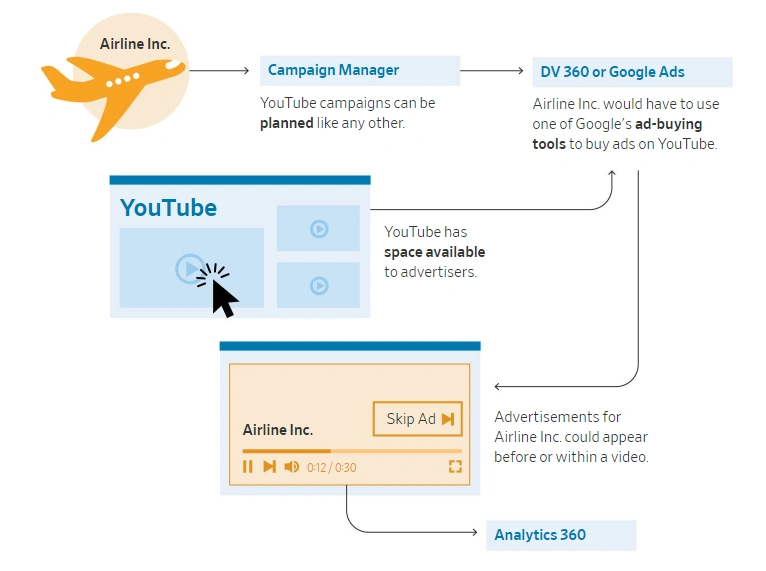 |
| Optimizing Landing Pages – Follow landing page best practices to create pages that connect directly with your ad groups and provide a cohesive experience for visitors, from keyword to conversion. | 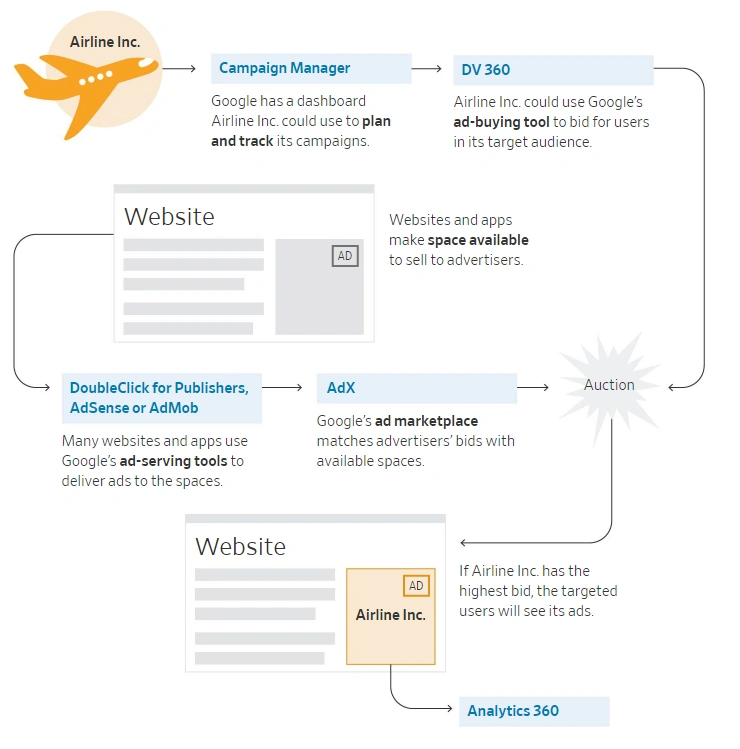 |
| Adding Negative Keywords – Continuously research, identify, and exclude irrelevant search terms that are wasting your budget. | 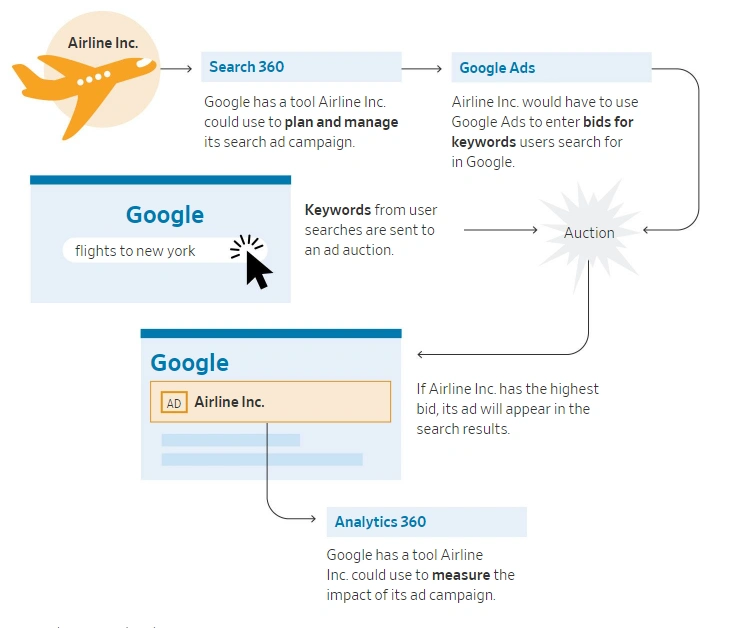 |
the discrepancy between mobile ad spend and device engagement
Google AdSense
Google AdSense is an advertising program offered by Google that allows website owners and publishers to monetize their online content by displaying targeted ads. It enables website owners to earn revenue from their websites by displaying relevant advertisements to their audience.
Here's how Google AdSense works:
-
Application and Approval: Website owners need to apply for an AdSense account through the Google AdSense website. Upon application, Google reviews the website to ensure it meets the program's guidelines and policies. If approved, the website owner receives a unique AdSense code.
-
Ad Placement: Once approved, the website owner can log in to their AdSense account and generate ad units using the provided code. Ad units are customizable and can be placed on various sections of the website, such as the header, sidebar, or within the content.
-
Ad Display: Google's ad-serving technology analyzes the website's content and displays relevant ads based on factors such as the website's topic, user demographics, and browsing history. The ads can be text-based, display ads, or a combination of both.
-
Revenue Generation: Website owners earn revenue through AdSense when visitors interact with the displayed ads. The revenue is generated through a combination of cost-per-click (CPC) and cost-per-thousand-impressions (CPM) models. Website owners are paid a portion of the advertising revenue generated by clicks or impressions on the ads.
-
Performance Tracking: AdSense provides detailed reports and analytics to track ad performance, including metrics like impressions, clicks, click-through rates (CTR), and estimated earnings. This data helps website owners optimize their ad placements and maximize their revenue potential.
-
Payment: Once a website owner reaches the payment threshold, which varies depending on the country and currency, Google processes the payment. Payments are typically made on a monthly basis, and various payment options are available, including direct bank deposit, wire transfer, or checks.
It's important to note that Google AdSense has specific policies and guidelines that need to be followed to ensure compliance and maintain an active account. Violation of these policies can result in warnings, account suspension, or termination.
Overall, Google AdSense provides an opportunity for website owners and publishers to earn revenue by displaying targeted ads on their websites, helping them monetize their online content and generate income.
AdWords
Please note as of 2021, Google Ads was still commonly referred to as Google AdWords. However, Google rebranded it to Google Ads in 2018 to better reflect the expanded advertising capabilities beyond keyword-based search ads.
Google AdWords, now known as Google Ads, is an online advertising platform provided by Google. It allows businesses and advertisers to create and manage advertisements that appear on Google's search engine results pages, as well as on other Google properties and partner websites.
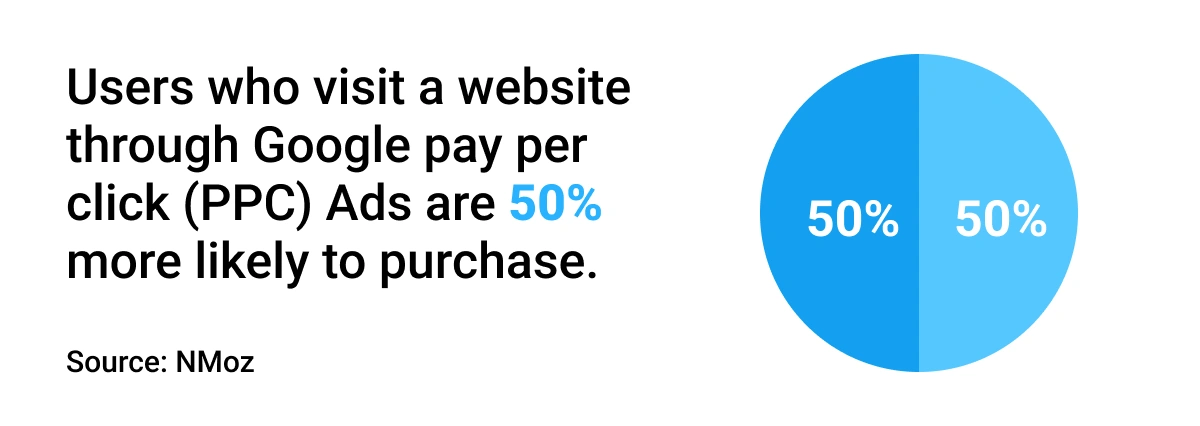
Google Ads operates on a pay-per-click (PPC) model, where advertisers bid on specific keywords relevant to their products or services. When users search for those keywords, the ads may appear alongside or above the organic search results. Advertisers are charged only when users click on their ads, hence the name "pay-per-click."
Here's how Google Ads works:
-
Keyword Research: Advertisers conduct keyword research to identify relevant keywords and phrases that potential customers might use when searching for products or services. This helps advertisers determine which keywords to target in their ad campaigns.
-
Ad Campaign Creation: Advertisers create ad campaigns in the Google Ads platform. This involves creating ad groups, selecting keywords, writing compelling ad copy, and setting bids and budgets for the campaigns.
-
Ad Auction: When a user enters a search query on Google, an ad auction takes place to determine which ads are shown. The auction considers various factors, including bid amounts, ad quality, and relevance to the search query.
-
Ad Display and Clicks: If an advertiser's ad is eligible and wins the auction, it may appear on the search results page or on relevant websites within the Google Display Network. When users click on the ad, they are directed to the advertiser's website or landing page.
-
Performance Tracking and Optimization: Google Ads provides comprehensive reporting and analytics to track the performance of ad campaigns. Advertisers can monitor metrics like impressions, clicks, click-through rates (CTR), conversion rates, and return on investment (ROI). This data helps advertisers optimize their campaigns by adjusting bids, refining ad copy, and targeting specific audiences to improve results.
-
Budget and Billing: Advertisers set daily or monthly budgets for their campaigns, controlling how much they are willing to spend on advertising. The costs are deducted from the allocated budget based on the number of clicks received. Advertisers are billed by Google based on the actual clicks or impressions generated by their ads.
Google Ads offers various ad formats, including text ads, display ads, video ads, shopping ads, and app promotion ads. It provides advertisers with a powerful platform to reach their target audience, increase brand visibility, and drive relevant traffic to their websites or landing pages.
Tracks daily changes to their Adwords campaigns
- see which ads they decreased
- see which ads they stopped showing
- see when they changed the ads landing page
- see the latest keywords that triggered their ads that previously didn't
- see which ads increased in position
Uses
Research a prospect before the consultation to see how much activity is happening on their account. If there is not much I can use this to show them their current Adwords manager is not doing much work.
Audit
Action: Every account should be audited at least quarterly, by someone other than the person running it. Goal: List insights, recommended actions & expected business impact
Part 1: Orientation
Date Range
what date range should we use for the audit? has data been fairly consistent over time?
Conversions
what types of conversions are being used? Are values being used well?
Goals
what does winning look like? What are all the macro & micro goals?
Structure
What's the 80/20 of campaigns? Do the campaign names make sense? which networks are being used? what are the top 1 or 2 campaigns?
Settings
what campaign settings are being used? which bidding strategies are being used? are scripts or auto-rules being used?
Part 2: Segmenting the Data
Impression Share
what's the potential of this account? Is it constrained by Budget or Rank?
Top v Other
Is there potential to increase average position?
Devices
Which campaigns have mobile turned on? What's the relative performance? Are there quick wins (turning off, or bidding up)
Networks
Are GDN campaigns separate from Search? Is the Search Partner Network being used? Any quick wins (turning partners off)
Geography
Which locations perform best/worst? Are there differences in geographic vs user location? Are there quick wins to be had by changing bids?
Time
Obvious seasonal patterns? (use 12 months data) Use Dimensions to study 'day of week' And 'hour of day' tables Do some days/hours need to be bid up/down?
Part 3: Even more detail
Brand
Is there a clear brand strategy? Does this campaign have 100% IS? & Pos 1
AdGroups
What are the top adgroups by cost? Are there big differences in CPA & CR% ? How many groups per campaign?
Keywords
How many keywords are there per adgroup? Which match types are being used? What's the relative performance by type? What are the top 1-5% of keywords? Are there big differences in CPA & CR%?
Search Queries
Have negative keywords been added? Are there easy wins to add more negs? Any SQ that should be added as keywords?
Quality Score
Chart of quality score for all keywords with impressions Bonus: Find your QS weighted by Impressions.
Ad Copy
Are ads being tested? How many ads are there per group? Are big differences being tested? Do D1 lines end with . or ? (so they wrap)?
Extensions
Which extensions are being used? Check: sitelinks, locations, call Are expanded sitelinks being used? Bonus: Are callouts being used?
Destination URLs
Is the homepage being used too much? Is there a wide spread of pages? Does the list look sensible? Visit the page & audit that too!
Shopping
Are Shopping campaigns being used? What's the CPA relative to other campaigns?
Display Network
Which targeting methods are being used? Behavioral: Remarketing, In-Market, Affinity Managed Placements Contextual Are there placements that should be excluded? (eg AdsenseForMobileApps.com) Are category exclusions being used? Are lots of image ads being tested? Is DCO being used?
YouTube
Are YouTube campaigns being used? What's the performance like relative to others? What's the goal of these campaigns? Are YT remarketing lists being built?
Analytics
Are GA & AdWords properly linked? Is GA remarketing being used? Are goals or ecomm setup? Are display features enabled?